Cursor as a Pro: AI-Native IDE, Composer and Multi-Agent 2026 (Enterprise Edition)
Contents 10 sections

Module 1 Cursor 3 Fundamentals

Cursor 3 in April 2026: The AI-Native IDE Paradigm and the Agent Revolution

Lesson 1 of 30 55 min read Free preview, no account needed
Save Notes Quiz In the course
The AI Professor knows this lesson Select any passage and get the explanation on the spot. Try it now in the demo.

Most developers think an AI-powered IDE means an editor that autocompletes their lines of code better. On April 2, 2026, the Cursor team released version 3 and demolished exactly that assumption: a complete rebuild of the interface and architecture that does not add AI on top of an editor, but rebuilds the editor around AI. It is not an incremental upgrade, nor a feature bolted onto an existing foundation — it is a ground-up reimagining of what an IDE means in the era of generative artificial intelligence, the shift from "IDE with an AI plugin" to "AI-native IDE". For the professional developer, the question is no longer whether you adopt the change, but how fast you do it without compromising code quality.

From Traditional IDE to AI-Native IDE: A Paradigm Shift

To understand the magnitude of the change Cursor 3 brings, we first need to look at the evolution of development environments. For decades, IDEs evolved incrementally: from simple text editors, to editors with syntax highlighting, then to integrated environments with autocompletion, debugging, and refactoring. Each step added features on top of a fundamentally unchanged paradigm — the developer writes code, line by line, file by file.

The arrival of GitHub Copilot in 2021 introduced the concept of an "AI assistant" inside the IDE. But the model stayed the same: the developer writes code, and the AI suggests completions. It is like having a colleague who reads over your shoulder and finishes your sentences. Useful, but not transformative.

VS Code with AI extensions, JetBrains with AI Assistant, Neovim with plugins — they all follow the same pattern: a traditional IDE with a layer of AI glued on top. The underlying architecture remains centered on files, on manual editing, on granular control over every line of code.

Cursor 3 abandons this approach entirely. Instead of adding AI on top of a code editor, Cursor 3 builds the code editor around AI. The primary interface is no longer the text editor — it is the Agents Window, a dedicated window for orchestrating AI agents that work in parallel on different aspects of your project.

The difference is fundamental and worth underlining: in a traditional IDE with AI, you write code and the AI helps you. In Cursor 3, you describe what you want to happen and orchestrate the agents that implement it. Your role transforms from code writer into architect and orchestrator.

Agents Window: The Primary Interface of Cursor 3

The Agents Window is the heart of Cursor 3. Where previous versions gave you a side chat panel to converse with the AI, you now have a full interface dedicated to managing multiple simultaneous workstreams.

The Concept of an Agent in Cursor 3

An agent in Cursor 3 is not a simple chatbot that answers questions about code. It is an autonomous entity that can:

  • Navigate the project structure and understand the context
  • Read files, documentation, configuration
  • Write code across multiple files simultaneously
  • Execute commands in the terminal (compilation, tests, linting)
  • Analyze the results and iterate until it reaches a correct solution
  • Create Git branches, commits, and pull requests

Each agent operates in its own context, with its own conversation memory and access to the tools it needs. You can have one agent working on implementing a new feature, another refactoring an existing module, and a third writing tests — all simultaneously, without interfering with each other.

Agent Tabs: Multiple Views

Agent Tabs let you view several agent conversations at once. You can arrange the tabs:

  • Side-by-side — two or more conversations next to each other, ideal for comparing different approaches
  • Grid layout — a matrix of conversations, useful when you orchestrate 4-6 agents on independent tasks
  • Stacked — overlapping tabs with quick switching, for when you work sequentially but want fast access to all contexts

This capability eliminates one of the biggest frustrations of working with AI in earlier IDEs: losing context. When you had a single chat panel, you had to choose between continuing an existing conversation (and polluting its context) or starting a new one (and losing the history). With Agent Tabs, each task has its own dedicated space.


The rest of the lesson is in the course

Unlock the rest of this lesson and the 29 other lessons.

  • 30 lessons, with a quiz in every lesson
  • AI Professor in every lesson, fair use
  • Publicly verifiable Certificate of Completion
  • Instant access; stop the renewal anytime from your account

What's next in this lesson

  • "IDE with an AI Plugin" versus "AI-Native IDE": A Comparative Analysis
  • From Code Writer to Agent Orchestrator
  • The Working Methodology in Cursor 3
  • The Cursor 3 Ecosystem: Over 35 AI Models
  • Pricing Plans and Enterprise Positioning
  • Integration with the Development Ecosystem
  • Implications for the Developer's Career
  • Conclusion: The Beginning of a New Era

Interactive demo

Your account, before you pay

The real app, in a sample account with no subscription: the home page, the subscriptions, the learning paths, the catalog. Nothing is saved and you don't need an account.

courses-ai.com/app Interactive demo · sample account

In every lesson

The AI Professor starts from the lesson you have open

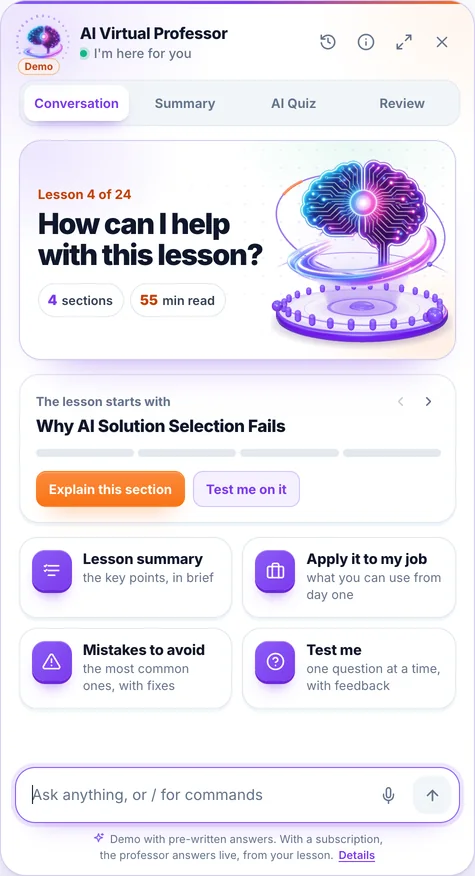
You ask it in writing or by voice, right from the lesson, and you can listen to the answer on request. Where needed, it fills in from general knowledge. When you select a passage, a bar appears with “Explain this to me”, “Give me an example”, “Why does it matter?” and “My own question”.

Its panel has four tabs:

  • Conversation: you ask, it answers starting from the lesson
  • Summary: the key ideas of the lesson, point by point
  • AI Quiz: 3, 5 or 10 new questions from the lesson, with explanations
  • Review: flashcards made from the lesson

Included in every subscription and in single-course access, within a fair-use limit.

Screenshot from the app: the AI Professor panel, open in a lesson.

The demo opens on a lesson from the course “AI for Business Leaders”, with prepared answers; voice is off in the demo.

It is an artificial intelligence system, not a human teacher; its answers may contain errors. Details in the Terms & Conditions.

Course curriculum

Everything you'll learn in this course

11 modules · 30 lessons · about 26 hours of reading · expert level

1 Cursor 3 Fundamentals 3 lessons
  • Cursor 3 in April 2026: The AI-Native IDE Paradigm and the Agent Revolution Reading now 55 min
  • Professional Cursor 3 Setup: Configuration, Profiles, and Context Architecture 50 min
  • Cursor Rules with .mdc: Standardizing AI Behavior at the Project Level 55 min
2 Composer Mastery 3 lessons
  • Composer 2.5: Multi-File Editing, Agent Mode, and Cursor's Frontier Model 55 min
  • Large-Scale Refactoring with Composer: Strategies for Zero Regressions 55 min
  • Expert Bug Fixing with Composer: Root Cause Analysis and Verification Loops 50 min
3 Model Selection and Intelligent Routing 3 lessons
  • The 35+ Models in Cursor: The Complete Guide to Selection and Capabilities 55 min
  • Auto Mode vs Manual: Model Routing Strategies for Maximum Productivity 50 min
  • Composer 1, 1.5, and 2: Cursor's Proprietary Models — Advantages and Limitations 50 min
4 Background Agents and Cloud 3 lessons
  • Background Agents: Autonomous Development in the Cloud with PR Delivery 55 min
  • Cloud Agents and Automations: Triggers, Scheduled Execution, and Computer Use 55 min
  • Git Worktrees and /best-of-n: Agent Isolation and Multi-Model Comparison 55 min
5 Design Mode and Terminal-Driven Development 3 lessons
  • Design Mode (Cmd+Shift+D): AI-Directed Visual Editing 50 min
  • Terminal-Driven Development: The Agent's Autonomous Feedback Loop 55 min
  • Keyboard Shortcuts and Maximum Productivity: Cursor 3 Masterclass 50 min
6 MCP and the Cursor Ecosystem 3 lessons
  • MCP in Cursor: Model Context Protocol — Setup, Configuration, and Servers 55 min
  • MCP Apps, Team Marketplace, and the Ecosystem of Thousands of Servers 55 min
  • Integrations and Extensions: JetBrains, Slack, Web App, and CLI 50 min
7 Code Quality and Security 3 lessons
  • Validation Stack: Lint, Tests, Static Analysis and Runtime Checks 55 min
  • Prompt Patterns for Enterprise Code: Architectures That Guide the AI 55 min
  • Sandbox Security: Permissions, Network, and Agent Protection 55 min
8 Team Productivity and Enterprise 3 lessons
  • Team Standardization: Shared Rules, Prompts, and Playbooks 55 min
  • Teams and Enterprise: Admin, SSO, Analytics and Compliance 55 min
  • Impact Metrics: How to Really Measure AI Efficiency in Your Team 55 min
9 Cursor vs the Competition 3 lessons
  • Cursor vs GitHub Copilot vs Windsurf: AI IDEs Compared in Detail 55 min
  • Cursor vs Claude Code vs OpenAI Codex: IDE vs Terminal Agent 55 min
  • Adoption Strategies: How to Choose and Combine AI Tools for Your Team 50 min
10 Advanced Workflows and the Future 2 lessons
  • Power User Workflows: Advanced Patterns for 10x Productivity 55 min
  • Roadmap 2026-2027: From IDE to AI Development Platform 55 min
11 Appendix: Resources, 2026 Updates and Learning Paths 1 lesson
  • Official Resources, 2026 Updates, and Learning Paths 32 min

At the end

You leave with proof anyone can check

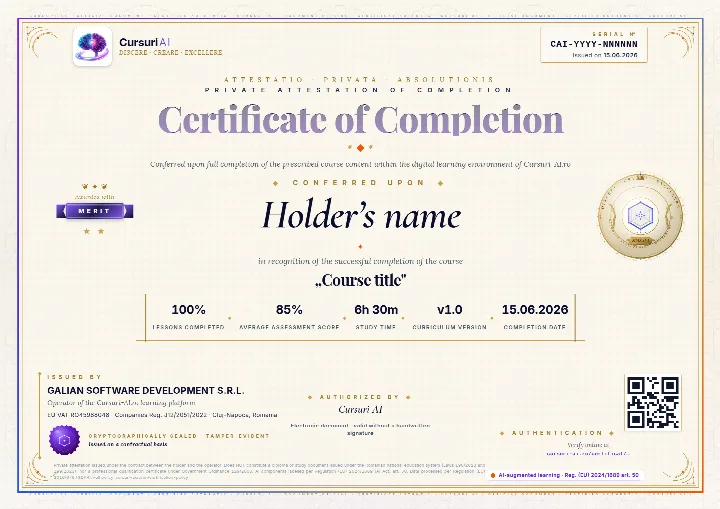
The Certificate of Completion for “Cursor as a Pro: AI-Native IDE, Composer and Multi-Agent 2026 (Enterprise Edition)”: a private attestation with a unique number and a QR code. A recruiter confirms it is authentic on the public verification page, with no account and no cost.

Example of a Cursuri AI Certificate of Completion with sample data: the serial number and the issue date in the top-right corner, the holder’s name, the course, the tier awarded, the percentage of lessons, the average score, the study time, the course version, the issuer and the verification QR code
The real document, an A4 PDF, shown here with sample data. Yours carries your name, the course “Cursor as a Pro: AI-Native IDE, Composer and Multi-Agent 2026 (Enterprise Edition)”, the serial number, the issue date and the tier you earned; the QR code in the image is decorative.
  • Anyone can verify it

    Public verification page, QR code and cryptographic fingerprint, with no account for the person checking.

  • You show it where it counts

    Add it to your CV and LinkedIn profile; a recruiter confirms authenticity with one click.

  • It says exactly what it attests

    The course, the tier you earned (Pass, Merit or Distinction), the serial number and the issue date, plus the percentage of lessons completed.

Frequently asked questions

Good to know before you start

How do I get access to the course?

You can read the beginning of the first lesson right on this page, with no account. For the course you create an account, pick how many courses you want each month — from 1 course to the full catalog — and get access immediately after your payment is confirmed. Everything happens 100% online.

Can I stop my subscription anytime?

Yes. You stop the renewal straight from your account, in just a few clicks. Your access stays active until the end of the period you have already paid for, and nothing more is charged after that.

What does the subscription for this course include?

All 30 lessons in the course, interactive quizzes, the AI Professor built into every lesson (select a passage and choose “Explain this to me”), within a fair-use limit, personal notes, automatically saved progress and content updates included.

Is there a fixed learning schedule?

No. You learn at your own pace, on any device. Lessons are structured step by step, and the platform saves your progress automatically, so you can pick up right where you left off — anytime.

Ready to unlock all the content?

Just this course, €99 / month, VAT included, or 3 courses with this one included, €199 / month, VAT included. You change your courses at every renewal, and the AI Professor is included in your subscription. Your Certificate of Completion stays yours after you stop the subscription.

Instant access Stop the renewal anytime Secure payment via Stripe
From €99 / month, VAT included · Stop the renewal anytime
Unlock the full course

Pick up where you left off, when you have time

We email you the link back to this lesson and what comes next in the course.

  • The link back to this exact lesson
  • What comes next in the course
  • How the AI Professor helps inside every lesson
  • Unsubscribe with one click
  • Address deleted automatically if you do not confirm