Microsoft 365 Copilot for Office Work: Role-Based Productivity
Contents 9 sections

Module 1 Copilot Fundamentals: What It Is, How It Works with Your Data and License Types

What Microsoft 365 Copilot Is and What It Is NOT: An Honest Introduction

Lesson 1 of 32 52 min read Free preview, no account needed
Save Notes Quiz In the course
The AI Professor knows this lesson Select any passage and get the explanation on the spot. Try it now in the demo.

Two colleagues at the same company both say they "use Copilot". One asks it for a summary of the email thread and the documents he has access to and gets exactly the answer he needs; the other asks the same question and gets a generic answer, because his tool does not even see the company's data. The difference does not come from talent, but from the fact that under the same word — "Copilot" — hide completely different products, with different prices and different capabilities. Anyone who does not understand this distinction from the start pays either through frustration or through a subscription bought for nothing. That is why we start honestly, without marketing: we establish what Microsoft 365 Copilot is and what it is not, so that you begin with correct expectations.

From "Copilot" as a vague term to a precise definition

The word "Copilot" has become an umbrella term that Microsoft uses for an entire family of AI-assisted experiences. The problem, for a professional who wants to become productive, is that under the same commercial label hide very different products, with different prices and different capabilities. This confusion is not accidental — it is the natural effect of a consolidated brand strategy — but for us, as serious users, it must be untangled from the very first lesson.

Microsoft 365 Copilot, the actual subject of this course, is an artificial intelligence assistant integrated directly into the Office applications you use every day: Word, Excel, PowerPoint, Outlook, Teams, and OneNote, plus a business chat experience called Microsoft 365 Copilot Chat. Its defining characteristic is not just that it generates text, but that it works on top of your work data — the emails, documents, meetings, and files you already have access to within your organization.

A note on names. According to Microsoft's documentation (updated on September 3, 2026), Microsoft 365 Copilot is now named Microsoft Copilot, and Microsoft 365 Copilot Chat is now named Microsoft Copilot Chat. This course uses both names: in the lessons we usually keep "Microsoft 365 Copilot" for the business assistant inside the apps, while "Microsoft Copilot (consumer)" or "Free Microsoft Copilot" refers to the chat for the general public, described below.

In 2026, the language engine behind Microsoft 365 Copilot is a multi-model system: Microsoft integrates latest-generation models from more than one provider — OpenAI models (for example GPT-5.6, which Microsoft brought to Microsoft 365 Copilot in 2026) and Anthropic's Claude models, which Microsoft offers as a subprocessor and turns on by default for most commercial customers outside the EU/EFTA and the UK (in those regions, separate admin settings and an EU Data Boundary caveat apply, covered in the final module). By default, a real-time router ("Auto") picks the model for each prompt, and where a model selector is offered you can choose yourself, so the specific model used for a task can change over time; for which model is running at any given moment, the source of truth is the official Microsoft documentation. This detail matters because it explains why the quality of responses has increased significantly compared to the first versions: the underlying models are among the most capable large language models commercially available. Still — and here comes the first note of honesty — a powerful model does not by itself guarantee a good result; the result depends on how well you use it, and this "how" is the subject of the entire course.

The crucial distinction: free web chat vs. paid assistant inside the apps

This is the distinction that, if you remember it, has already earned you half the value of this lesson. There are two different worlds, even though both bear the name "Copilot".

Microsoft Copilot (consumer, on the web and in the dedicated app)

This is the public chat experience, accessible at the Copilot chat address and through the dedicated mobile or desktop app. Conceptually it resembles a generalist chatbot: you ask it questions, it answers, it can generate images, it can search the web. Part of this experience is available for free, with limitations, and it is aimed at the general public, not at the work environment.


The rest of the lesson is in the course

Unlock the rest of this lesson and the 31 other lessons.

  • 32 lessons, with a quiz in every lesson
  • AI Professor in every lesson, fair use
  • Publicly verifiable Certificate of Completion
  • Instant access; stop the renewal anytime from your account

What's next in this lesson

  • The pedagogical contract of this course
  • Commercial honesty: we do not promise free access
  • Support for languages other than English
  • Three myths that can hurt you from the start
  • What a workday looks like "with Copilot" versus "without"
  • What this lesson does NOT cover (and where you can find the rest)
  • Recap: what you must remember from this lesson

Interactive demo

Your account, before you pay

The real app, in a sample account with no subscription: the home page, the subscriptions, the learning paths, the catalog. Nothing is saved and you don't need an account.

courses-ai.com/app Interactive demo · sample account

In every lesson

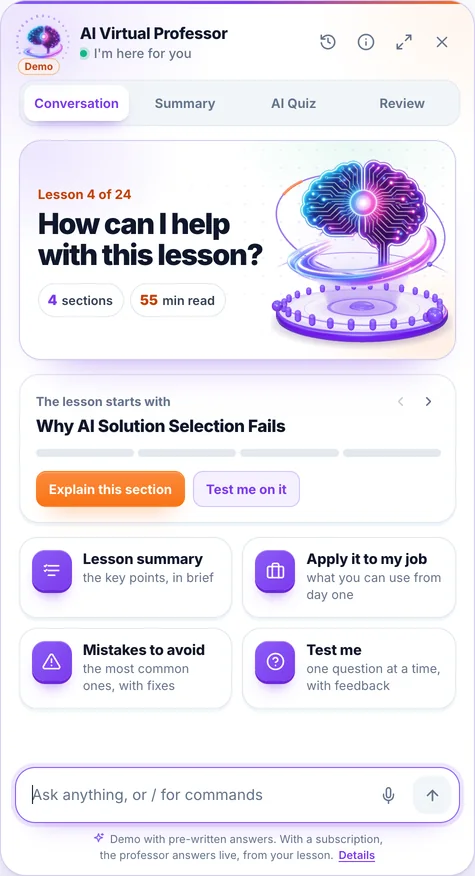
The AI Professor starts from the lesson you have open

You ask it in writing or by voice, right from the lesson, and you can listen to the answer on request. Where needed, it fills in from general knowledge. When you select a passage, a bar appears with “Explain this to me”, “Give me an example”, “Why does it matter?” and “My own question”.

Its panel has four tabs:

  • Conversation: you ask, it answers starting from the lesson
  • Summary: the key ideas of the lesson, point by point
  • AI Quiz: 3, 5 or 10 new questions from the lesson, with explanations
  • Review: flashcards made from the lesson

Included in every subscription and in single-course access, within a fair-use limit.

Screenshot from the app: the AI Professor panel, open in a lesson.

The demo opens on a lesson from the course “AI for Business Leaders”, with prepared answers; voice is off in the demo.

It is an artificial intelligence system, not a human teacher; its answers may contain errors. Details in the Terms & Conditions.

Course curriculum

Everything you'll learn in this course

11 modules · 32 lessons · about 26 hours of reading · beginner level

1 Copilot Fundamentals: What It Is, How It Works with Your Data and License Types 3 lessons
  • What Microsoft 365 Copilot Is and What It Is NOT: An Honest Introduction Reading now 52 min
  • Grounding: How Copilot "Sees" Your Data Through Microsoft Graph 53 min
  • License Types and What They Mean in Practice: What You Can and Cannot Do 50 min
2 The Art of the Prompt in Copilot: Durable Patterns That Work in Every App 3 lessons
  • The Anatomy of a Good Copilot Prompt: Goal, Context, Source, Format 53 min
  • Reusable Prompt Patterns: Summarize, Rewrite, Compare, Extract, Transform 52 min
  • Iteration, Follow-up, and Output Verification: The Dialogue That Delivers Real Results 51 min
3 Copilot in Word: Drafting, Summarizing, Rewriting and Structuring Long Documents 3 lessons
  • Drafting from Scratch and from Sources: How to Start a Document with Copilot 52 min
  • Summarizing and Navigating Long Documents: Extract the Essence in Seconds 50 min
  • Rewriting, Tone, and Structure: Adapt Your Document for Any Audience 50 min
4 Copilot in Excel: Analysis, Natural-Language Formulas, Insights, Pivots and Editing with Copilot 3 lessons
  • Natural Language Formulas and Understanding Your Data: Excel Without Memorizing Syntax 53 min
  • Insights, Trends, and Pivot Tables: From Table to Conclusion 51 min
  • Editing with Copilot in Excel (formerly Agent Mode): Multi-Step Actions on Your Spreadsheet (with a Licensing Caveat) 52 min
5 Copilot in Outlook: Inbox Management, Email Thread Summaries and Drafting 3 lessons
  • Summarizing Email Threads and Prioritizing Your Inbox 50 min
  • Drafting and Adjusting Replies: Clear, Fast, On-Tone Emails 50 min
  • Triage, Follow-ups, and Recovering Context from Old Conversations 49 min
6 Copilot in Teams: Meeting Summaries, Action Items and Context Recovery 3 lessons
  • Meeting Summaries and Intelligent Recap: What Was Discussed, in Brief 51 min
  • Action Items and Decisions: Turn Talk into Clear Tasks 50 min
  • Ask During and After the Meeting: Recover Lost Context 49 min
7 Copilot in PowerPoint: Generating and Restructuring Presentations from Existing Content 3 lessons
  • Generate a Presentation from Existing Content: From Document to Slides 51 min
  • Restructure, Condense, and Reorganize: Presentations That Flow Logically 49 min
  • Speaker Notes, Slide Summaries, and Delivery Preparation 48 min
8 Role-Based Productivity: Concrete Workflows for Sales, Marketing, Finance, HR and Operations 3 lessons
  • Sales and Marketing: Account Prep, Proposals, and Promotional Content 53 min
  • Finance and HR: Reports, Operational Analyses, Internal Communication, and Human Resources Documents 52 min
  • Operations and Management: Coordination, Status Updates, and Context-Based Decisions 51 min
9 Confidentiality and Compliance: Sensitivity Labels, GDPR/DPIA, EU Data Boundary 3 lessons
  • How Copilot Protects (and Does NOT Protect) Your Data: Enterprise Data Protection and Permissions 51 min
  • Sensitivity Labels and the Data You Never Use 51 min
  • GDPR, DPIA (Art. 35), the EU Data Boundary, and EU AI Act Transparency 50 min
10 Applied Project: Optimize a Real Workflow from Your Role End-to-End with Copilot 3 lessons
  • The Project Brief: Choose and Map a Real Workflow from Your Role 50 min
  • End-to-End Execution: Build the Optimized Flow in the M365 Apps 52 min
  • Verification, Compliance, and Recap: A Trustworthy Deliverable and Next Steps 50 min
11 2026 Appendix: Official Resources, What Changed, Choosing the Model in the EU and Learning Paths 2 lessons
  • Official Resources, 2026 Updates, and Learning Paths 24 min
  • Model Choice in the EU: Anthropic Models in Copilot and the EU Data Boundary 22 min

At the end

You leave with proof anyone can check

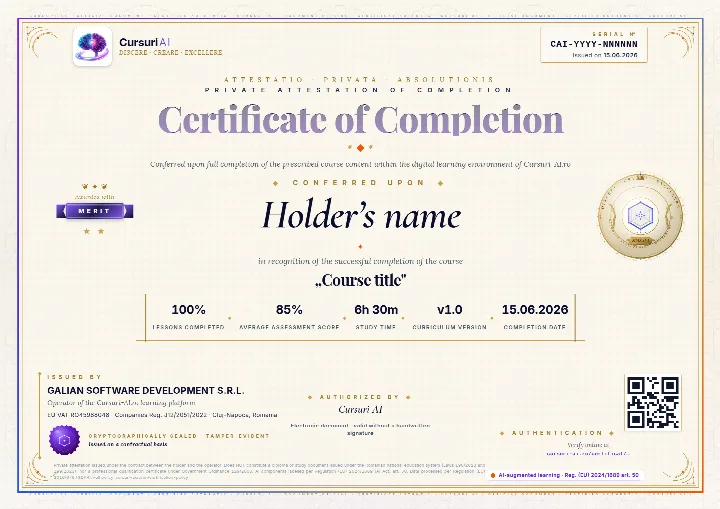
The Certificate of Completion for “Microsoft 365 Copilot for Office Work: Role-Based Productivity”: a private attestation with a unique number and a QR code. A recruiter confirms it is authentic on the public verification page, with no account and no cost.

Example of a Cursuri AI Certificate of Completion with sample data: the serial number and the issue date in the top-right corner, the holder’s name, the course, the tier awarded, the percentage of lessons, the average score, the study time, the course version, the issuer and the verification QR code
The real document, an A4 PDF, shown here with sample data. Yours carries your name, the course “Microsoft 365 Copilot for Office Work: Role-Based Productivity”, the serial number, the issue date and the tier you earned; the QR code in the image is decorative.
  • Anyone can verify it

    Public verification page, QR code and cryptographic fingerprint, with no account for the person checking.

  • You show it where it counts

    Add it to your CV and LinkedIn profile; a recruiter confirms authenticity with one click.

  • It says exactly what it attests

    The course, the tier you earned (Pass, Merit or Distinction), the serial number and the issue date, plus the percentage of lessons completed.

Frequently asked questions

Good to know before you start

How do I get access to the course?

You can read the beginning of the first lesson right on this page, with no account. For the course you create an account, pick how many courses you want each month — from 1 course to the full catalog — and get access immediately after your payment is confirmed. Everything happens 100% online.

Can I stop my subscription anytime?

Yes. You stop the renewal straight from your account, in just a few clicks. Your access stays active until the end of the period you have already paid for, and nothing more is charged after that.

What does the subscription for this course include?

All 32 lessons in the course, interactive quizzes, the AI Professor built into every lesson (select a passage and choose “Explain this to me”), within a fair-use limit, personal notes, automatically saved progress and content updates included.

Is there a fixed learning schedule?

No. You learn at your own pace, on any device. Lessons are structured step by step, and the platform saves your progress automatically, so you can pick up right where you left off — anytime.

Ready to unlock all the content?

Just this course, €99 / month, VAT included, or 3 courses with this one included, €199 / month, VAT included. You change your courses at every renewal, and the AI Professor is included in your subscription. Your Certificate of Completion stays yours after you stop the subscription.

Instant access Stop the renewal anytime Secure payment via Stripe
From €99 / month, VAT included · Stop the renewal anytime
Unlock the full course

Pick up where you left off, when you have time

We email you the link back to this lesson and what comes next in the course.

  • The link back to this exact lesson
  • What comes next in the course
  • How the AI Professor helps inside every lesson
  • Unsubscribe with one click
  • Address deleted automatically if you do not confirm