No-Code Data Analysis with AI: ChatGPT, Excel and SQL for Non-Programmers
Contents 7 sections

Module 1 Fundamentals: What AI Can and Cannot Do with Your Data

What Conversational AI Can and Cannot Do With Your Data

Lesson 1 of 27 50 min read Free preview, no account needed
Save Notes Quiz In the course
The AI Professor knows this lesson Select any passage and get the explanation on the spot. Try it now in the demo.

A chart can look impeccable and, at the same time, be completely wrong. You get it in a few seconds by asking the AI for a visualization, you drop it into a presentation for leadership, and if a faulty aggregation sits behind it, nobody will challenge it anymore — because it looks convincing. This is the real stake of data analysis with AI: not the speed at which you reach a result, but the ability to know whether that result is true. The very same tool that can make you several times more productive can also lead you, with utter serenity, to a wrong conclusion. The difference between the two lies in what you know to ask of it and what you know to verify — exactly what we build in this course.

Why this lesson comes first

Most materials about "data analysis with AI" start with an impressive trick: you upload a file, ask for a chart, get a chart, applause. The problem is that the initial enthusiasm masks precisely the risks that matter in a professional context. A beautiful chart generated from a wrong aggregation is more dangerous than no chart at all, because it looks convincing and ends up in a presentation for leadership, where nobody has time to challenge it anymore.

So our pedagogical contract is simple and firm:

  • AI accelerates the mechanical work of cleaning, describing, and visualizing data.
  • AI does not guarantee the correctness of the results it produces.
  • The final responsibility for the numbers remains yours, no matter how articulate the answer sounds.

You will notice throughout the course that we work exclusively with synthetic data — invented datasets, with no real people — precisely so we can experiment freely, without exposing confidential information. This is not a cosmetic detail, but a professional rule, as you will see in the section about GDPR. All the example files in this course (for instance synthetic_orders.csv) are fabricated specifically for learning and do not correspond to any real person or company.

Who this course is for

The course is built for non-programmers: people who work with data every day — in sales, marketing, operations, administration, operational finance — but who do not write code and do not want to learn a programming language just to do their job. You do not need knowledge of Python, R, or advanced SQL. You need two things: curiosity about what your data says and the discipline to verify what the AI answers. The first one you already have, since you are here; the second one we build together.

What conversational AI does WELL

There is a clear category of tasks where an AI assistant like ChatGPT (with the GPT-6 Sol model in 2026) saves you entire hours of repetitive work. We group them into four zones of real competence.

1. Fast data cleaning

Real-world data is dirty: extra spaces, inconsistent date formats, values written as "YES/Yes/yes", chaotically named columns, numbers stored as text. AI excels at proposing and executing cleaning transformations, especially when you describe the problem in natural language.

Example prompt (synthetic data):
"I uploaded a CSV file with 1,200 synthetic orders. The
'payment_status' column contains the values: 'paid', 'Paid', 'PAID',
'settled', 'unpaid', 'Unpaid'. Normalize these values into exactly two
categories: 'Paid' and 'Unpaid'. Show me the mapping table before you
apply it and tell me how many rows fall into each category."


The rest of the lesson is in the course

Unlock the rest of this lesson and the 26 other lessons.

  • 27 lessons, with a quiz in every lesson
  • AI Professor in every lesson, fair use
  • Publicly verifiable Certificate of Completion
  • Instant access; stop the renewal anytime from your account

What's next in this lesson

  • What AI does POORLY or RISKILY
  • The course's positioning map
  • Legal guardrail: GDPR and your data
  • The right mindset: AI as an amplifier

Interactive demo

Your account, before you pay

The real app, in a sample account with no subscription: the home page, the subscriptions, the learning paths, the catalog. Nothing is saved and you don't need an account.

courses-ai.com/app Interactive demo · sample account

In every lesson

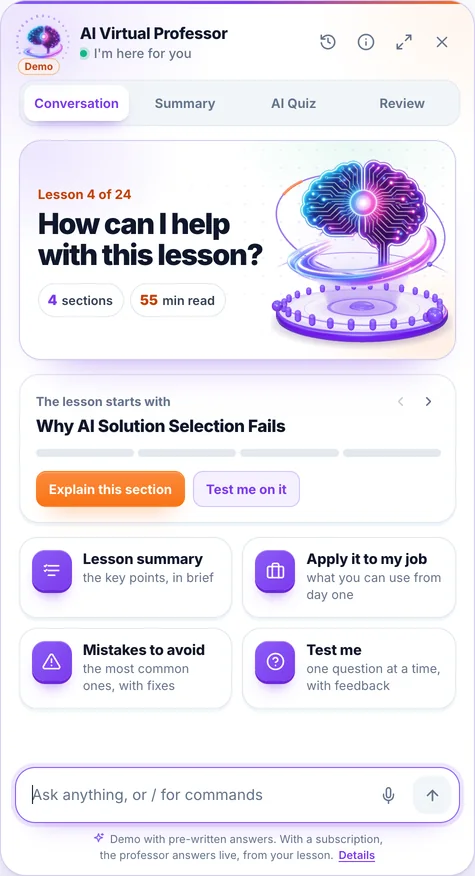
The AI Professor starts from the lesson you have open

You ask it in writing or by voice, right from the lesson, and you can listen to the answer on request. Where needed, it fills in from general knowledge. When you select a passage, a bar appears with “Explain this to me”, “Give me an example”, “Why does it matter?” and “My own question”.

Its panel has four tabs:

  • Conversation: you ask, it answers starting from the lesson
  • Summary: the key ideas of the lesson, point by point
  • AI Quiz: 3, 5 or 10 new questions from the lesson, with explanations
  • Review: flashcards made from the lesson

Included in every subscription and in single-course access, within a fair-use limit.

Screenshot from the app: the AI Professor panel, open in a lesson.

The demo opens on a lesson from the course “AI for Business Leaders”, with prepared answers; voice is off in the demo.

It is an artificial intelligence system, not a human teacher; its answers may contain errors. Details in the Terms & Conditions.

Course curriculum

Everything you'll learn in this course

10 modules · 27 lessons · about 24 hours of reading · beginner level

1 Fundamentals: What AI Can and Cannot Do with Your Data 3 lessons
  • What Conversational AI Can and Cannot Do With Your Data Reading now 50 min
  • The Verification Mindset: Why You Never Blindly Trust AI Output 50 min
  • The 2026 Tool Landscape: ChatGPT, Copilot, Gemini, and When to Use Each 50 min
2 ChatGPT Advanced Data Analysis: Upload, Cleaning, Statistics and Charts 3 lessons
  • Your First File in ChatGPT: Upload, What the Model "Sees", and the Real Limits 56 min
  • Cleaning data with prompts: missing values, duplicates, inconsistent formats 57 min
  • Descriptive statistics and charts from prompts: mean, distributions, trends 58 min
3 From Business Question to Insight: Formulating Requests on Tabular Data 3 lessons
  • The Good-Question Framework: From "How's the Business Doing" to an Analyzable Request 55 min
  • Data Prompts That Work: Structure, Context, Anti-Ambiguity 53 min
  • Iteration and follow-up: refine the result in dialogue, without starting over 51 min
4 Copilot in Excel: AI on Cell Data, Natural-Language Formulas and Pivots 3 lessons
  • Copilot in Excel, honestly: what it is, what it does and why it is NOT free 54 min
  • AI on Cell Data with Copilot: Summaries, Classifications, and Extractions from Natural Language 56 min
  • Natural-Language Formulas, Pivots, and Insights with Copilot — and What You Always Verify 55 min
5 The Accessible Alternative: Excel Analysis Directly in ChatGPT (No Copilot License) 2 lessons
  • No Copilot license? Analyze the same Excel file directly in ChatGPT 54 min
  • The Excel ↔ ChatGPT workflow in practice: export, analyze, reimport, and reuse 53 min
6 Introduction to Text-to-SQL for Non-Programmers 3 lessons
  • What a Database Is and Why SQL Matters (Even If You Never Write It) 53 min
  • Text-to-SQL: How a Natural-Language Question Becomes a Query 57 min
  • When Text-to-SQL Is Reliable and When It Is NOT: Pitfalls, Ambiguity, and Verification 54 min
7 Verifying AI Output: How to Catch Invented Columns and Wrong Calculations 3 lessons
  • Anatomy of a Data Hallucination: Invented Columns, Aggregations, and Hidden Assumptions 56 min
  • The 5-step verification protocol: sanity check, sample, recalculation, counter-question 57 min
  • The limits of the models and human responsibility: when NOT to use AI on data 52 min
8 Confidentiality and Compliance: What Data NOT to Put in Cloud Tools 3 lessons
  • GDPR in a nutshell for AI data analysis: what personal data is and why it matters 54 min
  • Public tier vs Enterprise: DPAs, data retention, and how NOT to train the vendor's model "for free" 55 min
  • Synthetic Data and Anonymization in Practice: Work Safely, Anytime 53 min
9 Applied Project: A Complete Mini Business Report, from Raw Data to Verified Insight 3 lessons
  • The Project Brief and Synthetic Data: Preparing an "Orders + Clients" Dataset 54 min
  • Executing the Analysis: Cleaning, Statistics, Segmentation, and Charts End-to-End 58 min
  • Verification, the Final Report, and the Course Recap: A Trustworthy Deliverable 56 min
10 Appendix: Official Resources, 2026 Updates and Learning Paths 1 lesson
  • Official Resources, 2026 Updates, and Learning Paths 35 min

At the end

You leave with proof anyone can check

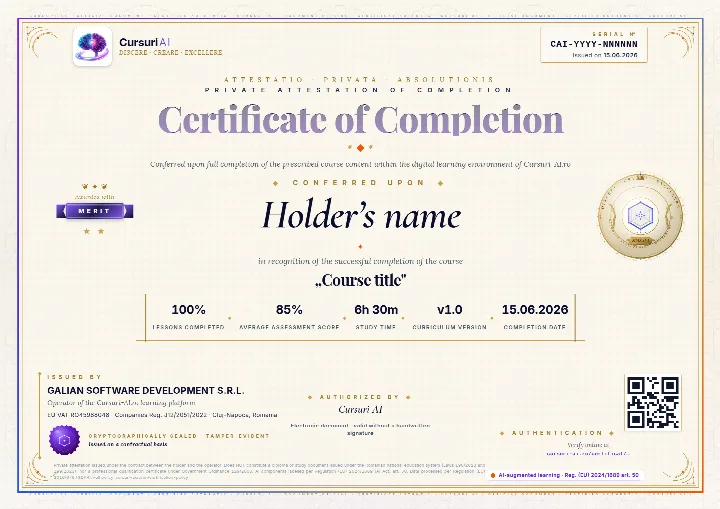
The Certificate of Completion for “No-Code Data Analysis with AI: ChatGPT, Excel and SQL for Non-Programmers”: a private attestation with a unique number and a QR code. A recruiter confirms it is authentic on the public verification page, with no account and no cost.

Example of a Cursuri AI Certificate of Completion with sample data: the serial number and the issue date in the top-right corner, the holder’s name, the course, the tier awarded, the percentage of lessons, the average score, the study time, the course version, the issuer and the verification QR code
The real document, an A4 PDF, shown here with sample data. Yours carries your name, the course “No-Code Data Analysis with AI: ChatGPT, Excel and SQL for Non-Programmers”, the serial number, the issue date and the tier you earned; the QR code in the image is decorative.
  • Anyone can verify it

    Public verification page, QR code and cryptographic fingerprint, with no account for the person checking.

  • You show it where it counts

    Add it to your CV and LinkedIn profile; a recruiter confirms authenticity with one click.

  • It says exactly what it attests

    The course, the tier you earned (Pass, Merit or Distinction), the serial number and the issue date, plus the percentage of lessons completed.

Frequently asked questions

Good to know before you start

How do I get access to the course?

You can read the beginning of the first lesson right on this page, with no account. For the course you create an account, pick how many courses you want each month — from 1 course to the full catalog — and get access immediately after your payment is confirmed. Everything happens 100% online.

Can I stop my subscription anytime?

Yes. You stop the renewal straight from your account, in just a few clicks. Your access stays active until the end of the period you have already paid for, and nothing more is charged after that.

What does the subscription for this course include?

All 27 lessons in the course, interactive quizzes, the AI Professor built into every lesson (select a passage and choose “Explain this to me”), within a fair-use limit, personal notes, automatically saved progress and content updates included.

Is there a fixed learning schedule?

No. You learn at your own pace, on any device. Lessons are structured step by step, and the platform saves your progress automatically, so you can pick up right where you left off — anytime.

Ready to unlock all the content?

Just this course, €99 / month, VAT included, or 3 courses with this one included, €199 / month, VAT included. You change your courses at every renewal, and the AI Professor is included in your subscription. Your Certificate of Completion stays yours after you stop the subscription.

Instant access Stop the renewal anytime Secure payment via Stripe
From €99 / month, VAT included · Stop the renewal anytime
Unlock the full course

Pick up where you left off, when you have time

We email you the link back to this lesson and what comes next in the course.

  • The link back to this exact lesson
  • What comes next in the course
  • How the AI Professor helps inside every lesson
  • Unsubscribe with one click
  • Address deleted automatically if you do not confirm