Vibe Coding: From Prompt to Application with Lovable, v0, Bolt and Replit Agent
Contents 10 sections

Module 1 What Vibe Coding Is and Where It Makes Sense

Vibe Coding in 2026: Definition, Strengths, and the "From Prompt to App" Promise

Lesson 1 of 22 52 min read Free preview, no account needed
Save Notes Quiz In the course
The AI Professor knows this lesson Select any passage and get the explanation on the spot. Try it now in the demo.

You describe the application you want in a single sentence, hit enter, and within a few minutes you have a frontend, a database, an authentication flow, and a live URL. What used to be days of work for a junior developer yesterday is now a working draft generated in minutes. This is exactly where both the strength and the trap of the prompt-to-app paradigm hide: a draft that "works" in a demo is not a production application, and the distance between the two is greater — and more dangerous — than it seems at first glance. This entire course is built around that distance, and around a single principle that governs it — you ship it, you own it.

Where the term "vibe coding" comes from

The term was publicly introduced by Andrej Karpathy (co-founder of OpenAI, former Director of AI at Tesla) in a post from February 2025. His phrasing described a practice in which the developer "gives in to the vibes", accepts the code generated by the AI model without reading it rigorously, and interacts with the environment almost exclusively through natural language. The idea went viral quickly and was later consolidated into a more sober definition.

The reference sources for the definition used in this course are the Wikipedia article on "vibe coding" and the analyses published by Contrast Security. Synthesized, they converge on the following working formulation:

Vibe coding = you describe the intent of an application in natural language, an AI model generates the code, and you focus on the observable result (what the application does), not on the syntax or internal structure of the code.

This definition has three elements worth isolating:

  1. Intent in natural language is the primary interface. You don't write functions; you describe behaviors.
  2. The AI model writes the code. You remain the architect of the intent, not of the line-by-line implementation.
  3. The focus is on the result. The question "does it work as I asked?" becomes more important than "what does the code look like?".

A critical nuance from the start

Karpathy himself described vibe coding as suitable for weekend projects, prototypes, experiments — not as a method for shipping critical production software without oversight. This nuance is essential. Many superficial interpretations have turned "vibe coding" into a promise that "anyone can build anything without knowing how to program". Our course firmly rejects this caricature. Mature vibe coding means using AI as a speed multiplier while keeping human responsibility over what you ship.

The "from prompt to app" promise (prompt-to-app)

The central promise of the tools we study is the following: a verbal specification results in a functional full-stack application. Concretely, this means that from a prompt like:

"I want a task management application for a small team, with authentication, shared lists, labels, and a dashboard showing weekly progress."

the tool can generate, in a few minutes:

  • a frontend (the visible interface, usually React or a similar framework);
  • a database and a persistence layer (often through integration with a managed backend);
  • the authentication logic and the application's routes;
  • a preliminary deployment accessible through a URL.

What used to be days of work for a junior developer yesterday becomes a working draft generated in minutes today. Here lies the real strength, but also the trap: a working draft is not a production application. The distance between the two is the recurring theme of the entire course.

Table: what a prompt typically delivers and what remains your job

Application layer What the tool can generate from a prompt What remains your responsibility
Interface (UI) Layout, components, basic navigation Visual coherence, accessibility, edge cases
Data and persistence Initial schema, CRUD operations Access rules, integrity, safe migrations
Authentication Standard login/registration flow Security policies, sessions, account recovery
Business logic Simple, verbally describable rules Complex validations, compliance, rare cases
Deployment Preliminary URL, basic hosting Domain, monitoring, scaling, real costs

The rest of the lesson is in the course

Unlock the rest of this lesson and the 21 other lessons.

  • 22 lessons, with a quiz in every lesson
  • AI Professor in every lesson, fair use
  • Publicly verifiable Certificate of Completion
  • Instant access; stop the renewal anytime from your account

What's next in this lesson

  • The global market: why it matters now
  • The course's four tools, at the concept level
  • The course's central philosophy: "you ship it, you own it"
  • A firm disclaimer (read carefully)
  • How this course differs from the Cursor and Claude Code courses
  • Three misconceptions we correct from the start
  • What you will be able to do at the end of the course
  • Recap and what comes next

Interactive demo

Your account, before you pay

The real app, in a sample account with no subscription: the home page, the subscriptions, the learning paths, the catalog. Nothing is saved and you don't need an account.

courses-ai.com/app Interactive demo · sample account

In every lesson

The AI Professor starts from the lesson you have open

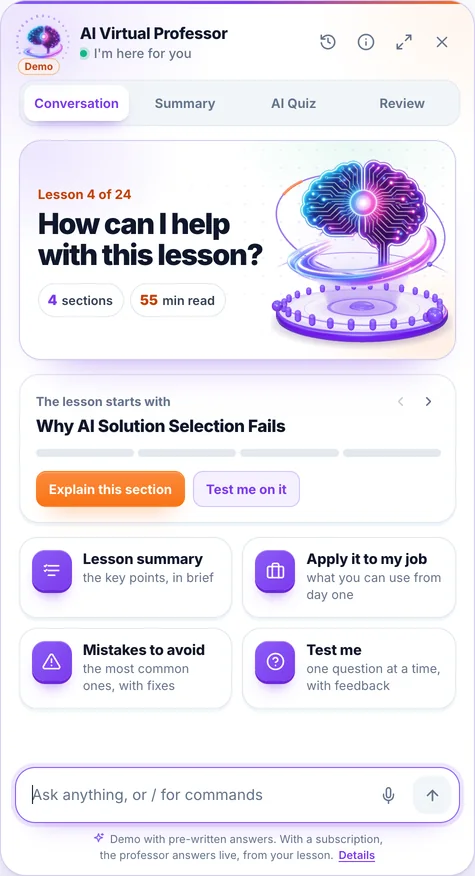
You ask it in writing or by voice, right from the lesson, and you can listen to the answer on request. Where needed, it fills in from general knowledge. When you select a passage, a bar appears with “Explain this to me”, “Give me an example”, “Why does it matter?” and “My own question”.

Its panel has four tabs:

  • Conversation: you ask, it answers starting from the lesson
  • Summary: the key ideas of the lesson, point by point
  • AI Quiz: 3, 5 or 10 new questions from the lesson, with explanations
  • Review: flashcards made from the lesson

Included in every subscription and in single-course access, within a fair-use limit.

Screenshot from the app: the AI Professor panel, open in a lesson.

The demo opens on a lesson from the course “AI for Business Leaders”, with prepared answers; voice is off in the demo.

It is an artificial intelligence system, not a human teacher; its answers may contain errors. Details in the Terms & Conditions.

Course curriculum

Everything you'll learn in this course

11 modules · 22 lessons · about 19 hours of reading · beginner level

1 What Vibe Coding Is and Where It Makes Sense 2 lessons
  • Vibe Coding in 2026: Definition, Strengths, and the "From Prompt to App" Promise Reading now 52 min
  • Real Strengths and Limits: When Vibe Coding Makes Sense and When NOT to Use Prompt-to-App 53 min
2 The Anatomy of Prompt-to-App: From Specification to Application 2 lessons
  • From Specification to Structured Request: How to Describe an App So You Get It Right 52 min
  • Prompt Iteration: The Refinement Loop, Conversational Debugging, and Scope Control 51 min
3 A Comparative Tour of the Tools: Lovable, v0, Bolt, Replit Agent 2 lessons
  • Lovable and v0.app: Full-Stack Generation vs. Interface Generation — Strengths and Use Cases 50 min
  • Bolt and Replit Agent: Agentic Browser IDE vs. Complete Cloud Environment — Choosing by Use Case 50 min
4 Essential Integrations: Database, Auth, Versioning, Payments and Deployment 2 lessons
  • Database and Authentication with Supabase: The Data Model, Auth, and the Critical Role of RLS 53 min
  • Version Control with GitHub, Payments with Stripe, and Deployment: How You Go from Preview to Live 52 min
5 From MVP to Something Usable: Production Limits 2 lessons
  • The Production Limits of Generated Code: Performance, Scaling, and Invisible Technical Debt 52 min
  • Real User Data: From Test Data to Production Safely 50 min
6 Security for Non-Engineers: The Weaknesses of AI Code 3 lessons
  • How Insecure Is AI-Generated Code: The Veracode 2025 Report and Typical Vulnerabilities (OWASP) 53 min
  • Case Study: The 2025 Lovable Incident (CVE-2025-48757) and What It Teaches Us About RLS 51 min
  • Pre-Production Security Review Checklist: What You Check, Manually and with Tools 50 min
7 Shadow IT and Sensitive Data 2 lessons
  • Shadow IT and Vibe Coding: The Risk of Applications Built Outside the Organization's Control 51 min
  • What You NEVER Put in a Vibe-Coded App Without Controls: Sensitive Data and Red Lines 50 min
8 Ownership, Licenses and Liability 2 lessons
  • Who Owns AI-Generated Code: Copyright, Thaler v. Perlmutter, and Licenses 52 min
  • Delivery Liability and GDPR: Who Is the Controller and Who Is Liable When You Hand Off to the Client 53 min
9 Practical Compliance: The EU AI Act and Responsible Delivery in the EU 2 lessons
  • EU AI Act Art. 50 and Transparency: What It Means for Applications with AI-Generated Content 52 min
  • Responsible Delivery to EU Clients: A Legal and Compliance Checklist for Handover 51 min
10 Capstone Project: An MVP Shipped with a Security Checklist and Legal Review 2 lessons
  • Build the MVP: From Specification to a Working Application with Integrations 53 min
  • Ship It Responsibly: Security Checklist Walkthrough and Legal Review 53 min
11 Appendix: Official Resources, 2026 Updates and Learning Paths 1 lesson
  • Official Resources, What Changed in 2026, and Learning Paths 26 min

At the end

You leave with proof anyone can check

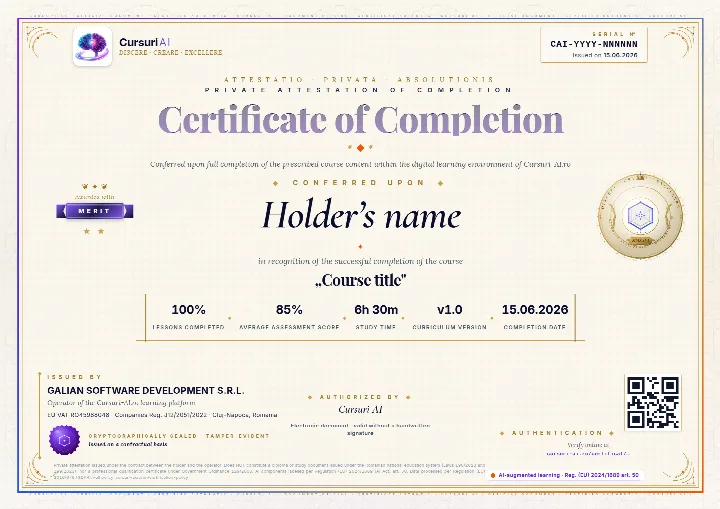
The Certificate of Completion for “Vibe Coding: From Prompt to Application with Lovable, v0, Bolt and Replit Agent”: a private attestation with a unique number and a QR code. A recruiter confirms it is authentic on the public verification page, with no account and no cost.

Example of a Cursuri AI Certificate of Completion with sample data: the serial number and the issue date in the top-right corner, the holder’s name, the course, the tier awarded, the percentage of lessons, the average score, the study time, the course version, the issuer and the verification QR code
The real document, an A4 PDF, shown here with sample data. Yours carries your name, the course “Vibe Coding: From Prompt to Application with Lovable, v0, Bolt and Replit Agent”, the serial number, the issue date and the tier you earned; the QR code in the image is decorative.
  • Anyone can verify it

    Public verification page, QR code and cryptographic fingerprint, with no account for the person checking.

  • You show it where it counts

    Add it to your CV and LinkedIn profile; a recruiter confirms authenticity with one click.

  • It says exactly what it attests

    The course, the tier you earned (Pass, Merit or Distinction), the serial number and the issue date, plus the percentage of lessons completed.

Frequently asked questions

Good to know before you start

How do I get access to the course?

You can read the beginning of the first lesson right on this page, with no account. For the course you create an account, pick how many courses you want each month — from 1 course to the full catalog — and get access immediately after your payment is confirmed. Everything happens 100% online.

Can I stop my subscription anytime?

Yes. You stop the renewal straight from your account, in just a few clicks. Your access stays active until the end of the period you have already paid for, and nothing more is charged after that.

What does the subscription for this course include?

All 22 lessons in the course, interactive quizzes, the AI Professor built into every lesson (select a passage and choose “Explain this to me”), within a fair-use limit, personal notes, automatically saved progress and content updates included.

Is there a fixed learning schedule?

No. You learn at your own pace, on any device. Lessons are structured step by step, and the platform saves your progress automatically, so you can pick up right where you left off — anytime.

Ready to unlock all the content?

Just this course, €99 / month, VAT included, or 3 courses with this one included, €199 / month, VAT included. You change your courses at every renewal, and the AI Professor is included in your subscription. Your Certificate of Completion stays yours after you stop the subscription.

Instant access Stop the renewal anytime Secure payment via Stripe
From €99 / month, VAT included · Stop the renewal anytime
Unlock the full course

Pick up where you left off, when you have time

We email you the link back to this lesson and what comes next in the course.

  • The link back to this exact lesson
  • What comes next in the course
  • How the AI Professor helps inside every lesson
  • Unsubscribe with one click
  • Address deleted automatically if you do not confirm