Most conversations about AI for sales start with the wrong question: "Which tool should we buy?" The better question is which parts of a seller's week are research, writing and record-keeping that a language model can draft in minutes, and which parts are judgment that must stay with a person. Get that split right and AI gives your team back time for customers; get it wrong and you send more generic email, faster, to people who never asked for it.
This playbook is for sales leaders and sellers, not engineers: five workflows with example prompts, the review habits that keep output honest, and the data protection limits that apply once customer data goes into an AI tool.
What AI is actually good at in a sales team
A general-purpose AI assistant is strong at four things that fill a seller's day:
- Synthesis: turning an annual report, a call transcript or a long email thread into a one-page summary.
- Drafting: first versions of emails, agendas, proposals and follow-ups.
- Structuring: pulling dates, next steps and objections out of messy notes into CRM fields.
- Questioning: playing the skeptical buyer or the manager who asks "what evidence says this closes this quarter?"
It is weak, or plainly dangerous, at three others:
- Knowing facts it has not been given. Asked about a company it cannot see, it may produce a confident, plausible and wrong description. Every fact about a prospect must come from a source you supplied.
- Making the call on a deal. It can list risks; it cannot weigh a relationship built over two years.
- Acting unsupervised on customers. An assistant that sends emails without review will eventually promise a discount nobody approved.
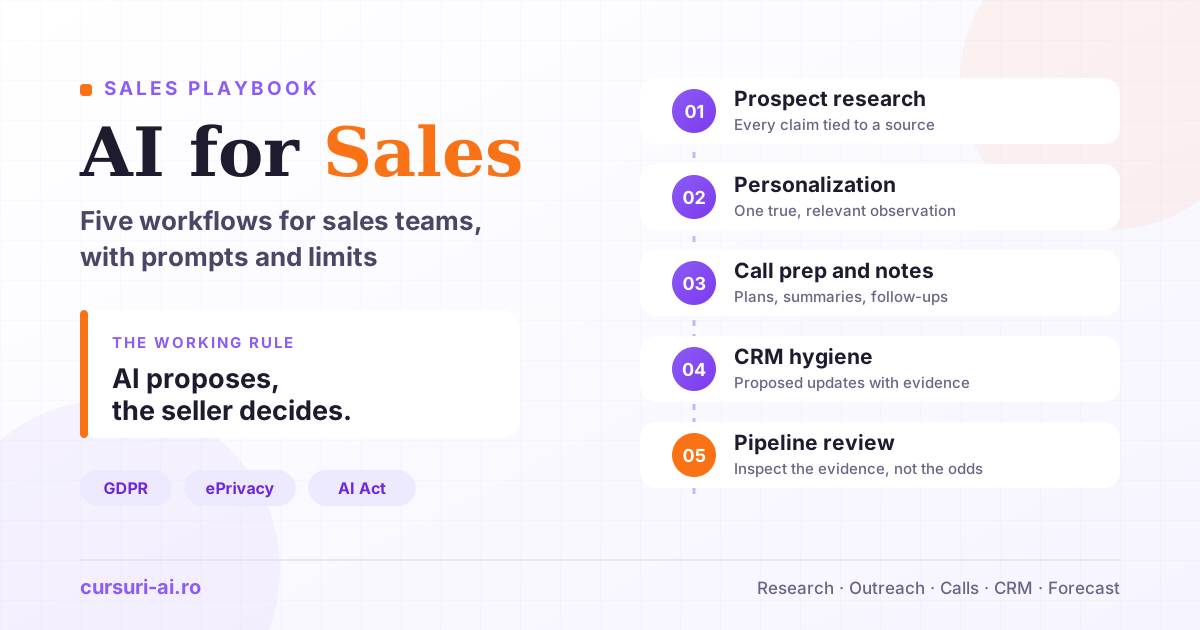
The working rule for the rest of this guide: AI proposes, the seller decides. Each workflow below is built around it, and each is covered in more depth, with hands-on projects, in AI for Sales and CRM.
Workflow 1: Prospect and account research
Research is a low-risk place to start, provided you feed the model sources instead of asking it to remember them. Collect the latest annual report, recent press releases, job postings for the team you sell to and the contact's public profile, then ask for a brief with every claim tied to a source:
You are helping me prepare for a first conversation with [Company].
Use ONLY the documents below. For every statement, add the source
in brackets, e.g. [Annual report, p. 12]. If something is not in the
documents, write "not in sources" instead of guessing.

Produce:
1. What the company does and how it makes money (3 sentences).
2. Three priorities management states publicly, with quotes.
3. Signals relevant to [our product category]: hiring, new markets,
   new regulation, leadership changes.
4. Two hypotheses about a problem we could help with, each labeled
   HYPOTHESIS and linked to the evidence above.
5. Five questions I should ask to test those hypotheses.

Documents:
[paste]
Two habits make this reliable. Separate facts from hypotheses: a hypothesis is something you test in the call, not something you assert in an email. Spot-check the citations: open two of the cited pages, and if one is wrong, treat the whole brief as unverified.
Workflow 2: Personalization without spam
AI makes it trivial to produce a thousand "personalized" emails. That is the problem: the compliment about a recent post, the vague reference to "growth", the question that could go to anyone. A better standard is one true, relevant observation per message: true because you can show its source, relevant because it connects to a problem you solve. If you cannot find one, the person should not be on this week's list.
Draft a first email to [Name], [Role] at [Company].
Verified facts (use only these): [fact + source], [fact + source].
Our relevant offer: [one sentence].
Rules: under 110 words, plain text, no flattery. Open with the most
relevant fact and why it matters for their role. End with one
low-effort question. Do not invent numbers, customers or results.
Then edit by hand and remove anything you would not say on the phone. Before sending, check three things: every specific claim is true and sourced; the sender is clearly identified and there is a working way to opt out (an EU legal requirement, see below); and the person is really in your target segment, not on the list because a tool scraped them.
The prompt patterns at work here (role, constraints, examples, explicit output format) are explained in Prompt Engineering in 2026: From Beginner to Pro.
Workflow 3: Call preparation and call notes
Before the call
Combine the research brief with your CRM history (previous calls, open opportunities, support tickets) and ask for a prep sheet:
Here is my research brief and the CRM history for [Account].
Prepare a one-page call plan:
- Goal of this call in one sentence.
- What we know vs. what we must still confirm, using our
  qualification framework: [paste your fields].
- The three most likely objections and the evidence that answers each.
Flag anything in the history that contradicts itself.
The last line matters most. Contradictions ("budget approved" in one note, "no budget this year" in another) are where deals quietly die.
After the call
From a transcript or rough notes, ask for a structured summary and a follow-up draft:
From the notes below, extract: decisions and who made them; open
questions and owners; the next step with a date (or "NO DATE AGREED");
anything said about budget, timing, competitors or decision process,
quoted word for word. Then draft a follow-up confirming decisions
and next steps only.
Notes: [paste]
Two cautions. Recording and transcribing calls has its own legal requirements, which differ by country: check them, and tell participants, before you switch a recorder on. And read the summary against your memory of the call before it reaches the CRM; models sometimes turn "we might consider it" into "they agreed".
Workflow 4: CRM hygiene
Forecasts are built on CRM data, and CRM data is entered last, in a hurry, on a Friday afternoon. AI helps by turning the update into a review: after each call or thread, the assistant proposes field updates and the seller approves them.
From the call summary, propose updates to: stage, next step, next step
date, close date, amount, decision maker, competitors, main risk.
Table: field | current value | proposed value | evidence (quote).
Propose a change only with direct evidence; otherwise "no change".
Current values: [paste]  Call summary: [paste]
The evidence column makes this auditable: when a manager asks why a close date moved, the answer is a customer quote, not a guess.
Other useful hygiene tasks: flagging likely duplicate accounts for manual merging, listing open deals with no recent activity, and sorting "loss reason" notes written twenty different ways into five categories you can report on. Keep the human approval step even when it feels slow; automatic writes are where small model errors become reporting errors nobody notices for a quarter.
Workflow 5: Forecasting and pipeline reviews
Be careful with the promise of "AI forecasting". Predictive forecasting learns from your historical data, so it is only as good as the stages and close dates your team entered in the past. If Workflow 4 is new, start with something more modest: AI-assisted pipeline inspection.
You are a demanding sales manager reviewing my pipeline.
For each deal, using only the data provided: does the evidence support
the stage (yes/no, why)? What is the biggest risk? What must happen in
the next 14 days to close on time? Then list deals whose close date
no customer commitment supports. Do not estimate win probabilities.
Deals: [paste export]
The last instruction is deliberate: asked for a probability, a language model produces a number with false precision. You want the inspection a good manager does, and the forecast call stays with the people who own the number.
Sales does not end at signature, either. The handover to onboarding and support is where promises made in the sales cycle get tested; the same summarize-and-structure workflows on the service side are covered in AI for Customer Support and Service.
The limits: customer data, GDPR and the EU AI Act
Everything above involves personal data: names, roles, email addresses, call content. Under the GDPR (Regulation (EU) 2016/679), the same rules apply whether that data sits in your CRM or in an AI tool. This section covers EU law; if you sell into the UK, the US or elsewhere, check local rules too.
This article is general information, not legal advice. Article references were checked against the official texts on 31 October 2026. For decisions with legal consequences, talk to your data protection officer or a lawyer.
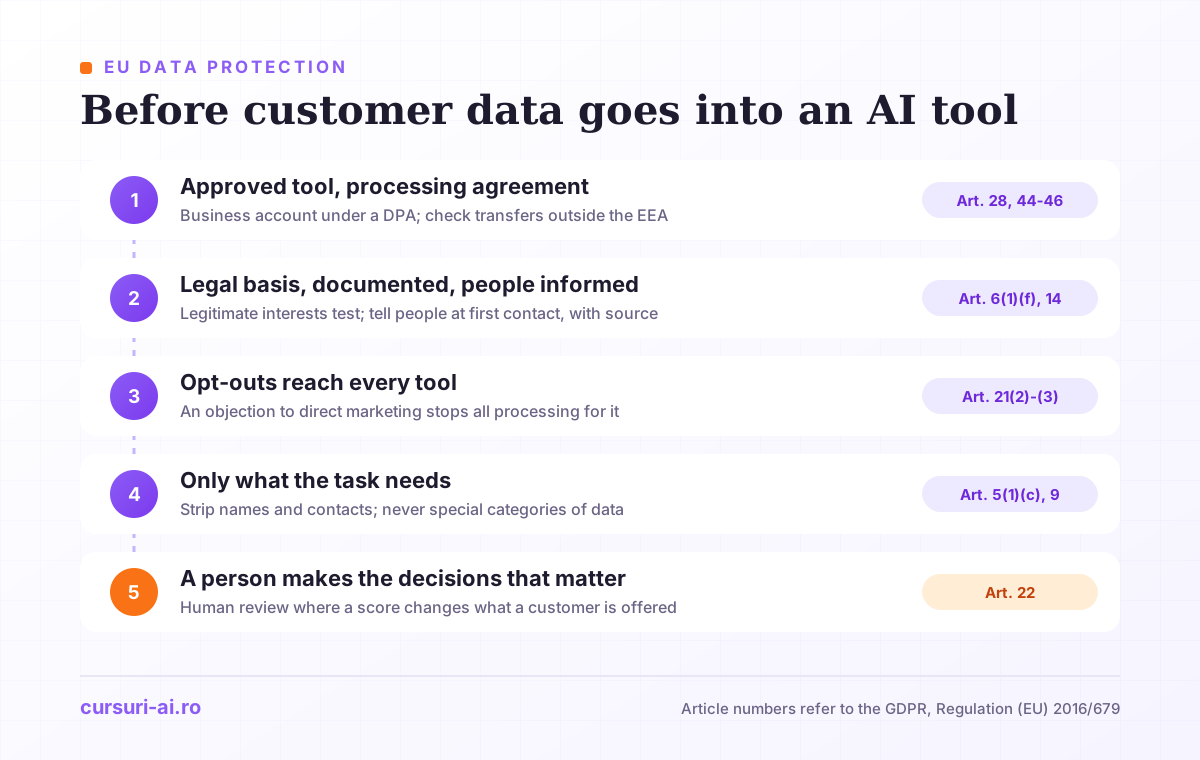
1. Is the AI tool approved and covered by a processing agreement?
When a vendor processes personal data on your behalf, Article 28 GDPR requires you to use only processors "providing sufficient guarantees" and a contract under which the processor acts "only on documented instructions from the controller". In practice: use the business version of a tool your company has signed a data processing agreement for, and check what the terms say about training models on your inputs. Call notes pasted into a personal account on a consumer app are outside that contract.
If the vendor processes data outside the European Economic Area, Chapter V of the GDPR requires a transfer mechanism, typically an adequacy decision (Article 45) or standard data protection clauses (Article 46). Ask your legal team whether this was checked.
2. Do you have a legal basis for prospecting?
The usual legal basis, and the one the European Commission names for marketing contact lists, is legitimate interests (Article 6(1)(f)). Recital 47 says that "the processing of personal data for direct marketing purposes may be regarded as carried out for a legitimate interest", but "may" is doing work there. The European Data Protection Board's draft Guidelines 1/2024 describe three cumulative conditions: a legitimate interest, the necessity of the processing for it, and a balancing test showing that the person's interests and rights do not take precedence. The EDPB adds that controllers should assess and document this before the processing starts.
Two consequences. Inform people: when you collect data from a source other than the person (a public profile, a purchased list, an enrichment tool), Article 14 requires you to tell them, including the source, at the latest at your first communication if you use the data to contact them. Check purchased lists: the European Commission's guidance says the organization supplying a list must be able to demonstrate that the data was obtained in compliance with the GDPR and may be used for advertising, and that you must not send advertising to people who objected.
3. Does your suppression list reach your AI tools?
Under Article 21(2) and (3), a person can object at any time to direct marketing, including related profiling, after which their data "shall no longer be processed for such purposes". There is no balancing test here. If your AI tools keep their own lists or sequences, make sure an opt-out recorded in the CRM stops them too.
4. Are you sending only what the task needs?
Article 5(1)(c) requires personal data to be "adequate, relevant and limited to what is necessary". In practice: remove names and contact details when the task does not need them ("a finance director at a 300-person logistics company said..." is enough to draft an objection response), never paste the special categories of data listed in Article 9, such as health information, and do not paste a whole CRM export when ten rows answer the question.
5. Is a person making the decisions that matter?
Article 22(1) gives people "the right not to be subject to a decision based solely on automated processing, including profiling" that has legal or similarly significant effects. A score that only helps a seller order a call list leaves the decision with a person. Scoring that automatically decides who gets credit terms, which price is offered or who is refused service deserves a legal review. Keep a human review step wherever an AI score changes what a customer is offered.
Cold email: the ePrivacy rules still apply
Marketing email is also governed by Article 13 of the ePrivacy Directive (2002/58/EC). For subscribers who are natural persons it requires prior consent, with one exception: your own customers, about your own similar products, if they could object easily when you collected their details and in every message. Article 13(4) prohibits marketing email that hides the sender or has no valid address for opt-out requests. For subscribers who are not natural persons, such as companies, Article 13(5) leaves protection to national law, so check your country's rules before an AI tool multiplies your sending volume.
What the EU AI Act adds for sales teams
Three provisions of the AI Act (Regulation (EU) 2024/1689) matter for sales teams:
- Chatbots must disclose that they are AI. Since 2 August 2026, Article 50(1) requires AI systems "intended to interact directly with natural persons" to be designed so people know they are interacting with an AI system, unless that is obvious. Check the chatbot on your website.
- No emotion inference on your own team. Since 2 February 2025, Article 5(1)(f) has prohibited using AI to infer the emotions of people in the workplace, except for medical or safety reasons. If a call analytics tool offers to read your sellers' emotions from their voices, ask legal first.
- Evaluating sellers is high-risk. Annex III lists AI systems used "to monitor and evaluate the performance and behaviour of persons" in work relationships. Under the amending Regulation (EU) 2026/1744, those high-risk obligations apply from 2 December 2027; involve HR and legal before scoring sellers with AI.
A 30-day rollout for a sales team
Week 1: rules and baseline. Agree which tools are approved, which data may go into them, and the "AI proposes, seller decides" rule, on one page. Pick two workflows, usually research and call notes, and record a baseline (see below).
Week 2: shared prompts. Have your best sellers adapt the example prompts to your products and qualification framework, and store them in one shared place.
Week 3: review habits. In team meetings, look at real outputs (a brief, an email, a CRM update) and discuss what had to be corrected. This is where the team learns where the model is unreliable.
Week 4: measure and decide. Keep what worked, drop what did not, add one workflow for the next month.
The hard part is not the prompts but the adoption: changing habits without losing trust in the data. That change management side, along with tool selection and data quality, is covered in depth in AI for Sales and CRM. For the leadership view across functions, see AI for Business Leaders: A Practical Playbook for 2026.
How to tell whether it is working
Be skeptical of productivity or win-rate claims that come without a published method. Measure your own team against its baseline instead:
- Preparation time per first meeting, as estimated by the sellers.
- CRM completeness: open deals with a dated next step and a close date backed by evidence.
- Reply quality: replies that are real conversations rather than opt-outs.
- Forecast accuracy over two or three quarters, the honest test of whether better data led to better calls.
- Correction rate: how often sellers fix AI drafts. If it stays high, the prompt or the sources need work.
Frequently Asked Questions (FAQ)
Can I paste customer emails or call transcripts into an AI assistant? Only into a tool your company has approved under a data processing agreement, and only the parts the task needs. Never include special categories of data such as health information, and check what the vendor's business terms say about training on your inputs.
Will AI-written outreach get our domain flagged as spam? The risk comes from volume and weak relevance, which AI makes easy to scale. Keep one verified, relevant observation per message, edit by hand, and respect opt-outs in every tool you send from.
Is AI lead scoring legal under the GDPR? Scoring that helps sellers prioritize can rely on legitimate interests when a documented assessment supports it and people can easily object. It is more sensitive when a score automatically decides what a person is offered, because Article 22 restricts decisions based solely on automated processing that significantly affect people. Keep a human review step there.
Do we need to tell prospects that we used AI to research them? Article 14 of the GDPR requires you to tell people whose data you collected elsewhere what you hold, why, who receives it (recipients can include service providers such as an AI vendor) and where it came from, at the latest when you first contact them. Your privacy notice is the usual place. A chatbot that talks to prospects must also make clear, under the AI Act, that it is an AI system.
Conclusion
AI for sales pays off when it takes over research, drafting and record-keeping while the people who own customer relationships keep the judgment. Feed it sources, label hypotheses, have it propose CRM updates with evidence, and use it to inspect your pipeline rather than predict it. Around that sits the legal frame: approved tools, a documented legal basis, opt-outs that reach every tool, minimal data, and human decisions where they matter. Start with two workflows, measure, then expand.
This article is general information, not legal advice. Check the official texts below for amendments after 31 October 2026.
Sources
- Regulation (EU) 2016/679 (GDPR), EUR-Lex
- Directive 2002/58/EC (ePrivacy Directive), consolidated text, EUR-Lex
- Regulation (EU) 2024/1689 (AI Act), EUR-Lex
- EDPB Guidelines 1/2024 on processing of personal data based on Article 6(1)(f) GDPR
- European Commission: Can data received from a third party be used for marketing?

The course that continues this article
AI for Sales and CRM
You have read the theory. In the course you put it into practice: written lessons structured in modules, with examples and exercises, quizzes, the AI Professor in every lesson and progress saved automatically. Once you complete the lessons and reach the minimum quiz score, you get the Certificate of Completion, a private attestation.
From the course syllabus
- Fundamentals of AI in Sales
- Intelligent CRM and Automation
- B2B Prospecting and Outreach with AI
- Advanced AI Sales Strategies
+ 7 more modules in the full syllabus
€99 per month for this course, VAT included · or pick it in a subscription of 3, 5 or 10 courses, from €199 per month, together with other Business courses; you can change them at every renewal (see what you learn across the whole track).
Monthly subscription with automatic renewal · stop the renewal anytime from your account · digital content with immediate access, see the withdrawal conditions. The certificate confirms that you completed the course and is private: it is not a diploma or a state-recognised qualification.