LLM API costs rarely explode because of one expensive call. They grow quietly: a system prompt that doubles in length, an agent that loops twelve times instead of three, a premium model answering questions a small one would get right, a nightly job paying real-time prices. This guide shows how to reduce LLM API costs without making the product worse: how to measure what you spend per task, the levers that matter (prompt caching, batch processing, model routing, output limits, response caching, agent budgets), a worked example with the arithmetic, and the mistakes that push bills up.
Where LLM API costs actually come from
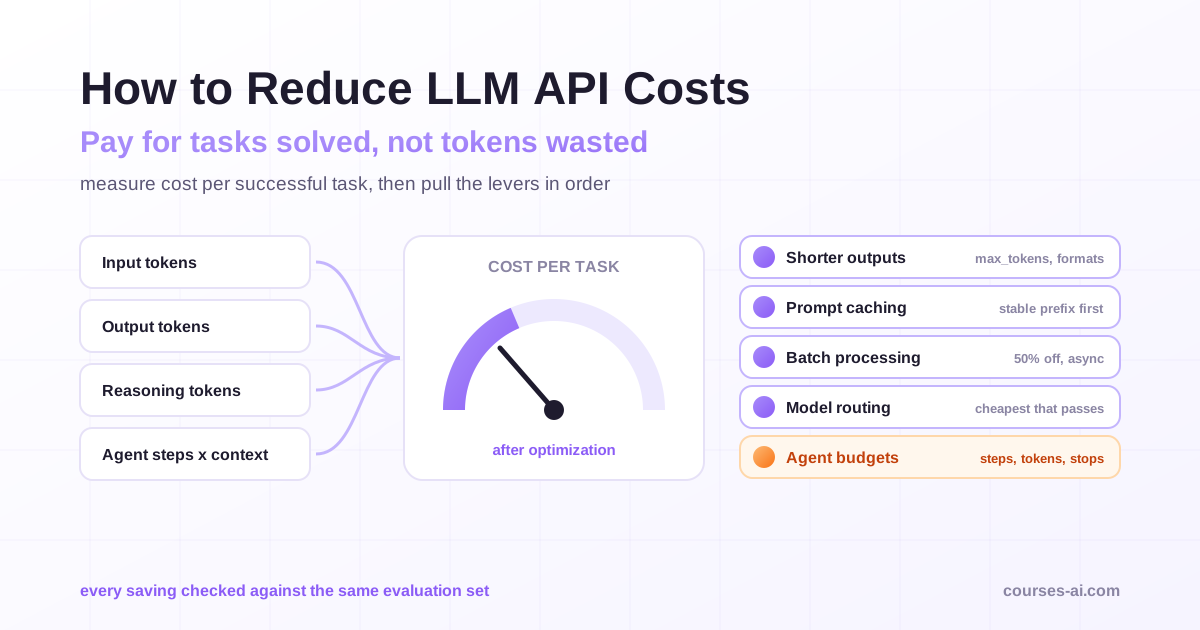
Every major provider bills by tokens, with separate prices for input and output. The bill for a feature is roughly:
requests × (input tokens × input price + output tokens × output price)
That formula hides four things that surprise teams in production:
- Output usually costs several times more than input. On the major providers' price lists, an output token costs a multiple of an input token, so a verbose answer can outweigh a long prompt.
- Reasoning tokens are billed as output. Models that think before answering generate internal reasoning tokens, and you pay for them at output rates even though the user never sees them.
- Input is more than the user's message. The system prompt, conversation history, retrieved documents, tool definitions and images all count as input tokens on every call.
- Agents multiply everything. An agent that calls tools re-sends the growing context on each step, so a ten-step task costs far more than ten times a single answer.
The unit that matters is not cost per call but cost per successful task: what you spend, including retries and failed attempts, to resolve one support ticket, summarise one contract or complete one coding change. A cheaper model that fails twice as often can cost more per task than an expensive one.
Measure before you optimize
You cannot reduce what you do not see. Before changing any prompt, log these fields for every request:
- feature or endpoint, and customer or tenant
- model and parameters (including reasoning effort, where the API has one)
- input tokens, cached input tokens, output tokens and reasoning tokens, as reported in the response's usage object
- latency, retries and whether the task succeeded
With a week of data, sort features by total spend and look at the distribution of tokens per request. In most applications a few features drive most of the cost, and within them a long tail of oversized requests (huge histories, runaway agents) drives a disproportionate share. Those are your first targets.
Building this kind of instrumentation, together with rate limits and cost governance, is one of the production topics in our Advanced LLM Integration in Production course, alongside model routing strategies and caching at every layer.
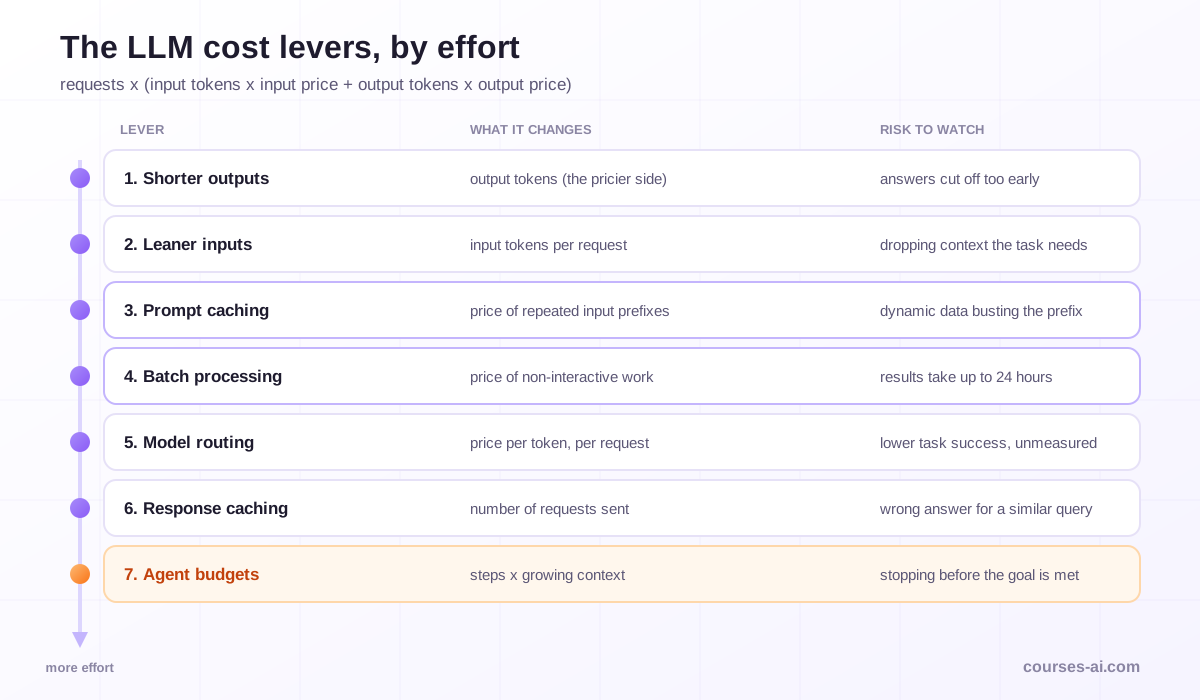
The cost levers, from least to most effort
1. Cut output tokens
Because output is the expensive side, shortening it is often the fastest win:
- Set
max_tokensdeliberately for each feature instead of leaving a generous default. It caps the worst case. - Ask for the format you need. "Answer in at most three sentences" or a JSON schema with only the fields you use prevents essays.
- Ask for changes, not rewrites. For editing tasks, request a diff or the changed paragraphs rather than the whole document again.
- Tune reasoning effort. Where the API exposes an effort or thinking setting, use the lowest level that passes your evaluation for that task. Classification and extraction rarely need deep reasoning.
2. Trim and structure the input
Input waste accumulates silently:
- Retrieve less, retrieve better. Sending twenty loosely related chunks to a RAG prompt costs more and often answers worse than five relevant ones.
- Compress history. Long conversations can keep the last few turns verbatim and a summary of the rest.
- Send only the tools a step needs. Every tool definition is input on every call; an agent with forty tools pays for all forty schemas each step.
- Resize images to the resolution the task needs.
These decisions belong to context engineering, the practice of choosing what goes into the model's window and in what order; our guide to context engineering for AI agents covers it in depth.
3. Use prompt caching
Prompt caching lets the provider reuse the processed prefix of a prompt across requests, and bill the reused part at a fraction of the normal input price. It is the single biggest lever for applications that send the same long instructions, documents or tool definitions on every call.
The details differ by provider:
- Anthropic's API lets you mark cache breakpoints in the prompt. Writing to the cache costs more than normal input (1.25 times the base input price for the default five-minute cache, 2 times for the one-hour option), while reading from it costs a fraction (one tenth of the base input price on most models, less on some newer ones). The documentation also lists a minimum cacheable length per model.
- OpenAI's API caches automatically for prompts of 1,024 tokens or more and reports
cached_tokensin the usage details of every response; the discount depends on the model. - Google's Gemini API documents its own context caching options.
Caching only works on an identical prefix, which makes prompt order an engineering decision. Put what never changes first (instructions, tool definitions, reference documents), then what changes rarely (a customer's profile), and the user's message last. The classic cache-busters are a timestamp or request ID at the top of the system prompt, tools serialised in a different order on each call, and per-user data placed before the shared instructions.
One caveat for agents: when cache reads are cheap, rewriting or summarising the conversation history to "save tokens" can cost more than it saves, because every rewrite invalidates the cached prefix and forces a new cache write. Measure cache hit rates before and after any compaction strategy.
4. Batch everything nobody is waiting for
OpenAI, Anthropic and Google all offer a batch interface that processes requests asynchronously at 50 percent of the standard price. OpenAI's Batch API uses a 24-hour completion window; Anthropic says most batches finish within an hour and expires any batch still running after 24 hours; Google describes 24 hours as a target turnaround. Anthropic's documentation states that the batch discount also applies to cached tokens, so the two levers stack.
Good candidates are any workloads without a user waiting: evaluation runs, document enrichment, classification of a backlog, embeddings or summaries for a new data source, nightly reports. Teams often discover that a large share of their volume is batchable once they look for it.
5. Route each request to the cheapest model that passes
Most applications send every request to one model, usually the strongest they tested. Routing sends each request to the cheapest model that handles it well:
- Static tiering: assign models per feature. Classification, extraction and short rewrites go to a small fast model; complex reasoning and long-form writing to a larger one.
- Cascades: try the small model first and escalate to the larger one when a check fails (low confidence, schema validation error, failed test). The FrugalGPT paper from Stanford studied this pattern and reported large savings at comparable accuracy in its experiments.
- Learned routers: a classifier predicts, per request, whether the small model is good enough. The RouteLLM paper (ICLR 2025) reported cost savings of more than two times on public benchmarks without substantially compromising response quality.
Routing is only as safe as your evaluation. Before moving a feature to a smaller model, run both models on a representative test set and compare task success, not general benchmark scores. Our article on LLM evaluation explains how to build that test set.
6. Cache responses in your own application
Provider caching discounts repeated input; your own cache can skip the call entirely:
- Exact-match caching stores the answer for an identical request (same model, prompt and parameters). It is safe and useful for repeated questions, deterministic transformations and retries.
- Semantic caching returns a stored answer for a request that is similar, measured by embedding distance. It saves more and fails more: "How do I cancel my order?" and "How do I cancel my subscription?" can look alike to an embedding and need different answers. Use it only with a strict similarity threshold, a short time to live, and never for personalised or account-specific answers.
7. Put budgets on agents
Agents are where costs get away from teams, because the number of steps is decided at runtime. Give every agent run:
- a maximum number of steps and tool calls
- a token or currency budget per task, checked before each step
- clear stop conditions, so the agent ends when the goal is met instead of "double-checking" in a loop
- a cheaper model for routine sub-steps (reading files, formatting) and the stronger model for planning
Log the cost of every run. A small share of runaway runs often accounts for a large share of agent spend, and you will only see them per run, not in a monthly total.
Guardrails: budgets, limits and alerts
Optimization lowers the typical bill; guardrails protect you from the atypical one:
- Per-tenant quotas so one customer, or one script, cannot consume the month's budget.
- Spending limits and alerts in the provider console, set below the level that would hurt.
- Anomaly alerts on cost per hour and tokens per request, not only on monthly totals.
- A kill switch per feature, so an expensive feature can be degraded to a cheaper model or turned off without a deploy.
- API key hygiene. A leaked key is a cost incident as well as a security one; scope keys per environment and rotate them.
A worked example, with the arithmetic
The figures below use illustrative round prices, not any provider's current list price, to show how the levers combine. Assume a model priced at $3 per million input tokens and $15 per million output tokens, with cache writes at 1.25 times and cache reads at 0.1 times the input price.
A support assistant handles 10,000 requests a day. Each request sends a 6,000-token static block (instructions, policies, tool definitions) plus 1,000 tokens of conversation, and receives a 400-token answer.
| Scenario | Cost per request | Cost per day |
|---|---|---|
| Baseline: no caching | 7,000 × $3/M + 400 × $15/M = $0.0270 | $270 |
| Static block cached | 6,000 × $0.30/M + 1,000 × $3/M + 400 × $15/M = $0.0108 | $108, plus cache writes |
| Cached, answers trimmed to 250 tokens | 6,000 × $0.30/M + 1,000 × $3/M + 250 × $15/M = $0.00855 | $85.50, plus cache writes |
Cache writes add little here. Even in a pessimistic case where the five-minute cache expired and was rewritten every five minutes all day, that is 288 writes × 6,000 tokens × $3.75/M, about $6.48 a day. The combined result, roughly $92 a day instead of $270, is a reduction of about two thirds, from two changes that do not touch answer quality: reordering the prompt so the static block comes first, and asking for shorter answers.
If the same team also runs a nightly job that summarises the day's tickets, moving that job to a batch interface halves its cost on top. Routing simple questions to a smaller model would cut further, but only after an evaluation shows it resolves them as well.
A cost-optimization checklist
- Log tokens (input, cached, output, reasoning), model, latency and success for every request.
- Compute cost per successful task for each feature and rank features by spend.
- Set a
max_tokensand an output format per feature. - Reorder prompts: static content first, user input last; remove timestamps and IDs from the prefix.
- Turn on, or structure for, prompt caching and track the cache hit rate.
- Move every non-interactive workload to a batch interface.
- Evaluate a smaller model per feature and route where it passes.
- Add exact-match response caching for repeated requests.
- Put step and budget limits on every agent run.
- Set quotas, spending alerts and a per-feature kill switch.
Mistakes that make LLM costs go up
- Optimizing price per token instead of cost per task. A model with half the price and twice the failure rate is not cheaper.
- Dynamic content at the top of the prompt. One timestamp in the system prompt can turn every request into a cache miss.
- Defaulting to the strongest model everywhere. It is the easiest choice during a prototype and the most expensive one in production.
- Unbounded agents. Without step and budget limits, a confused agent keeps spending until it hits a timeout.
- Semantic caching on personalised answers. Saving a call by giving one customer another customer's answer is a support problem and possibly a privacy one.
- Cutting quality to save cost without measuring. Every change should be checked against the same evaluation set before it ships.
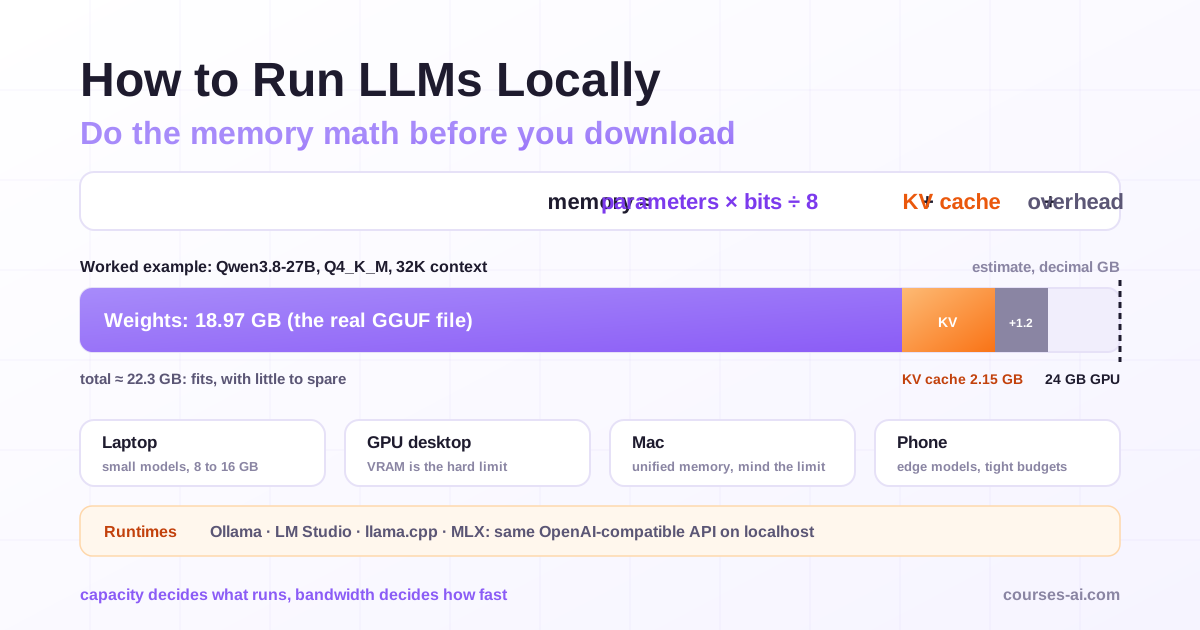
If your volumes are high and stable, self-hosting an open-weight model can also change the economics; our guide to running LLMs locally covers the hardware and memory arithmetic. For agents specifically, the Context Engineering and Memory for AI Agents course covers how to keep long-running context lean, and LLM Evaluation and Testing shows how to prove a cheaper configuration still works.
Frequently Asked Questions (FAQ)
What is the fastest way to reduce LLM API costs? Start with the changes that do not affect quality: set output limits and concise formats, put static content at the start of the prompt so prompt caching can work, and move non-interactive jobs to a batch interface. Then evaluate smaller models for individual features.
How much does prompt caching save? It depends on how much of each prompt is a repeated prefix and on the provider's rates. On Anthropic's API, cache reads cost a tenth of the base input price on most models, and OpenAI discounts cached input automatically for prompts of 1,024 tokens or more. Applications with long, shared instructions or documents benefit most.
Is the Batch API worth using? For any workload where nobody waits for the answer, yes. OpenAI, Anthropic and Google price batch requests at half the standard rate, with results within a 24-hour window and often much sooner. It is not suitable for chat or other interactive features.
Does using a smaller model always save money? Not always. A smaller model costs less per token, but if it fails more often you pay for retries, escalations and human fixes. Compare models on cost per successful task using your own test set before switching.
Why are reasoning models more expensive than their price suggests? They generate reasoning tokens before the visible answer, and those tokens are billed as output. Lowering the reasoning effort setting for simple tasks, and reserving deep reasoning for problems that need it, keeps the cost under control.
Conclusion
Reducing LLM API costs is an engineering discipline, not a hunt for the cheapest model. Measure cost per successful task, then work through the levers in order of effort: shorter outputs, leaner inputs, prompt caching with a stable prefix, batch processing for everything nobody waits for, routing to the cheapest model that passes your evaluation, your own response cache, and hard budgets on agents. Each lever is safe only when an evaluation confirms quality did not drop, and each saving holds only if guardrails stop the outliers that monthly averages hide.
Sources
- Prompt caching, Claude Platform documentation, Anthropic
- Prompt caching, OpenAI API documentation
- Batch API, OpenAI API documentation
- Batch processing, Claude Platform documentation, Anthropic
- Batch API, Gemini API documentation, Google
- RouteLLM: Learning to Route LLMs with Preference Data, Ong et al., ICLR 2025
- Also cited: Chen, Zaharia and Zou, FrugalGPT: How to Use Large Language Models While Reducing Cost and Improving Performance, arXiv 2305.05176
Verified on 15 November 2026 against the providers' documentation. Prices, discounts and cache rules change often and differ by model; check the current pricing pages before planning a budget.

The course that continues this article
Advanced LLM Integration in Production Applications
You have read the theory. In the course you put it into practice: written lessons structured in modules, with examples and exercises, quizzes, the AI Professor in every lesson and progress saved automatically. Once you complete the lessons and reach the minimum quiz score, you get the Certificate of Completion, a private attestation.
From the course syllabus
- Fundamentals of LLM Integration in 2026
- Streaming and Error Handling
- Function Calling and Tool Use
- Model Context Protocol (MCP)
+ 5 more modules in the full syllabus
€99 per month for this course, VAT included · or pick it in a subscription of 3, 5 or 10 courses, from €199 per month, together with other IT courses; you can change them at every renewal (see what you learn across the whole track).
Monthly subscription with automatic renewal · stop the renewal anytime from your account · digital content with immediate access, see the withdrawal conditions. The certificate confirms that you completed the course and is private: it is not a diploma or a state-recognised qualification.