To run LLMs locally you need three things that fit together: enough fast memory, a runtime such as Ollama, LM Studio, llama.cpp or MLX, and an open-weight model quantized to fit that memory. This guide shows the arithmetic, so you can tell before a 19 GB download whether a model will fit your laptop, GPU, Mac or phone, and when a hosted API is still the better choice.
The short answer
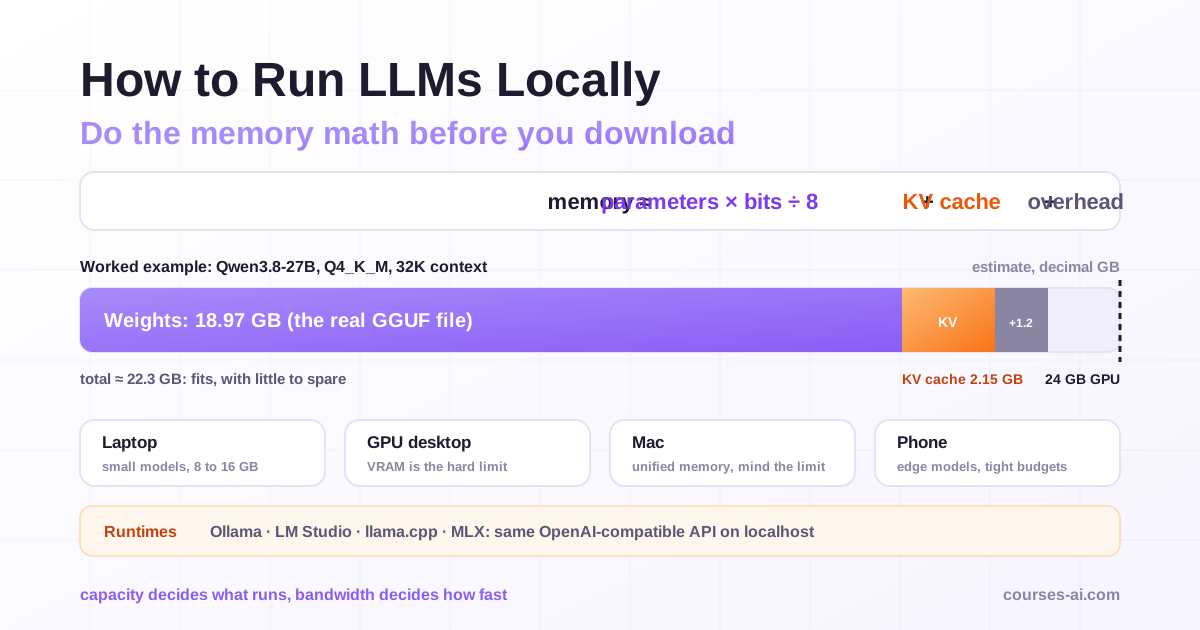
Memory capacity decides what you can run; everything else decides how fast. All sizes are estimates in decimal gigabytes (1 GB = 10⁹ bytes), computed with the formula below or taken from the publishers' own figures.
| Memory available to the model | Realistic starting point | Why it fits |
|---|---|---|
| Phone, or a laptop with 8 GB | Gemma 4 E2B or E4B | Google lists 1.1 GB and 2.5 GB for the mobile builds |
| 16 GB | gpt-oss-20b, Gemma 4 12B | gpt-oss-20b runs within 16 GB per its card; Gemma 4 12B is 6.7 GB at 4-bit |
| 24 GB GPU | Qwen3.8-27B or Gemma 4 31B at 4-bit, moderate context | About 22 GB for Qwen3.8-27B at 32K tokens (worked example below) |
| 32 to 64 GB | The same 27B to 31B models with long context or 8-bit weights | Qwen3.8-27B at 8-bit is a 28.6 GB file |
| 96 to 128 GB | gpt-oss-120b, Llama 4 Scout at 4-bit | gpt-oss-120b targets one 80 GB GPU; Scout is roughly 67 GB at 4-bit |
For the tool: Ollama for one command and a local API, LM Studio for a desktop app (and MLX on a Mac), llama.cpp for every knob, mlx-lm for scripting on Apple silicon.
Why run an LLM locally, and when an API is still better
- Privacy. Prompts and documents never leave the machine, provided the model really runs locally (see the cloud warning in the Ollama section).
- Offline work. A laptop on a plane or a device on a factory floor keeps working.
- No per-token fees. You pay for hardware, power and your time instead; high volumes of small, repetitive jobs pay off first.
- Control. The weights you tested are the weights you run next year, and you can fine-tune them, as shown in Fine-Tuning an Open-Source LLM with LoRA and QLoRA.
A hosted API stays the better call when you need the strongest proprietary models for hard reasoning or coding, many concurrent users, or no hardware to operate. You can also combine both; routing, fallbacks and cost control for that setup are the subject of Advanced LLM Integration in Production.
How much memory does a local LLM need? The formula
total memory  ≈  weights  +  KV cache  +  runtime overhead

weights (GB)     = parameters (billions) × bits per weight ÷ 8
KV cache (bytes) = 2 × layers with a growing cache × KV heads × head size
                     × bytes per value × context length (tokens)
overhead         ≈ 1 GB budget for compute buffers and the runtime
Weights. A quantized file's bits per weight are not the round number in its name. llama.cpp's quantization README publishes measured values for an 8B model: Q4_K_M averages 4.89 bits per weight, Q5_K_M 5.70, Q6_K 6.56, Q8_0 8.50 and F16 16.00. The formula checks out against that table: its F16 row (14.96 GiB at 16 bits) implies about 8.03 billion parameters, and 8.03 × 4.8944 ÷ 8 = 4.91 GB, which is 4.58 GiB, exactly the size listed for Q4_K_M. Mind the units: tools mix GB and GiB, and 1 GiB is 1.074 GB.
KV cache. While generating, the model keeps a key and a value vector (the factor of 2) for every past token in every attention layer. Modern models shrink it with grouped-query attention (few KV heads shared by many query heads), sliding windows and linear-attention layers whose state does not grow with the context. The inputs are in the model's config.json on Hugging Face: num_hidden_layers, num_key_value_heads, head_dim, and layer_types when layer kinds are mixed. Ollama and llama.cpp store the cache at 16 bits by default, so bytes per value is 2.
Overhead. Compute buffers, the runtime and, for multimodal models, the vision encoder. We budget 1 GB, which is also the margin llama.cpp's server leaves unused per device by default when it fits a model into memory (--fit-target, 1,024 MiB). Treat it as an assumption and read the real figure from ollama ps or llama.cpp's load log.
This arithmetic, and choosing runtime and quantization for the device you ship on, is covered module by module in Edge AI and On-Device Intelligence.
Worked example: Qwen3.8-27B on a 24 GB GPU at 32K context
Qwen3.8-27B is an Apache 2.0 model released in August 2026 that alternates three Gated DeltaNet (linear-attention) layers with one full-attention layer. Its config.json lists 64 layers, 16 of them full attention, each with 4 KV heads of 256 dimensions.
- Weights. The formula gives 26.9 billion text parameters × 4.89 ÷ 8 = 16.4 GB, but the Q4_K_M file in
ggml-org/Qwen3.8-27B-GGUFis 18.97 GB. Q4_K_M keeps some tensors at higher precision, and how many depends on the architecture: this file averages about 5.6 bits per weight. When the file exists, use its size. (The Q8_0 file is 28.6 GB, and 26.9 × 8.5 ÷ 8 = 28.6 GB: at 8 bits the formula is exact.) - KV cache per token. 2 × 16 layers × 4 heads × 256 × 2 bytes = 65,536 bytes, or 64 KiB.
- KV cache at 32K. 65,536 × 32,768 tokens = 2.15 GB.
- Linear-attention state. Fixed whatever the context: 48 layers × 48 value heads × 128 × 128 values, about 0.08 GB at 16 bits or 0.15 GB at 32 bits. We take 0.15 GB.
- Overhead. 1.07 GB (1,024 MiB).
Total: 18.97 + 2.15 + 0.15 + 1.07 ≈ 22.3 GB. It fits a 24 GB card with little to spare; the vision projector (0.63 GB at Q8_0) brings it to about 23 GB. At 128K context the cache grows to 8.59 GB and the total to about 28.8 GB: you need a 32 GB device, a quantized cache or a shorter context.
The architecture matters as much as the size. If all 64 layers kept a full cache, the same model would need 8.59 GB of cache at 32K instead of 2.15 GB. A classic 8B design with 36 full-attention layers and 8 KV heads of 128 dimensions needs 144 KiB per token, or 4.83 GB at 32K: more cache than this 27B model.
KV cache per token for current architectures
Estimates at 16 bits, from each model's config.json; 8K, 32K and 128K mean 8,192, 32,768 and 131,072 tokens.
| Model (attention layout) | KV per token | 8K | 32K | 128K |
|---|---|---|---|---|
| Classic 8B, 36 full-attention layers, 8 KV heads × 128 | 144 KiB | 1.21 GB | 4.83 GB | 19.3 GB |
| Qwen3.8-27B, 16 of 64 layers full, 4 KV heads × 256 | 64 KiB | 0.54 GB | 2.15 GB | 8.59 GB |
| gpt-oss-20b, 12 of 24 layers full, the rest a 128-token window, 8 KV heads × 64 | 24 KiB | 0.20 GB | 0.81 GB | 3.22 GB |
Gemma 4 31B goes further: its config puts 50 of its 60 layers on a 1,024-token sliding window, so only 10 layers grow with the context. Its full-attention layers use a different head layout, so read its exact cache size from the runtime's load log.
Two levers shrink the cache. Ollama's OLLAMA_KV_CACHE_TYPE=q8_0 halves it versus the f16 default and q4_0 quarters it (both need flash attention); Ollama's FAQ calls the q8_0 loss "very small", depending on model and task. llama.cpp uses -ctk q8_0 -ctv q8_0. The other lever: set the context the task needs, not the model's maximum.
The memory table: weights by size and quantization
Weights only, in GB, from parameters × bits per weight ÷ 8 with the bits measured by llama.cpp. These are estimates: as the worked example shows, a real Q4_K_M file can be about 15% larger for some architectures, and more for small models. Add the KV cache for your context and about 1 GB of overhead.
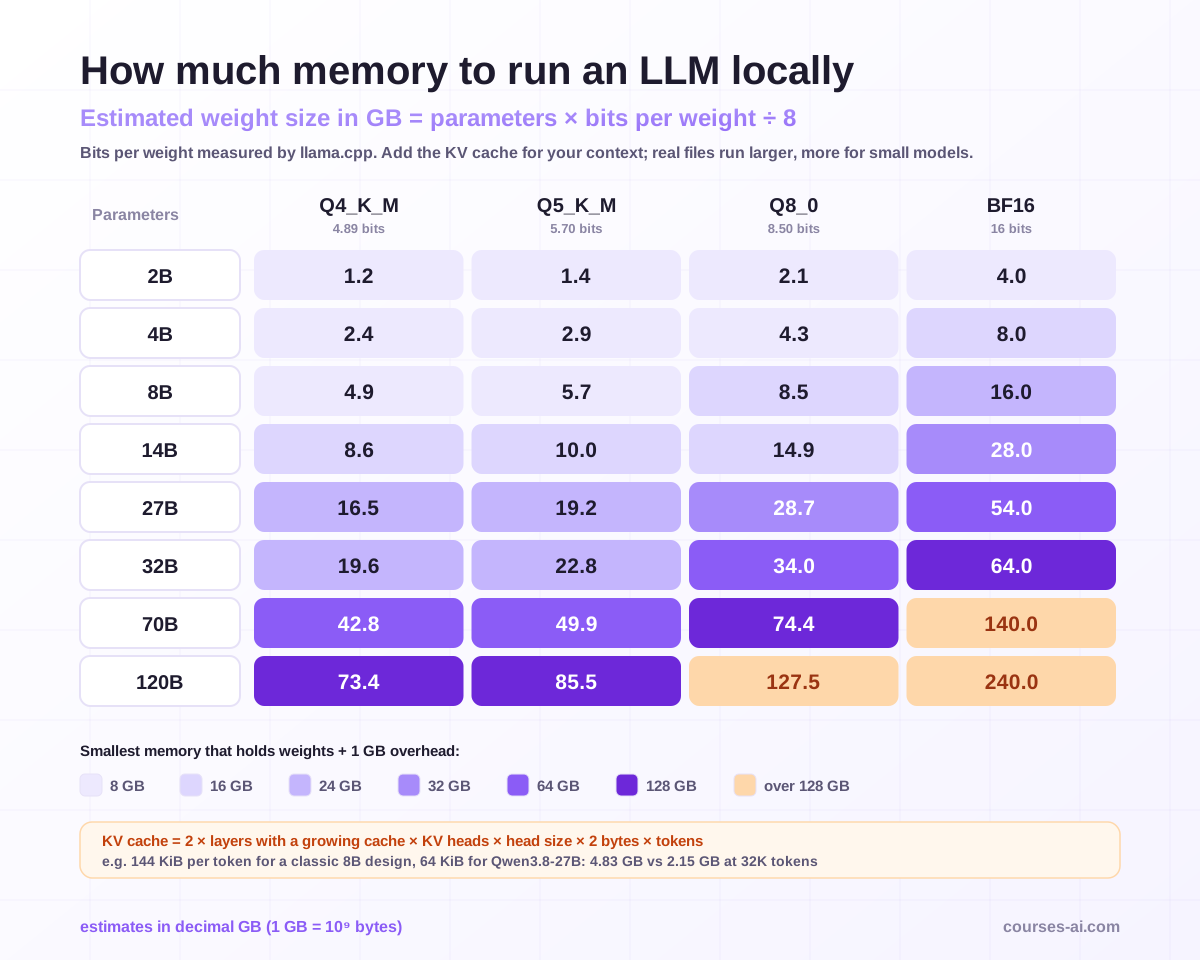
| Parameters | Q4_K_M (4.89 bits) | Q5_K_M (5.70) | Q8_0 (8.50) | BF16 (16) |
|---|---|---|---|---|
| 2B | 1.2 | 1.4 | 2.1 | 4.0 |
| 4B | 2.4 | 2.9 | 4.3 | 8.0 |
| 8B | 4.9 | 5.7 | 8.5 | 16.0 |
| 14B | 8.6 | 10.0 | 14.9 | 28.0 |
| 27B | 16.5 | 19.2 | 28.7 | 54.0 |
| 32B | 19.6 | 22.8 | 34.0 | 64.0 |
| 70B | 42.8 | 49.9 | 74.4 | 140.0 |
| 120B | 73.4 | 85.5 | 127.5 | 240.0 |
A cross-check against a publisher's numbers: Q4_0 stores blocks of 32 four-bit weights plus one 16-bit scale, 18 bytes per 32 weights or 4.5 bits per weight. For Gemma 4 31B (30.7 billion parameters per its model card) that gives 30.7 × 4.5 ÷ 8 = 17.3 GB; Google's Gemma documentation lists 17.5 GB for Q4_0, and the ggml-org Q4_0 file is 18.0 GB.
Mixture of experts changes the reading. In a mixture-of-experts (MoE) model every expert sits in memory, so total parameters set the memory, while only the active parameters are computed per token, so they set the speed. Gemma 4 26B A4B has 25.2 billion parameters with 3.8 billion active; gpt-oss-20b has 21 billion with 3.6 billion active, its expert weights quantized to MXFP4. When the GPU is small but system RAM is large, llama.cpp's --cpu-moe keeps the expert weights in RAM.
Hardware: capacity first, bandwidth second
Capacity answers "does it fit?". Memory bandwidth answers "how fast does it write?": to generate each token the runtime reads roughly all active weights once, which gives a back-of-the-envelope ceiling.
max tokens per second ≈ memory bandwidth (GB/s) ÷ GB read per token
With made-up round numbers: a machine with 300 GB/s running a dense model with 19 GB of weights tops out near 16 tokens per second. An MoE model with 3 billion active parameters at about 4.9 bits reads about 1.8 GB per token, for a ceiling near 160. Real speeds are lower (the KV cache is read too), but the ratio explains why MoE models suit machines with plenty of memory and modest bandwidth. Ignore tokens-per-second claims that do not name the hardware, model file and context.
Compute matters most for reading the prompt (prefill), which sets the time to first token: llama.cpp's quantization README, on hardware it does not name, shows about 822 tokens per second for prompt processing against about 72 for generation for Llama-3.1-8B at Q4_K_M: prefill runs an order of magnitude faster than generation.
- PC with a discrete GPU. VRAM is the hard limit. llama.cpp supports NVIDIA (CUDA), AMD (HIP), Intel (SYCL) and other GPUs through Vulkan, and splits a model between GPU and CPU when needed (
-ngl, "auto" by default); every layer left on the CPU slows generation. - Mac with Apple silicon. Unified memory lets the GPU use system RAM, which is why 64 GB and 128 GB Macs run models no single consumer GPU holds. macOS limits how much memory the GPU can wire; mlx-lm documents raising it with
sudo sysctl iogpu.wired_limit_mb=N, N being larger than the model and smaller than the machine's memory. - Phones and edge devices. Gemma 4 E2B and E4B are Google's models for mobile and edge. Google's LiteRT-LM runtime (Apache 2.0) targets Android, iOS, web, desktop and IoT devices such as the Raspberry Pi, and the AI Edge Gallery app runs models on the phone itself.
Ollama vs LM Studio vs llama.cpp vs MLX
All four expose an OpenAI-compatible local endpoint, so code written against one usually works with the others.
| Tool | What it is | License | Local API (default) | Pick it when |
|---|---|---|---|---|
| Ollama | CLI, desktop app and model library; runs as a background server | MIT | http://localhost:11434, OpenAI-compatible under /v1 |
You want one command and a stable local API for apps |
| LM Studio | Desktop app with the lms CLI; llama.cpp engine, plus MLX on Macs |
Proprietary, personal and internal business use | Port 1234 in the docs' examples, /v1 |
You want to browse, compare and tune models in a GUI |
| llama.cpp | The C/C++ engine with a CLI and a server; GGUF format | MIT | 127.0.0.1:9931, /v1/chat/completions |
You want full control, any hardware, or to embed it |
| mlx-lm | Python package for Apple silicon built on MLX | MIT | mlx_lm.server |
You script, test or fine-tune on a Mac |
Ollama
Installation and first run, as in the project's README:
# macOS and Linux
curl -fsSL https://ollama.com/install.sh | sh

# Windows (PowerShell)
irm https://ollama.com/install.ps1 | iex

ollama run gemma4        # chat with Gemma 4
ollama run gpt-oss:20b   # OpenAI's 20B open-weight model
ollama ps                # size, CPU/GPU split and context of loaded models
Two defaults catch people out. Context length is set from your VRAM: 4K tokens below 24 GiB, 32K from 24 to 48 GiB, 256K from 48 GiB up. Ollama's docs say agents, web search and coding tools need at least 64,000 tokens; set it with OLLAMA_CONTEXT_LENGTH=64000 ollama serve (or the app's slider) and check the CONTEXT and PROCESSOR columns in ollama ps. A context that is too short is easy to miss: check the CONTEXT column rather than assuming your whole prompt was read.
And not every model in the library is local. It also lists cloud-hosted variants (tags such as gemma4:cloud), and Ollama's FAQ says it processes your prompts and responses for cloud models. If local must mean local, set OLLAMA_NO_CLOUD=1 (or "disable_ollama_cloud": true in ~/.ollama/server.json) and restart; the log then shows Ollama cloud disabled: true.
Ollama binds to 127.0.0.1:11434, and any OpenAI client can talk to it:
from openai import OpenAI

client = OpenAI(base_url="http://localhost:11434/v1/", api_key="ollama")  # key required but ignored
reply = client.chat.completions.create(
    model="gpt-oss:20b",
    messages=[{"role": "user", "content": "Explain the KV cache in two sentences."}],
)
print(reply.choices[0].message.content)
LM Studio
LM Studio is a desktop app for macOS (Apple silicon, macOS 14 or newer, 16 GB of RAM recommended), Windows (x64 and ARM) and Linux (x64 and ARM64, Ubuntu 20.04 or newer). Since version 0.3.4 the Mac build bundles an MLX engine, lmstudio-ai/mlx-engine (MIT), next to llama.cpp. The app itself is not open source: its terms (version of 23 August 2026) license it "solely for Your personal and / or internal business purposes" and rule out offering it as a service.
The lms CLI ships with the app (open LM Studio once first):
lms get openai/gpt-oss-20b
lms load openai/gpt-oss-20b --context-length=32768 --gpu=max
lms server start
The server speaks the OpenAI API (and, per the docs, an Anthropic-compatible one), so the Python snippet above works with base_url="http://localhost:1234/v1".
llama.cpp
llama.cpp is the engine underneath much of this ecosystem, and its README now offers a one-line installer:
# macOS and Linux
curl -LsSf https://llama.app/install.sh | sh

# Windows (PowerShell)
irm https://llama.app/install.ps1 | iex

# chat with a small model straight from Hugging Face
llama cli -hf ggml-org/Qwen3.5-0.8B-GGUF

# serve the worked example: explicit context, 8-bit KV cache
llama serve -hf ggml-org/Qwen3.8-27B-GGUF:Q4_K_M -c 32768 -ctk q8_0 -ctv q8_0
Four server options from the llama-server README matter here. -hf picks Q4_K_M when you name no quantization, or the repository's first file if there is no Q4_K_M. -c defaults to 0, meaning "loaded from model", but --fit (on by default) trims unset options to fit your memory, down to 4,096 tokens; set -c yourself so you know what you got. -ngl (GPU layers) defaults to auto. The server listens on 127.0.0.1, port 9931, with the OpenAI-compatible endpoint at /v1/chat/completions. Before binding any of these servers to 0.0.0.0, add authentication: Ollama's local API ignores API keys, and llama-server checks one only when started with --api-key.
MLX and mlx-lm
On Apple silicon, Apple's MLX framework has its own model format and the mlx-lm package (MIT):
pip install mlx-lm
mlx_lm.chat --model mlx-community/Qwen3.8-27B-4bit
--max-kv-size turns on a rotating, fixed-size KV cache when memory is tight, at some cost in quality on long inputs.
Which open-weight models to run locally (November 2026)
There is no single "best local LLM in 2026". Filter by memory, then compare two or three candidates on 20 to 30 of your own prompts. Open-weight does not always mean open source.
| Family | Sizes (total / active parameters) | License | Context | Fits from |
|---|---|---|---|---|
| Gemma 4 (Google) | E2B (5.1B, 2.3B effective), E4B (8B, 4.5B effective), 12B, 26B A4B (25.2B / 3.8B), 31B | Apache 2.0 | 128K (E2B, E4B), 256K (others) | phones to 24 GB GPUs |
| Qwen3.8-27B (Qwen) | 27B, hybrid attention, vision encoder | Apache 2.0 | 262,144 tokens native | 24 GB at 4-bit |
| gpt-oss (OpenAI) | gpt-oss-20b (21B / 3.6B), gpt-oss-120b (117B / 5.1B), both MoE | Apache 2.0 | 131,072 tokens (config) | 16 GB and 80 GB |
| Llama 4 Scout (Meta) | 109B / 17B, MoE | Llama 4 Community License | 10M tokens (model card) | about 67 GB at 4-bit (estimate) |
Apache 2.0, used by Gemma 4, Qwen3.8 and gpt-oss, is a standard permissive license. The Llama 4 Community License is Meta's own: companies with more than 700 million monthly active users must request a license from Meta, products must display "Built with Llama", and the Hugging Face weights are gated behind accepting those terms. Community quantizations inherit the original license.
Note that Qwen3.8-27B has thinking mode on by default, which spends local compute before the answer; its model card shows how to disable it per request.
Quantization: GGUF, Q4 versus Q8, and the other formats
GGUF is llama.cpp's single-file format holding the weights, tokenizer and metadata, including the chat template. Ollama, LM Studio and llama.cpp all run it. The names encode the scheme:
- Q8_0 (8.50 bits per weight): closest to the original, when memory allows.
- Q6_K, Q5_K_M: the middle ground when a 4-bit file errs on your task.
- Q4_K_M (4.89 bits): the
-hfdefault and the usual starting point. - IQ4_XS (4.46 bits) and 2- to 3-bit I-quants: smaller, with growing quality loss.
- Q4_0 (4.5 bits): the legacy format of ggml-org's Gemma 4 files.
K-quants spend more bits on the tensors that matter most, so real file sizes do not follow the name exactly. Outside GGUF, MLX has its own 4-bit and 8-bit repositories, and gpt-oss ships in MXFP4.
A sound procedure: start at Q4_K_M, run your own evaluation prompts at a low temperature, move up one level if quality disappoints, and move down only under real memory pressure. Test KV cache quantization separately; Ollama's FAQ notes that models with a high grouped-query attention ratio can lose more precision from it. If you plan to adapt the model itself, Fine-Tuning and Open-Source LLMs covers training and exporting your own weights. And if your real goal is answering from your own documents, What Is RAG? explains the retrieval half, which runs locally just as well.
Frequently Asked Questions (FAQ)
How much VRAM do I need to run an LLM locally? Add parameters × bits per weight ÷ 8 for the weights, the KV cache for your context, and about 1 GB of overhead. As estimates, at Q4_K_M an 8B model needs about 4.9 GB of weights, a 27B model about 16.5 GB and a 70B model about 43 GB, before the cache.
Ollama vs LM Studio: which should I use? Ollama for a command-line tool and a local API that applications call (MIT license). LM Studio for a desktop app to browse and compare models, with an MLX engine on Macs; it is proprietary, licensed for personal and internal business use. Both expose OpenAI-compatible endpoints, so switching costs little.
Can I run an LLM locally on a laptop without a GPU? Yes. llama.cpp runs on CPUs alone, and Apple silicon laptops use their integrated GPU with unified memory. With 8 GB of RAM, stay with Gemma 4 E2B or E4B; with 16 GB, gpt-oss-20b also fits. Expect slower generation than on a discrete GPU.
What is the best local LLM in 2026? There is no single winner. Pick the largest model that fits your memory with the context you need, then compare candidates such as Gemma 4, Qwen3.8-27B and gpt-oss on your own prompts. Check the license: Apache 2.0 for those three, a custom community license for Llama 4.
Is a local LLM private?
Yes, if it actually runs on your machine and the server is not exposed. Disable cloud features (Ollama: OLLAMA_NO_CLOUD=1) and keep the server bound to 127.0.0.1.
Conclusion
To run LLMs locally, do the memory arithmetic first: quantized weights, plus a KV cache that depends on the architecture as much as on the context, plus about a gigabyte of overhead. Pick the tool by how you work, set the context length yourself, keep cloud features off when privacy is the point, and choose the model by testing candidates on your own tasks. For the hardest reasoning or real scale, an API is still the right tool.
Sources
Checked on 5 November 2026. Memory figures are estimates computed from these sources.
- llama.cpp (MIT): installation, commands, backends
- llama.cpp quantization README: measured bits per weight, sizes and speeds for Llama-3.1-8B
- llama-server README: server flags, defaults, host and port
- ggml-org/Qwen3.8-27B-GGUF: GGUF file sizes
- Qwen3.8-27B model card and
config.json: license, architecture, context, thinking mode - Gemma 4 model card and
config.json: license, sizes, parameters, context, sliding-window layout - Gemma 4 documentation, Google: memory requirements by size and precision, mobile builds
- gpt-oss-20b model card and
config.json: license, parameters, MXFP4, memory, commands - Llama 4 Scout model card: Llama 4 Community License, parameters
- Ollama FAQ and Context length: bind address, KV cache types, cloud features, context defaults
- Ollama library: gemma4: local and cloud tags
- LM Studio CLI and Terms of Use (23 August 2026); LM Studio docs on requirements and its OpenAI-compatible server
- lmstudio-ai/mlx-engine (MIT): bundled with LM Studio 0.3.4 and newer for Mac
- mlx-lm (MIT): installation, commands, rotating KV cache, wired memory limit
- LiteRT-LM (Apache 2.0): platforms, AI Edge Gallery app

The course that continues this article
Edge AI and On-Device Intelligence
You have read the theory. In the course you put it into practice: written lessons structured in modules, with examples and exercises, quizzes, the AI Professor in every lesson and progress saved automatically. Once you complete the lessons and reach the minimum quiz score, you get the Certificate of Completion, a private attestation.
From the course syllabus
- Foundations: What Edge AI Is and Why It Matters in 2026
- Model Compression: Making Models Fit the Edge
- Edge AI Frameworks and Runtimes
- Mobile AI: iOS and Android
+ 6 more modules in the full syllabus
€99 per month for this course, VAT included · or pick it in a subscription of 3, 5 or 10 courses, from €199 per month, together with other IT courses; you can change them at every renewal (see what you learn across the whole track).
Monthly subscription with automatic renewal · stop the renewal anytime from your account · digital content with immediate access, see the withdrawal conditions. The certificate confirms that you completed the course and is private: it is not a diploma or a state-recognised qualification.