To use Claude Code, install it with Anthropic's native installer, run claude inside your project, sign in, and describe the change you want: the agent reads your codebase, edits files, runs commands and checks its own work. Reliable results come from four habits on top of that: a short CLAUDE.md, permissions you understand, a plan before large changes, and a check the agent can run. This guide covers each step as Claude Code works in November 2026, including the defaults that changed this year.
What Claude Code is and where it runs
Anthropic's documentation describes Claude Code as an agentic loop: gather context, take action, verify results. Claude, the model, decides each step. Claude Code, the harness around it, supplies the tools (file edits, shell commands, search, web access) and manages what the model sees. That split explains most of this guide: a prompt or a line in CLAUDE.md is a request the model weighs, while permission rules, hooks and the sandbox are enforced by the harness every time.
The same engine runs on several surfaces, each with install steps in the official overview:
| Surface | Best for | Good to know |
|---|---|---|
| Terminal CLI | The full feature set, scripting with claude -p, remote servers |
The claude command |
| VS Code extension | Inline diffs, @-mentions and plan review inside the editor | Also installs in Cursor |
| JetBrains plugin | Diff viewing and selection sharing in IntelliJ IDEA, PyCharm, WebStorm and others | Needs the CLI installed separately |
| Desktop app | Visual diff review and parallel sessions | Claude Code is included; requires a paid subscription |
| Web (claude.ai/code) | Long tasks that keep going after you disconnect | Runs in the cloud, Anthropic-managed by default |
The local surfaces read the same CLAUDE.md files, settings and MCP servers. To sign in you need a Claude subscription (Pro, Max, Ultra, Team or Enterprise), a Claude Console account with pre-paid API credits, or access through Amazon Bedrock, Google Cloud's Agent Platform or Microsoft Foundry.
If you are weighing a terminal agent against an AI-native editor, our guide to the Cursor AI code editor covers the IDE-first side. Installing Claude Code is the easy part. The hard part is a workflow you can trust on a real repository, with multi-file changes, git, headless runs, hooks and CI, and that is what Claude Code Mastery: Agentic Coding from the Terminal works through module by module.
Install Claude Code and run your first session
The native installer is the recommended path, and native installs update themselves in the background:
# macOS, Linux, WSL
curl -fsSL https://claude.ai/install.sh | bash

# Windows PowerShell
irm https://claude.ai/install.ps1 | iex

# Package managers (these don't auto-update)
brew install --cask claude-code       # update: brew upgrade claude-code
winget install Anthropic.ClaudeCode   # update: winget upgrade Anthropic.ClaudeCode
The npm package (npm install -g @anthropic-ai/claude-code) is still documented as an advanced option. It needs Node.js 22 or later, and the docs warn never to install it with sudo. Run claude --version in a new terminal: a working install prints a version number followed by (Claude Code), and claude doctor diagnoses problems without starting a session.
Then cd into a project and run claude. On first use it asks you to log in through your browser, or skips the login if ANTHROPIC_API_KEY is set and you approve the key; /login switches accounts later. The first time you open a folder, an interactive session shows the workspace trust dialog. Read it instead of clicking through: it lists what the repository's own configuration would grant, and the security section explains why that matters.
Start with questions such as what does this project do?, then ask for a small change. For real work, the best practices guide recommends naming the file, the symptom and what "fixed" means, instead of "fix the login bug":
users report login fails after the session times out. look at token refresh in src/auth/,
write a failing test that reproduces it, then fix it
The controls you will use every day:
| Command or key | What it does |
|---|---|
claude -c / claude -r |
Continue the latest conversation in this folder, or pick one to resume |
claude -p "query" |
Run once without the interactive interface, print the answer and exit |
@path/to/file |
Include a file in your message |
!command |
Run a shell command yourself and let Claude respond to its output |
Esc |
Stop Claude mid-action and keep the work done so far |
Shift+Tab |
Cycle permission modes |
CLAUDE.md: write down only what Claude can't see
Every session starts with a fresh context window. CLAUDE.md files carry instructions across sessions: plain Markdown that Claude Code loads at the start of every conversation and that Claude treats as context, not as enforced configuration.
| File | Applies to | Use it for |
|---|---|---|
~/.claude/CLAUDE.md |
You, in every project | Personal preferences and tooling shortcuts |
./CLAUDE.md or ./.claude/CLAUDE.md |
Everyone in the repository, through git | Build and test commands, conventions, team decisions |
./CLAUDE.local.md |
You, in this project (add it to .gitignore) |
Sandbox URLs, your own test data |
| Managed policy file | Everyone in the organization | Company standards deployed by IT |
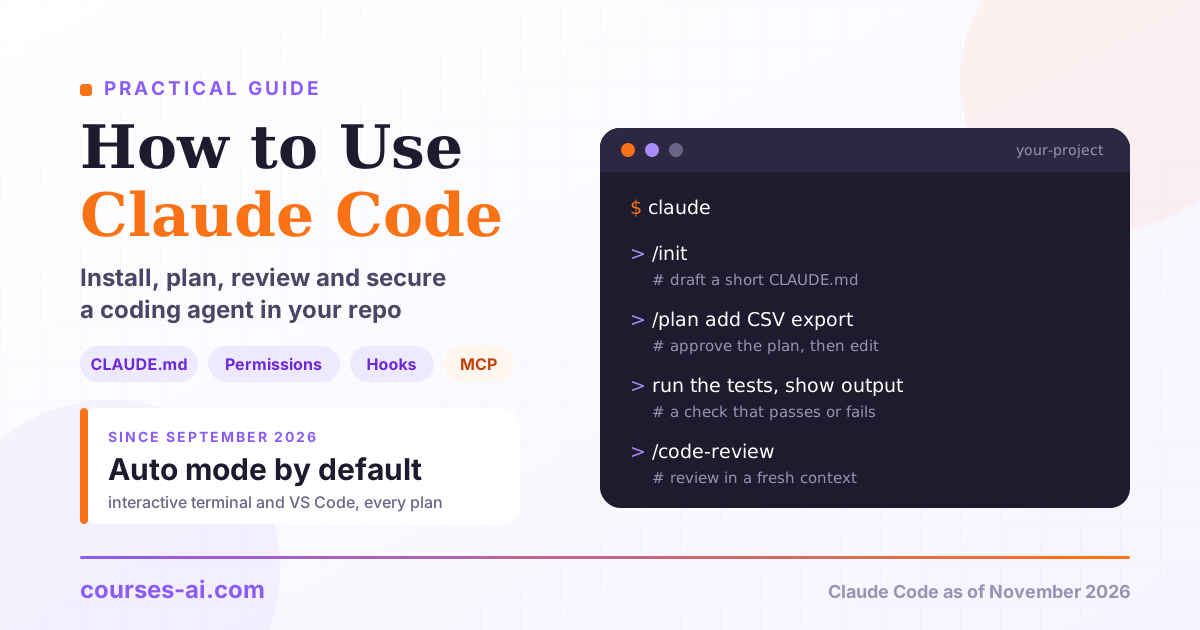
Run /init to draft one from your codebase (if a CLAUDE.md exists, it suggests improvements instead of overwriting it), then cut. The guidance is to stay under 200 lines per file and to leave out what Claude finds by reading the code, such as directory layouts. Keep what it can't find: the commands that prove work is done, misleading corners of the codebase, and decisions made outside the repository.
# Commands
- Install: npm ci
- One test file: npm test -- src/billing/invoice.test.ts
- Typecheck: npx tsc --noEmit

# Conventions
- Amounts are integer cents; never use floats for money
- API handlers validate input with the schemas in src/api/schemas/

# Gotchas
- Integration tests need DATABASE_URL, see .env.example
- src/generated/ is generated code: change the OpenAPI spec and regenerate
As the project grows, path-scoped rules in .claude/rules/ (Markdown files with a paths: list in their frontmatter) load only when Claude reads or edits a matching file, and @path imports split a long file, although imported files still load with it. A repository that already has an AGENTS.md and no CLAUDE.md works as is: Claude Code v2.1.277 or later reads it as the project instructions. Run /context to see which instruction files loaded, and /memory to browse the notes Claude keeps for itself in auto memory. If you keep adding emphasis to a line and Claude still misses it, the docs' verdict is that the rule belongs in a hook or a deny rule.
Permission modes and settings: decide what runs without asking
A permission mode sets what Claude may do without asking you first. The permission modes reference defines six:
| Mode | Runs without asking | Best for |
|---|---|---|
default (labeled Manual) |
Reads only | Sensitive work, unfamiliar code |
acceptEdits |
Reads, file edits and common filesystem commands in the working directory | Iterating on code you review afterwards with git diff |
plan |
Reads, and classifier-approved commands when auto mode is available; no source edits until you approve a plan | Exploring before a change |
auto |
Everything, with a classifier model reviewing actions in the background | Long tasks, fewer prompts |
dontAsk |
Only pre-approved tools; anything that would prompt is denied | Locked-down CI and scripts |
bypassPermissions |
Everything | Isolated containers and VMs only |
The default changed in September 2026. In current versions, interactive terminal and VS Code sessions start in auto mode on every plan and provider, whenever auto mode is available to the session (a supported model, not turned off by your organization); before that, only Pro, Max, Ultra and Team plans started there. claude -p runs start in Manual instead and deny any call that would need approval, unless an allow rule, a hook or --permission-mode auto covers it.
Read auto mode precisely, because it is what you run unless you change it. By default its classifier blocks actions such as curl | bash, sending sensitive data to external endpoints, production deploys and migrations, force pushes, and git reset --hard or other commands that would discard uncommitted work. It also allows some things by default that surprise people: reading .env and sending those credentials to their matching API, and pushing to any branch of the repository you're working in, including the default branch. In the documentation's words, auto mode "reduces permission prompts but does not guarantee safety." After three blocks in a row, or twenty in total, it pauses and goes back to asking you.
Shift+Tab cycles modes during a session, claude --permission-mode plan picks one at launch, and permissions.defaultMode in ~/.claude/settings.json sets your default.
Permission rules refine the mode. Settings files apply in this order, highest first: managed settings from your organization, --settings on the command line, .claude/settings.local.json (yours, kept out of git), .claude/settings.json (the team's, committed) and ~/.claude/settings.json (yours, in every project). Rules are evaluated deny first, then ask, then allow, and a deny at any level wins:
{
  "permissions": {
    "allow": ["Bash(npm test)"],
    "ask": ["Bash(git push *)"],
    "deny": ["Read(./.env)", "Read(./.env.*)", "Read(./secrets/**)"]
  }
}
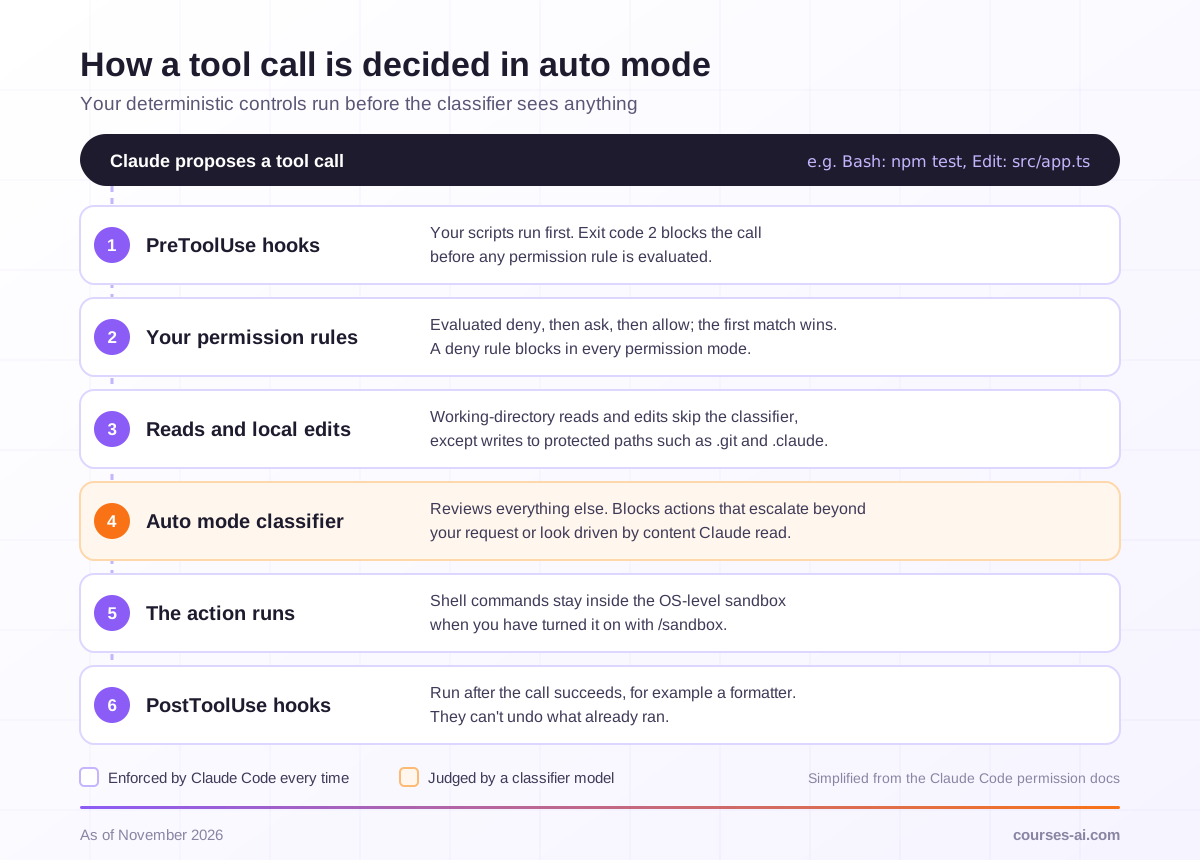
Committed as .claude/settings.json, this runs the test suite without a prompt, keeps a human checkpoint on pushes even in auto mode, and blocks Claude's file tools from reading secrets. Deny rules apply in every mode, including bypassPermissions, while committed allow rules wait until each person accepts the folder's trust dialog. Rules match tool calls, not intent: a Read deny catches cat .env but not a script that opens the file itself, so turn on the OS-level sandbox with /sandbox (macOS, Linux and WSL2) for limits that must hold.
In auto mode, a tool call passes these checks in order, and the deterministic ones come first:
Work plan-first
Plan mode is the cheapest place to catch a wrong direction: Claude reads files, runs exploration commands and writes a plan, but doesn't edit your source until you approve it. Enter it with Shift+Tab, by starting a prompt with /plan (for example /plan move session storage to Redis), or with claude --permission-mode plan. When the plan is ready, you approve it and continue in auto mode, approve it and review each edit yourself, or keep planning. Ctrl+G opens the plan in your editor first, so you can rewrite parts of it.
A workflow that holds up on non-trivial changes:
- Spec. If you don't have one, ask:
I want CSV export on the reports page. Interview me until you could write the spec, then save it as SPEC.md. - Plan in a clean context. Run
/clear, then/plan implement SPEC.md. This is where you catch a wrong data model or a forgotten caller, before any code exists. - Implement against a check. Name the test file, typecheck or build that proves the work.
- Review with fresh eyes, as described below.
- Commit in small steps, so git holds your safe points.
The opusplan model alias uses Opus while you plan and switches to Sonnet, which costs less, for execution. And steer early: Esc stops Claude mid-action, /rewind (or Esc twice on an empty prompt) rolls code and conversation back to an earlier prompt, and after two failed corrections the docs advise /clear plus one better prompt instead of a third correction.
Skills, hooks, subagents and MCP: add them when a trigger appears
None of these is needed on day one. The documentation suggests adding each one when its trigger shows up:
| When this happens | Add |
|---|---|
| Claude gets a convention or command wrong twice | A line in CLAUDE.md |
| You paste the same multi-step procedure into chat again | A skill |
| Something must happen every time, with no exceptions | A hook |
| A side task floods the conversation with output you won't reread | A subagent |
| You keep copying data from a tool Claude can't see | An MCP server |
| A second repository needs the same setup | A plugin that bundles it |
Skills: procedures that load on demand
A skill is a folder with a SKILL.md file, in .claude/skills/<name>/ for the project or ~/.claude/skills/<name>/ for you. By default its description stays in context, and the body loads only when you type /name or Claude finds it relevant, which is why long procedures belong here rather than in CLAUDE.md. Custom commands have been merged into skills, and .claude/commands/ files keep working. For anything with side effects, disable-model-invocation: true means only you can start it:
---
name: fix-issue
description: Fix a GitHub issue end to end, from a failing test to a summary ready for the pull request.
disable-model-invocation: true
---
Fix GitHub issue $ARGUMENTS:

1. Read the issue with the gh CLI and restate the problem in two lines.
2. Write a failing test that reproduces it.
3. Fix the code until that test and the full suite pass.
4. Show the test command and its output, then draft the PR description.
Saved as .claude/skills/fix-issue/SKILL.md, it runs with /fix-issue 1234. Claude Code also bundles skills of its own, including /code-review, /doctor and /verify.
Hooks: rules with zero exceptions
Hooks are commands Claude Code runs at fixed points in its lifecycle, set in a hooks block of a settings file: PreToolUse runs before a tool call and can block it, PostToolUse after a call succeeds, and Stop when Claude finishes responding. On events that can be blocked, exit code 2 blocks the action, and whatever the script writes to stderr goes back to Claude as the reason. This configuration (it needs jq) formats every file Claude edits and sends Claude back to work while the typecheck fails:
{
  "hooks": {
    "PostToolUse": [
      {
        "matcher": "Edit|Write",
        "hooks": [
          { "type": "command", "command": "npx prettier --write --ignore-unknown \"$(jq -r '.tool_input.file_path')\"" }
        ]
      }
    ],
    "Stop": [
      {
        "hooks": [
          { "type": "command", "command": "npx tsc --noEmit 1>&2 || exit 2" }
        ]
      }
    ]
  }
}
Run /hooks to confirm they loaded, and keep the set small. A PostToolUse hook can't undo an action that already ran, while a PreToolUse block holds in every permission mode, which makes it the right tool for a rule like "never edit migrations/".
Subagents: separate context, narrower tools
A subagent works in its own context window, with its own system prompt and tools, and returns a summary. Claude already delegates to built-in ones: Explore for read-only codebase search, Plan for research during plan mode, and a general-purpose agent for multi-step work. Add your own as a Markdown file in .claude/agents/ (project) or ~/.claude/agents/ (personal), or ask Claude to write one:
---
name: reviewer
description: Reviews changed files against the spec they were built from. Use once a feature is implemented and before a pull request is opened.
tools: Read, Grep, Glob
model: sonnet
---
You are reviewing code you did not write. Check that every requirement in the spec is
implemented and that the listed edge cases have tests. Report only gaps that affect
correctness, and skip style.
Claude Code enforces the tools list, so this reviewer can read but never edit. Each subagent sends its own requests, and they count toward the same usage limits as your main conversation.
MCP servers: systems Claude can't reach otherwise
MCP, the Model Context Protocol, connects Claude Code to issue trackers, databases, design tools and other systems. You add servers from your shell:
# remote server over HTTP, the recommended transport
claude mcp add --transport http notion https://mcp.notion.com/mcp

# local stdio server: everything after -- is the command that starts it
claude mcp add --env AIRTABLE_API_KEY=YOUR_KEY --transport stdio airtable -- npx -y airtable-mcp-server

# share with the team through a committed .mcp.json
claude mcp add --transport http shared-server --scope project https://example.com/mcp
The default local scope keeps a server private to you in this project, --scope project writes a committed .mcp.json whose servers Claude Code asks you to approve in interactive sessions, and --scope user covers all your projects. /mcp shows status and disables servers.
Two cautions come straight from the docs. Verify that you trust each server, because servers that fetch external content can expose you to prompt injection. And prefer a CLI such as gh when one exists, because connected servers add their tool names and instructions to the context even when unused. Our explainer on MCP covers the protocol itself. Building your own server, with transports, OAuth and a threat model, is the subject of MCP (Model Context Protocol) — Building Servers and Integrations.
Review and test what the agent changes
The best practices guide states the problem plainly: Claude stops when the work looks done. Without something to run, "looks done" is all it has, and you become the test suite. Give every task a check that comes back pass or fail, such as a test file, a build's exit code, a linter or a script that diffs output against a fixture, and ask for evidence: the command Claude ran and its output.
Then use the review tools Claude Code ships with:
/diffshows the changes in your working tree, including Claude's edits so far./code-reviewreviews your branch for correctness bugs in a background subagent that never saw your conversation, so the reasoning that produced the code doesn't sway it.--fixapplies the findings, a pull request number reviews that PR instead, and/reviewis an alias./security-reviewchecks the diff between your branch and the default branch onoriginfor risks such as injection, auth issues and data exposure./verifybuilds and runs your app to confirm the change does what it should, which catches problems that tests and type checks miss.
Know the limits of undo. /rewind restores Claude's file edits, but not a file that only a Bash command changed, and not the edits of most subagents, including a background /code-review --fix run. Commit before large changes and treat git as the real safety net.
Unattended runs need the same discipline, written into flags. claude -p runs once and exits, which is how Claude Code ends up in CI jobs and shell loops:
claude --bare -p "Run the unit tests, fix any failures, and reply OK or FAIL" \
  --allowedTools "Read,Edit,Bash(npm test)" \
  --permission-mode dontAsk \
  --max-turns 20 \
  --output-format json
--bare skips hooks, skills, plugins, MCP servers and CLAUDE.md files so the run behaves the same everywhere, with authentication from ANTHROPIC_API_KEY, an apiKeyHelper in a --settings file, or your cloud provider's credentials. --allowedTools pre-approves what the task needs, dontAsk denies everything else, and --max-turns caps the run. Before you leave anything running alone, the docs suggest five questions: does it know what done looks like, can it check its own work, what can it touch, what stops it, and who signs off on the result. Turning that loop into a GitHub Actions or GitLab CI job is what the headless and CI/CD modules of Claude Code Mastery are about.
Cost and model choice
Claude Code is billed by token consumption: against your plan's limits on a Pro, Max, Ultra, Team or Enterprise subscription, or against pre-paid API credits on a Console account. As a benchmark, Anthropic's cost guide reports, as of November 2026, an average across enterprise deployments of around $13 per developer per active day and $150 to $250 per developer per month, with 90% of users staying below $30 per active day. /usage (alias /cost) shows session cost, plan limits and, on subscription plans, which skills, subagents and MCP servers drive your usage.
On most plans and providers, a new session runs Claude Opus 5.5 at medium effort. Switch with /model or claude --model <alias>:
| Alias | On the Anthropic API | Use it for |
|---|---|---|
opus |
Claude Opus 5.5 | The default; most coding work |
sonnet |
Claude Sonnet 5.5 | Routine work at lower cost |
haiku |
Claude Haiku 5.5 | Simple jobs, often inside subagents |
fable |
Claude Fable 5.1 | The hardest, longest-running tasks; never the default |
opusplan |
Opus in plan mode, Sonnet for execution | Plan-heavy workflows |
On Amazon Bedrock, Google Cloud's Agent Platform and Microsoft Foundry, some aliases resolve to older versions, so check what /model reports. Depending on your plan, Fable usage can bill to usage credits instead of your plan's included limits.
Effort, set with /effort (low, medium, high, xhigh or max on the current models), controls how much Claude reasons per step. Raise it for a bug in code you didn't write, a flaky test or a schema change with many readers; lower it for quick back-and-forth you review anyway; keep max, which lasts only for the current session, for hard problems Claude should work through alone. For a single hard turn, put ultrathink in the prompt. Phrases such as "think hard" are ordinary text, not controls.
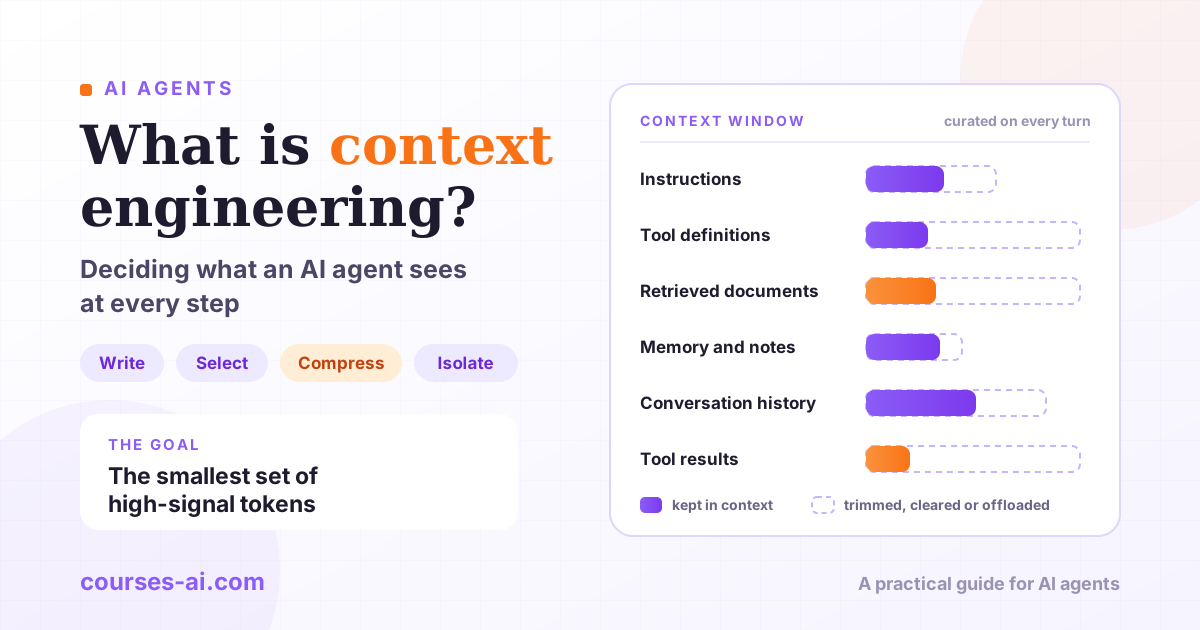
Context is the other cost driver, because every request resends the whole conversation. /clear between unrelated tasks costs nothing. /compact keep the schema decisions frees space, but on a long session the compaction is itself a large request. The prompt cache lasts about an hour on a subscription and five minutes on an API key, so the first message after a long break reprocesses everything. Why long sessions get both expensive and less precise, and how to budget a context window with compaction, retrieval and sub-agents, is the subject of Context Engineering and Memory for AI Agents: Beyond Prompting.
Security habits: secrets, untrusted repos, prompt injection
The commands Claude runs can reach anything your user account can, so treat Claude Code like any automation you give shell access to.
Secrets. File reads inside the working directory need no approval in any mode, and auto mode also allows sending .env credentials to their matching API, so put secrets behind Read deny rules, as in the settings example above, and turn on the sandbox where the limit must hold against scripts. Never put credentials in CLAUDE.md, which is committed and loaded into every session. Claude Code stores its own API keys and tokens in the macOS Keychain when available, and on Linux in a file with mode 0600.
Untrusted repositories. A clone can ship its own .claude/settings.json with hooks and permission rules, plus .mcp.json, skills, subagents and a CLAUDE.md. In an interactive session, Claude Code holds back hooks until you accept the workspace trust dialog, and asks before connecting the project's MCP servers. A claude -p run shows neither prompt: it treats the folder as trusted, so committed hooks run and .mcp.json servers connect without asking. Before scripting Claude Code over someone else's code, review its .claude/ folder, or pass --setting-sources user so the project's settings and .mcp.json aren't read, or --settings '{"disableAllHooks": true}' to turn hooks off for that run. Check the allowed-tools field of any skill in the repository as well, because workspace trust doesn't gate it. The risk is real: CVE-2025-59536, fixed in version 1.0.111, let a project execute code before the user accepted the startup trust dialog. Leave auto-updates on.
Prompt injection. Anything Claude reads, whether a web page, an issue, a log file or an MCP tool result, can carry instructions you didn't write. The security documentation recommends reviewing suggested commands before approving them, not piping untrusted content directly to Claude, verifying proposed changes to critical files, and using virtual machines to run scripts and make tool calls, especially when interacting with external web services. The auto mode classifier is built to block actions that appear driven by hostile content, and WebFetch gives Claude a model-written answer about most pages instead of the raw page, but neither is a guarantee. bypassPermissions offers no protection against prompt injection: keep it for isolated containers and VMs, and note that on Linux and macOS it refuses to start as root.
A short checklist before you call a setup done:
- Auto-updates on.
- Secrets behind
Readdeny rules, plus the sandbox where the limit must hold. - An
askrule ongit push *if a human should approve pushes. - Unknown repositories opened only after reading
.claude/,.mcp.jsonand CLAUDE.md. claude -pwith--allowedTools,dontAskand--max-turns;bypassPermissionsonly in a container or VM./permissionsreviewed now and then, since every "Yes, and don't ask again" saves an allow rule to.claude/settings.local.json.
Frequently Asked Questions (FAQ)
Do I need a paid plan to use Claude Code? Claude Code needs one of three account types: a Claude subscription (Pro, Max, Ultra, Team or Enterprise), a Claude Console account with pre-paid API credits, or access through Amazon Bedrock, Google Cloud's Agent Platform or Microsoft Foundry. The desktop app requires a paid subscription.
What is the difference between Claude Code's permission modes?
They set what Claude may do without asking: Manual (default) allows reads only, acceptEdits adds file edits, plan proposes without editing your source, auto has a classifier model review actions instead of you, dontAsk runs only pre-approved tools, and bypassPermissions skips the checks and belongs in isolated containers or VMs. Since September 2026, interactive terminal and VS Code sessions start in auto mode where it's available.
What should I put in CLAUDE.md?
Only what Claude can't learn by reading the repository: the commands that prove work is done, misleading parts of the codebase, decisions made outside the code, and anything you've corrected twice. Draft it with /init, keep it under 200 lines, and turn rules that can't have exceptions into hooks or deny rules.
Which model does Claude Code use by default?
On most plans and providers, Claude Opus 5.5 at medium effort. Switch with /model sonnet for routine work at lower cost, /model haiku for simple jobs or /model fable for Claude Fable 5.1 on the hardest long-running tasks, and change reasoning depth with /effort.
Is it safe to run Claude Code on a repository I just cloned?
Treat its configuration as code: read the trust dialog, the .claude/ folder, .mcp.json and CLAUDE.md before you accept. claude -p shows no trust prompt and runs committed hooks, so pass --setting-sources user or turn hooks off for that run, and use a VM or dev container for code you distrust.
Conclusion
Using Claude Code well comes down to a few deliberate choices. Install it natively so fixes arrive automatically, and give it a short CLAUDE.md and a check it can run. Understand auto mode, now the default for interactive sessions, and put what must never happen into deny rules, ask rules and hooks, which Claude Code enforces whatever the model decides. Plan before large changes, review in a fresh context, commit often because checkpoints don't cover everything, add extensions only when a trigger appears, and watch /usage instead of guessing what a session costs.

The course that continues this article
Claude Code Mastery: Agentic Coding from the Terminal (multi-file, git, CI, MCP)
You have read the theory. In the course you put it into practice: written lessons structured in modules, with examples and exercises, quizzes, the AI Professor in every lesson and progress saved automatically. Once you complete the lessons and reach the minimum quiz score, you get the Certificate of Completion, a private attestation.
From the course syllabus
- Claude Code Fundamentals: Installation, CLI and the Agent-First Mental Model
- Multi-File and Large Codebases: Plan, Edit, Review and Context Management
- The Full Git Workflow: Branches, Commits, Conflicts, Code Review and PRs
- Headless Mode (claude -p) and Non-Interactive Automation
+ 7 more modules in the full syllabus
€99 per month for this course, VAT included · or pick it in a subscription of 3, 5 or 10 courses, from €199 per month, together with other IT courses; you can change them at every renewal (see what you learn across the whole track).
Monthly subscription with automatic renewal · stop the renewal anytime from your account · digital content with immediate access, see the withdrawal conditions. The certificate confirms that you completed the course and is private: it is not a diploma or a state-recognised qualification.