MCP, the Model Context Protocol, is the open standard that lets an AI application talk to tools and data through one interface instead of a pile of one-off integrations. If you have connected a database, a ticketing system or a code repository to an assistant and wondered why so many tools now talk about "MCP servers", this guide explains what MCP is, how the protocol actually works on the wire in its current revision, and how to build, test and secure a small server of your own.
What MCP is, in plain terms
The MCP specification describes MCP as "an open protocol that enables seamless integration between LLM applications and external data sources and tools." It uses JSON-RPC 2.0 messages and, by the spec's own account, takes some inspiration from the Language Server Protocol, which did the same job for programming languages and editors: write the integration once, and every compatible tool can use it.
Before MCP, connecting a model to a system meant writing glue code for each pair of application and data source. Anthropic's original announcement on 25 November 2024 put the problem bluntly: "Every new data source requires its own custom implementation, making truly connected systems difficult to scale." MCP replaces that with a contract. You expose your system once as an MCP server; any application that implements an MCP client can discover what the server offers and use it.
Two facts about the protocol's status matter if you are deciding whether to build on it:
- Governance is neutral. On 9 December 2025 Anthropic donated MCP to the Agentic AI Foundation, a directed fund under the Linux Foundation co-founded by Anthropic, Block and OpenAI. In the same announcement Anthropic listed ChatGPT, Cursor, Gemini, Microsoft Copilot and Visual Studio Code among the products that had adopted MCP.
- The spec is versioned by date. Revisions are named
YYYY-MM-DD, after the last backwards-incompatible change. The current revision is 2026-07-28, and it changed the protocol substantially. Tutorials written in 2025 describe earlier revisions, so check which one a guide targets before you copy its code.
The concepts below are stable across revisions. The wire details are not, and the hard part of building a server that survives in production (transport choice, authorization, tool design, testing, threat modeling) is exactly what the MCP (Model Context Protocol) — Building Servers and Integrations course covers module by module, in Python and TypeScript.
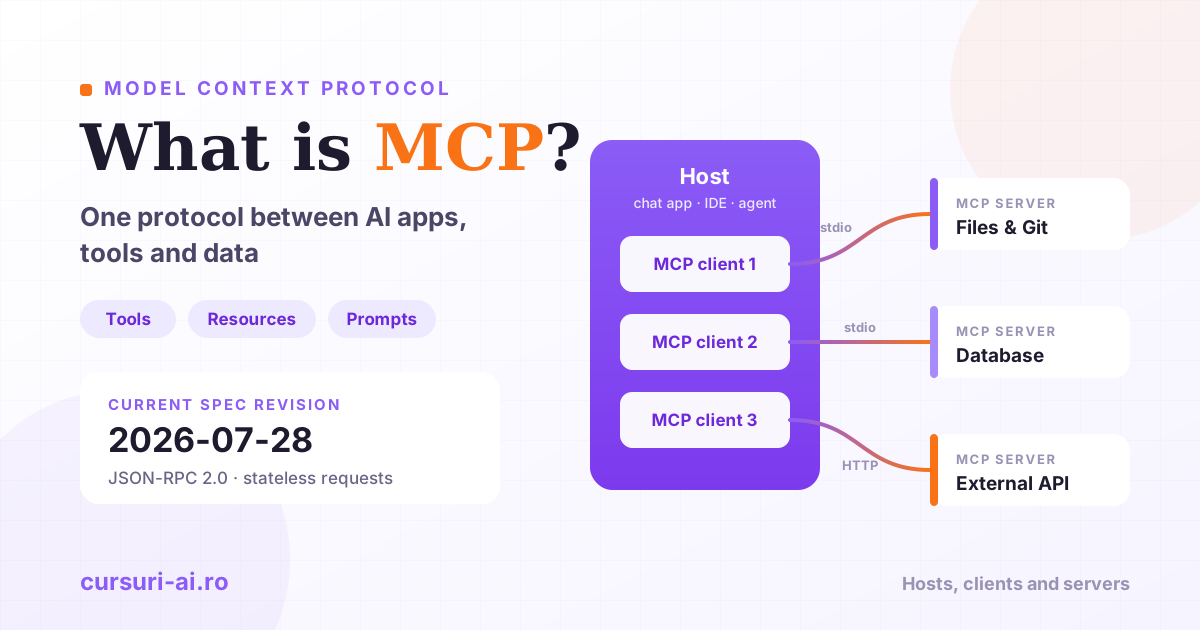
The architecture: hosts, clients and servers
MCP has three roles, and most design and security questions come down to which of them is responsible.
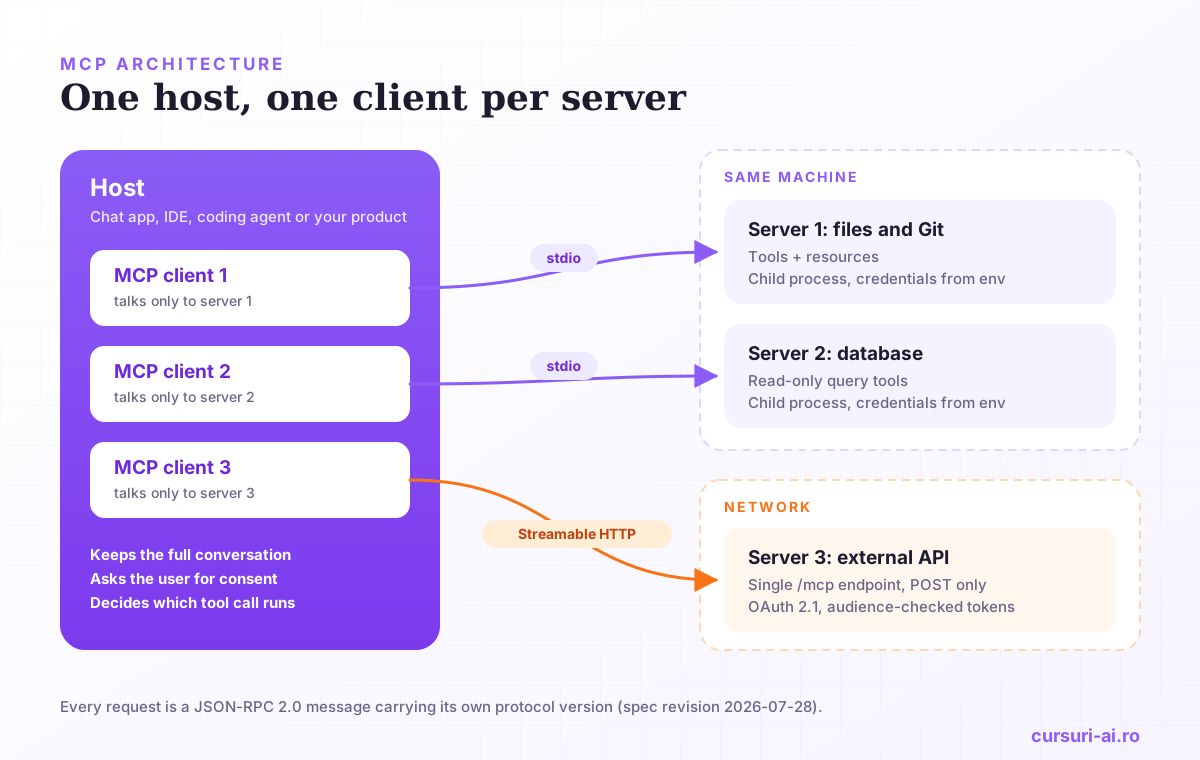
The host is the application the user actually works in: a desktop chat app, an IDE, a coding agent in the terminal, or your own product. The spec gives the host the coordinating job. It creates and manages the clients, controls their permissions and lifecycle, enforces security policies and consent requirements, handles user authorization decisions and aggregates context from all connected servers. When the model decides to call a tool, the host is the last checkpoint before anything runs.
The client lives inside the host. Each client "communicates with exactly one server": a host connected to five servers runs five clients. The one-to-one relationship is deliberate. It isolates failures and permissions per connection and keeps each server's view of the world narrow.
The server exposes a focused capability: a database, a file tree, an internal API, a SaaS product. A server can be a local process or a remote web service.
The design principles in the spec explain why the split looks like this. Servers "should be extremely easy to build", "highly composable", and, the one that matters most for security, servers "should not be able to read the whole conversation, nor 'see into' other servers." The full conversation stays with the host. A server only receives what a request carries.
What a server offers: tools, resources and prompts
A server can expose three kinds of building blocks, and the distinction between them is about who decides when they are used:
| Primitive | Who controls it | What it is | Protocol methods |
|---|---|---|---|
| Tools | The model | Functions the model can call: query a database, create a ticket, run a search | tools/list, tools/call |
| Resources | The application | Context data identified by a URI: a file, a schema, a record | resources/list, resources/read, resources/templates/list |
| Prompts | The user | Message templates the user picks, often shown as slash commands | prompts/list, prompts/get |
Tools get the most attention, but resources and prompts often make a server pleasant to use. A resource template such as runbooks://{runbook_id} lets the host offer a whole family of documents without listing each one. A prompt turns a recurring workflow ("triage this incident", "review this pull request") into something a user can trigger deliberately instead of hoping the model phrases it right.
Clients can offer features back to servers as well. In the 2026-07-28 revision the spec lists elicitation, where the server asks the user for missing information through the client. Two older client features, sampling (the server asks the host's model for a completion) and roots (the client tells the server which directories it may work in), are now deprecated, together with the logging feature. They remain functional during the deprecation window, but new implementations should not adopt them; for sampling, the changelog suggests calling the LLM provider's API directly.
How MCP works on the wire
Every MCP message is a JSON-RPC 2.0 request, response or notification. A tool call in the current revision looks like this (the shape is taken from the Streamable HTTP section of the spec):
{
  "jsonrpc": "2.0",
  "id": 1,
  "method": "tools/call",
  "params": {
    "name": "get_weather",
    "arguments": { "location": "Seattle, WA" },
    "_meta": {
      "io.modelcontextprotocol/protocolVersion": "2026-07-28",
      "io.modelcontextprotocol/clientInfo": { "name": "ExampleClient", "version": "1.0.0" },
      "io.modelcontextprotocol/clientCapabilities": {}
    }
  }
}
The _meta block is the visible sign of the biggest change in 2026-07-28: MCP is now stateless. Up to 2025-11-25, a client opened every connection with an initialize handshake, the two sides negotiated capabilities once, and Streamable HTTP servers tracked a session through the Mcp-Session-Id header. The 2026-07-28 changelog removes both. In practice:
- Every request carries its own protocol version and client capabilities in
_meta. A server accepts or rejects each request independently and answers an unsupported version with anUnsupportedProtocolVersionErrorthat lists the versions it does support. server/discoveris mandatory for servers. It returns the supported versions, capabilities and server identity in one call. Clients may call it first, but they are not required to.- No protocol sessions. State that must span calls (a cart, an open transaction) travels as an explicit handle returned by one tool and passed as an argument to the next.
- No server-initiated requests. A server that needs input mid-call returns an
InputRequiredResult(resultType: "input_required"), and the client retries the original request with the answers. The spec calls this Multi Round-Trip Requests; ordinary results carryresultType: "complete". - Change notifications go through
subscriptions/listen, a single long-lived stream that replaces the old HTTP GET endpoint andresources/subscribe. - Tasks, for long-running operations, moved out of the core into an official extension.
The spec keeps a backward-compatibility path to handshake-based revisions, and clients and servers may support several versions at once, so 2025-era clients do not break overnight. Removing sessions also means a request no longer has to reach the same server instance as the one before it, which simplifies running several instances behind a load balancer.
Transports: stdio or Streamable HTTP
The protocol defines two standard transports. Choosing between them is mostly a question of where the server runs and who is allowed to reach it.
stdio. The client launches the server as a subprocess and exchanges newline-delimited JSON-RPC messages over its standard input and output. The rule to remember: the server "MUST NOT write anything to its stdout that is not a valid MCP message." The official server quickstart is blunt about why, since writing to stdout "will corrupt the JSON-RPC messages and break your server," so logs go to stderr, which the client may capture, forward or ignore. On stdio, the authorization spec says implementations should not use the OAuth flow and should "instead retrieve credentials from the environment."
Streamable HTTP. The server runs as an independent service with a single endpoint that accepts POST, for example https://example.com/mcp. Each client message is its own POST; the server answers with either a single JSON object or a Server-Sent Events stream scoped to that one request, so it can send progress notifications before the final result. Each POST carries an MCP-Protocol-Version header that must match the version in the body, plus Mcp-Method (and Mcp-Name for tool calls, resource reads and prompt requests), which lets gateways and load balancers route traffic without parsing the body.
The security rules for Streamable HTTP are short and non-negotiable. Servers must validate the Origin header on every incoming connection to prevent DNS rebinding attacks, should bind only to 127.0.0.1 when running locally, and should authenticate every connection. The older HTTP+SSE transport from 2024-11-05 is formally deprecated.
| stdio | Streamable HTTP | |
|---|---|---|
| Where the server runs | Same machine, child process of the client | Anywhere reachable over the network |
| Clients per server | One | Many |
| Credentials | Environment variables | OAuth 2.1 per the authorization spec |
| Typical use | Personal tools, local files, developer workstations | Shared team services, SaaS integrations, production |
Build a minimal MCP server in Python
The official Python SDK (the mcp package, version 2.3.0 at the time of writing) implements the 2026-07-28 revision and, according to its documentation, serves 2026 and 2025-era clients from the same server. Its high-level API is the MCPServer class, which reads names, descriptions and JSON Schemas from ordinary Python functions. If you followed an older tutorial built on FastMCP, note that v2 renamed the class and its import path.
Install the SDK with the CLI extra:
uv add "mcp[cli]"
Here is a small but realistic server: a read-only lookup over an operations team's runbooks, with one tool, one resource template and one prompt.
# server.py
import logging
from typing import Annotated

from pydantic import Field

from mcp.server import MCPServer
from mcp.server.mcpserver.exceptions import ResourceNotFoundError, ToolError
from mcp.types import ToolAnnotations

logger = logging.getLogger(__name__)  # logs go to stderr, never stdout

mcp = MCPServer("runbooks")

RUNBOOKS = {
    "db-failover": "1. Confirm the primary is down. 2. Promote the replica. 3. Rotate the DSN.",
    "cache-flush": "1. Announce the flush. 2. Flush one node at a time. 3. Watch the hit rate.",
}


@mcp.tool(
    title="Search runbooks",
    annotations=ToolAnnotations(read_only_hint=True, open_world_hint=False),
)
def search_runbooks(
    query: Annotated[str, Field(min_length=2, max_length=64, description="Words to match in runbook IDs.")],
) -> list[str]:
    """Return the IDs of runbooks whose ID contains the query."""
    hits = [rid for rid in RUNBOOKS if query.lower() in rid]
    if not hits:
        raise ToolError(f"No runbook matches {query!r}. Try a shorter keyword.")
    logger.info("search_runbooks query=%r hits=%d", query, len(hits))
    return hits


@mcp.resource("runbooks://{runbook_id}")
def get_runbook(runbook_id: str) -> str:
    """The full text of one runbook."""
    if runbook_id not in RUNBOOKS:
        raise ResourceNotFoundError(f"No runbook with ID {runbook_id!r}.")
    return RUNBOOKS[runbook_id]


@mcp.prompt(title="Incident triage")
def triage(symptom: str) -> str:
    """Start an incident triage from a symptom."""
    return f"We are seeing: {symptom}. Search the runbooks, pick the closest one and list the first three checks."


if __name__ == "__main__":
    mcp.run()  # stdio by default
A few things in those lines are doing more work than they appear to:
- The function signature is the contract. The SDK turns the type hints and the Pydantic
Fieldconstraints into the tool's input schema. A call with a one-letter query is rejected before your function runs, and the validation message goes back to the model so it can retry. ToolErrorandResourceNotFoundErrorcarry intent. The SDK documentation reduces the choice to one question, "could a smarter model have avoided this?" If yes (a bad keyword, a record that does not exist), raiseToolError, so the error lands in the tool result withisErrorset and the model can correct itself; use a protocol error for problems the model cannot fix. A missing resource is always a protocol error, which is why the resource raisesResourceNotFoundErrorinstead of returning placeholder text. That mirrors the spec's split between tool execution errors and protocol errors.- The annotations are hints.
read_only_hint=Truetells the client the tool does not modify its environment, andopen_world_hint=Falsesays it works on a closed set of data rather than the open web. The schema states that all annotations are hints that "are not guaranteed to provide a faithful description of tool behavior," and clients must treat them as untrusted unless the server is trusted. Never rely on your own annotations as a security control. - The return type becomes structured output. Because
search_runbooksdeclares-> list[str], the SDK publishes an output schema and returns the result both as text for the model and asstructuredContentfor the client application.
To explore the server interactively, run it under the MCP Inspector:
uv run mcp dev server.py
To serve the same code over Streamable HTTP, change one line. Per the SDK's run documentation, transport options go to run(), the default host is 127.0.0.1 and the default path is /mcp:
mcp.run(transport="streamable-http", port=3001) # http://127.0.0.1:3001/mcp
Connecting it to a host is a configuration step. In Claude Code, for example, the -- separator divides Claude Code's own options from the command that launches a stdio server:
# local stdio server
claude mcp add --transport stdio runbooks -- uv --directory /absolute/path/to/project run server.py

# the same server over HTTP
claude mcp add --transport http runbooks http://127.0.0.1:3001/mcp
Finally, test it the way you test any other code. The SDK's Client can connect to a server object in memory, with no subprocess and no port:
# test_server.py
import pytest
from mcp import Client

from server import mcp


@pytest.fixture
def anyio_backend():
    return "asyncio"


@pytest.mark.anyio
async def test_unknown_query_is_a_tool_error():
    async with Client(mcp, raise_exceptions=True) as client:
        result = await client.call_tool("search_runbooks", {"query": "zz"})
        assert result.is_error
In TypeScript the shape is the same: the official quickstart builds an McpServer from @modelcontextprotocol/server in a factory function, registers tools with registerTool and starts it with serveStdio(createServer). It also warns that the older server.connect(new StdioServerTransport()) wiring still compiles but only serves 2025-era clients, the kind of detail that silently breaks an integration after an upgrade.
Designing tools a model can actually use
A server that passes its tests can still be useless if the model cannot work out when and how to call it. The protocol gives you the fields; using them well is a design discipline.
- Write descriptions like instructions, because they are. The tool name, description and parameter descriptions are text the model reads when deciding what to do. Say what the tool does, when not to use it and what the arguments mean, in the same careful way you would write a system prompt. The techniques in our prompt engineering guide apply directly.
- Keep names boring and unique. The spec recommends names of 1 to 128 characters using only ASCII letters, digits, underscore, hyphen and dot. When a host aggregates several servers, two
searchtools will collide; the spec suggests that clients and proxies aggregating tools disambiguate them, for example by prefixing a server identifier, which works better when your names are specific in the first place. - Prefer fewer, sharper tools. One tool that does one well-described thing beats a generic
executetool driven by an open-ended mode string. Narrow tools are easier for the model to choose, easier to validate and easier to authorize. - Return errors the model can act on. "Invalid date: must be in the future" lets the model retry; a stack trace does not. The spec says clients should pass tool execution errors back to the model precisely so it can self-correct.
- Use handles, not hidden state. Return an opaque, high-entropy identifier from the tool that creates state, and state its lifetime in the description so the model can see it.
- Return tools in a stable order. The spec asks for deterministic ordering so clients can cache the list and prompt caches stay warm.
Deciding which servers an agent should use, where a human approves an action and how several tools are orchestrated is an agent architecture question as much as an MCP one, and it runs through AI Agents: Architecting and Automating Autonomous Systems, from function calling and MCP to human-in-the-loop approval workflows.
MCP security: what to get right before you ship
The spec is direct about risk: MCP "enables powerful capabilities through arbitrary data access and code execution paths." Its core principles are user consent and control, data privacy and tool safety. Hosts must obtain explicit consent before exposing user data to servers and before invoking any tool, and "tools represent arbitrary code execution and must be treated with appropriate caution." The practical work falls into four areas.
Input and output hygiene on the server. The tools section lists four things servers must do: validate all tool inputs, implement proper access controls, rate limit tool invocations and sanitize tool outputs. For resources served from the file system, servers must sanitize paths to prevent directory traversal.
Authorization for HTTP servers. Authorization is optional in MCP, but a remote server that touches real data needs it, and the authorization specification is precise about the shape. A protected MCP server acts as an OAuth 2.1 resource server. It must publish OAuth 2.0 Protected Resource Metadata (RFC 9728) so clients can discover its authorization server. Clients must use Resource Indicators (RFC 8707) to name the server a token is for, and the server must check that every access token was issued for it as the audience. Tokens never go in the query string. In the 2026-07-28 revision, Client ID Metadata Documents are the recommended way for clients to register, and Dynamic Client Registration is deprecated.
No token passthrough. It is tempting to have your MCP server forward whatever token the client sent straight to a downstream API. The security best practices document calls this an anti-pattern and states the rule plainly: "MCP servers MUST NOT accept any tokens that were not explicitly issued for the MCP server." The same document describes the related confused deputy attack on proxy servers that use a static client ID with a third-party API, and requires per-client consent before forwarding to the third party.
Local servers and untrusted content. A local server runs with the same privileges as the client that launched it. The best practices ask clients that offer one-click installation to show the exact command before running it and to sandbox servers where possible, and ask local servers to prefer stdio or to restrict HTTP access with a token. Content is a risk too: a server that fetches web pages, emails or tickets can feed instructions to the model that you did not write. Claude Code's documentation, for example, tells users to verify they trust each server and warns that servers fetching external content "can expose you to prompt injection risk."
A pre-launch checklist that covers the common failures:
- Every tool validates its inputs with a schema and rejects anything outside it.
- Write and delete tools are separate from read tools, so a host can require confirmation for them alone.
- Remote servers validate
Origin, require a token on every request and check its audience. - Scopes start minimal and are raised step by step; state handles are random, expiring and bound to the authenticated user.
- Secrets reach stdio servers through environment variables, never through tool arguments.
- Every tool call is logged with enough context to reconstruct who asked for what.
The checklist is the easy part. Building the threat model for a specific server, deciding which actions need a human in the loop and testing the authorization flow end to end is covered in depth in MCP (Model Context Protocol) — Building Servers and Integrations.
MCP vs function calling
MCP does not replace the tool-calling features of model APIs; it sits one layer above them. Function calling is how a single model API lets you declare functions in a request and read back the model's chosen call. MCP is how those functions are packaged, discovered, transported and secured across applications. A host typically reads tool definitions from its MCP servers, passes them to the model through the provider's tool-calling interface, and sends the resulting call back to the right server. If you control both the application and the tool, plain function calling is often enough. MCP pays off when the same capability should work in several hosts, when a different team owns the tool, or when you want a vendor's ready-made server instead of writing glue code.
You may also meet MCP first as a consumer, wiring existing servers into a coding agent rather than writing new ones; configuring servers by scope and transport, least-privilege tool approvals and hooks as guardrails in the terminal are covered in Claude Code Mastery: Agentic Coding from the Terminal. And if you are mapping where MCP fits in the broader skill set, the guide to the AI Engineer role places tool integration next to RAG, evaluation and agents.
Frequently Asked Questions (FAQ)
What is MCP in simple terms? MCP, the Model Context Protocol, is an open standard for connecting AI applications to external tools and data. A system is exposed once as an MCP server, and any application that implements an MCP client can discover and use its tools, resources and prompts. Messages use JSON-RPC 2.0, and the current specification revision is 2026-07-28.
Who maintains the Model Context Protocol? Anthropic introduced MCP in November 2024 and donated it in December 2025 to the Agentic AI Foundation, a directed fund under the Linux Foundation co-founded by Anthropic, Block and OpenAI. The specification is developed in the open: changes go through numbered proposals (SEPs) reviewed as pull requests in the project's GitHub repository.
What is the difference between an MCP host, client and server? The host is the application the user works in, such as a chat app, an IDE or a coding agent. It runs one MCP client per connected server, and each client talks to exactly one server. The server exposes a focused capability, such as a database or an API, as tools, resources and prompts. The host keeps the full conversation and enforces consent; servers only see what each request contains.
Should I use stdio or Streamable HTTP for my MCP server? Use stdio for a server that runs on the user's own machine as a child process of the client, with credentials passed through environment variables. Use Streamable HTTP for a server that several users or applications reach over the network, validate the Origin header as the specification requires, and, when it handles real data, add OAuth 2.1 authorization with audience-checked tokens as the authorization specification defines.
What changed in the 2026-07-28 revision of MCP? The protocol became stateless: the initialize handshake and the Mcp-Session-Id header were removed, every request carries its protocol version and client capabilities, and servers must implement server/discover. Server-initiated requests were replaced by Multi Round-Trip Requests, Tasks moved into an official extension, and Roots, Sampling and Logging were deprecated.
Conclusion
MCP gives AI applications a common way to reach tools and data: hosts coordinate and enforce consent, clients hold one connection each, and servers expose tools, resources and prompts over stdio or Streamable HTTP. The 2026-07-28 revision made the protocol stateless, which simplifies scaling but changes how servers keep state and ask for input, so check which revision any example targets. Building a first server takes an afternoon with the official SDK. Making it trustworthy takes more care: precise tool descriptions, strict input validation, audience-checked tokens with no passthrough, and a clear answer to who approves every action a model can take.

The course that continues this article
MCP (Model Context Protocol) — Building Servers and Integrations (Enterprise Edition)
You have read the theory. In the course you put it into practice: written lessons structured in modules, with examples and exercises, quizzes, the AI Professor in every lesson and progress saved automatically. Once you complete the lessons and reach the minimum quiz score, you get the Certificate of Completion, a private attestation.
From the course syllabus
- MCP Fundamentals and Architecture
- Building MCP Servers with Python
- Building MCP Servers with TypeScript
- Transport, Authentication and Configuration
+ 5 more modules in the full syllabus
€99 per month for this course, VAT included · or pick it in a subscription of 3, 5 or 10 courses, from €199 per month, together with other IT courses; you can change them at every renewal (see what you learn across the whole track).
Monthly subscription with automatic renewal · stop the renewal anytime from your account · digital content with immediate access, see the withdrawal conditions. The certificate confirms that you completed the course and is private: it is not a diploma or a state-recognised qualification.