

What Lawyers Need to Know About AI in 2026
From the course AI for Legal Professionals: A Practical Claude for Legal Course
In every lesson
The AI Professor starts from the lesson you have open
You ask it in writing or by voice, right from the lesson, and you can listen to the answer on request. Where needed, it fills in from general knowledge. When you select a passage, a bar appears with “Explain this to me”, “Give me an example”, “Why does it matter?” and “My own question”.
Its panel has four tabs:
- Conversation: you ask, it answers starting from the lesson
- Summary: the key ideas of the lesson, point by point
- AI Quiz: 3, 5 or 10 new questions from the lesson, with explanations
- Review: flashcards made from the lesson
Included in every subscription and in single-course access, within a fair-use limit.
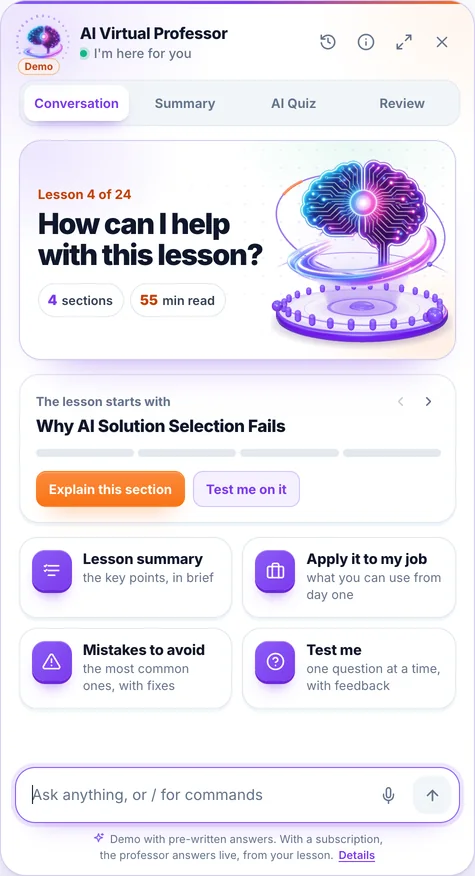
The demo opens on a lesson from the course “AI for Business Leaders”, with prepared answers; voice is off in the demo.
It is an artificial intelligence system, not a human teacher; its answers may contain errors. Details in the Terms & Conditions.
By 2026, artificial intelligence has moved from novelty to normal inside the legal profession. It drafts the first version of a clause, summarizes a 200-page deposition transcript, surfaces relevant authorities, and turns a messy folder of documents into a structured review set. Used well, it gives lawyers back hours every week. Used carelessly, it has already produced real, sanctionable disasters — briefs citing cases that never existed, confidential client data pasted into public tools, and clients relying on outputs no competent lawyer would have signed.
This course is written for licensed legal professionals — practising lawyers, in-house counsel, paralegals working under supervision, and legal operations teams. It is not legal advice, and it is not a substitute for your bar or jurisdiction's rules of professional conduct. It is a practical, responsibility-first guide to using AI so that it makes you faster without putting your clients, your license, or your firm at risk. Its practical base is Claude for Legal, Anthropic's offering for legal teams: ready-to-use legal artifacts, practice-area plugins, tracked-change review in Word and connectors to legal sources. Module 0 teaches you to configure it for privileged work, use it on typical matters and verify every output against authoritative sources.
Read this first. Everything in this course is educational content for professionals. It is not legal advice, and nothing here overrides your duties under your bar association, your jurisdiction's rules of professional conduct, or applicable law. When AI and your professional obligations appear to conflict, your professional obligations win — every time.
Claude for Legal: the practical base of this course
The official page, claude.com/solutions/legal, presents the offering through a few concrete components, which you work through in lessons 5–8 of this module:
- Ready-to-use legal artifacts: Tabular review (one row per agreement, every answer linked to the exact passage), Playbook deviation board (clauses marked standard, fallback, deviation or missing), Cite check, Matter board, Regulatory horizon scan, Jurisdiction survey matrix and Legal intake.
- Legal plugins by practice area — commercial, corporate, privacy, AI governance, litigation, IP — that learn your playbook through a setup interview.
- Claude in Word and Outlook: redlining with tracked changes, document comparison, email drafts that wait for you to send them.
- Connectors to document management, contract and legal research systems through the open Model Context Protocol.
- Configuration for privileged work: on Team and Enterprise plans, Anthropic does not train on your content by default, and Enterprise admins set how long it is retained.
What we do not promise: Claude for Legal is not a database of your jurisdiction's current law and it does not replace the lawyer. Every output is a draft you verify. That is why the course pairs the tool with authoritative sources and with your professional duties.
By the end of the Claude for Legal block you will have: a firm account configured on commercial terms, a project with instructions for your jurisdiction, your first Tabular review and playbook comparison run on test documents, a practice profile written for your governing law, the Word review workflow, and a 30-day rollout plan with an internal AI use policy.
The one sentence that governs this whole course
AI assists. The lawyer verifies, supervises, and remains responsible.
Every prompt, workflow, and tool in the modules that follow hangs off that sentence. AI is a capable junior assistant that never gets tired — and one that will, with total confidence, hand you a fabricated case citation. Your job is not to trust it. Your job is to use it and then check it, exactly as you would check the work of a first-week trainee whose output you are about to put your name on.
Pick up exactly where you left off
Pick the option that fits you; your account is created at checkout in under a minute:
What's next in this lesson
- Why models behave this way: the sixty-second technical foundation
- Where AI genuinely helps a legal practice
- What AI must never do in legal work
- Why the stakes are uniquely high in law
- The 2026 model and tool landscape, briefly
- A first safe prompt you can use today
- Worked micro-scenario: the same task done two ways
- The four-question gate before you point AI at any task
Everything you'll learn in this course
1 Module 0 — AI in Legal Practice and Claude for Legal: The 2026 Landscape and the Rules That Govern It 8 lessons
- What Lawyers Need to Know About AI in 2026 Reading now 50 min
- The Legal-Tech AI Stack in 2026 50 min
- Professional Responsibility When You Use AI 50 min
- Prompt Engineering for Legal Work: Instructions, Context and Guardrails 50 min
- Claude for Legal: What It Is, What It Includes and How to Configure It for Privileged Work 50 min
- Claude Legal Artifacts in Practice: Tabular Review, Playbook Deviations, Cite Check and Matter Boards 50 min
- Claude for Legal Plugins and Claude in Word: Practice Profiles, Tracked Changes and Outlook 50 min
- Connectors, Verifiable Research and a 30-Day Claude for Legal Rollout 50 min
2 Module 1 — Legal Research with AI: Speed With Mandatory Verification 3 lessons
- AI-Assisted Legal Research: Where It Helps and Where It Bites 50 min
- The Citation Verification Protocol: Because AI Hallucinates Cases 50 min
- Choosing and Using Legal Research Tools Responsibly 50 min
3 Module 2 — Contract Review and Analysis with AI 2 lessons
- Reviewing Contracts with AI: Extraction, Playbooks and Risk Flags 50 min
- From AI Flags to Legal Judgment: The Review Workflow 50 min
4 Module 3 — Contract Drafting with AI 2 lessons
- Drafting Contracts and Clauses with AI 50 min
- Redlining, Negotiation Support and Version Control with AI 50 min
5 Module 4 — Due Diligence, Document Review and eDiscovery 3 lessons
- AI in Due Diligence and Large-Scale Document Review 50 min
- eDiscovery and Technology-Assisted Review 50 min
- Internal Investigations and Regulatory Responses with AI 50 min
6 Module 5 — Summarization and Extraction from Legal Documents 2 lessons
- Summarizing Legal Documents Accurately 50 min
- Extracting Structured Data from Legal Documents 50 min
7 Module 6 — Legal Writing with AI: Memos, Briefs and Client Communication 2 lessons
- Drafting Memos and Briefs with AI 50 min
- Client-Facing and Plain-Language Legal Writing 50 min
8 Module 7 — Client Intake, Communication and Practice Management 3 lessons
- Client Intake and Communication with AI 50 min
- Practice Management and Productivity with AI 50 min
- Knowledge Management with AI: Precedent Banks, Clause Libraries and Internal Search 50 min
9 Module 8 — AI Across Practice Areas 4 lessons
- AI in Corporate and Transactional Practice 50 min
- AI in Litigation and Dispute Resolution 50 min
- AI in IP and Other Practice Areas 50 min
- AI for In-House Counsel and Legal Operations 50 min
10 Module 9 — Guardrails, Ethics, Compliance and Choosing Tools 4 lessons
- Confidentiality, Privilege and Data Protection in Practice 50 min
- UPL, Professional Responsibility and the EU AI Act 50 min
- Choosing Legal-Tech Tools and Building an AI Use Policy 50 min
- Rolling Out AI in a Legal Team: Pilots, Training and Change Management 50 min
11 Final Quiz — AI for Legal Professionals 1 lessons
- Final Assessment: Using AI Responsibly in Legal Practice 25 min
Everything you need to learn effectively
Interactive quizzes
Check your knowledge at the end of every lesson with scored quizzes and feedback.
Personal notes
Save notes on every lesson, accessible anytime from your dashboard.
Scheduled reviews
Revisit lessons exactly when it matters, at the right intervals — so you remember for the long term.
Progress & Achievements
Track your progress, unlock achievements, and visualize what you've learned.
Bookmarks
Save the lessons that matter and find them instantly when you need them.
Questions & Answers
Ask questions right on the lesson and get answers from our team.
Good to know before you start
How do I get access to the course?
You can read the beginning of the first lesson for free, right on this page. For the course you create an account, pick how many courses you want each month — from 1 course to the full catalog — and get access immediately after your payment is confirmed. Everything happens 100% online.
Can I stop my subscription anytime?
Yes. You stop the renewal straight from your account, in just a few clicks. Your access stays active until the end of the period you have already paid for.
What does the subscription for this course include?
All 34 lessons in the course, interactive quizzes, the AI Professor built into every lesson (select a passage and choose “Explain this to me”), within a fair-use limit, personal notes, automatically saved progress, and content updates included.
Is there a fixed learning schedule?
No. You learn at your own pace, on any device. Lessons are structured step by step, and the platform saves your progress automatically, so you can pick up right where you left off — anytime.
Ready to unlock all the content?
Just this course — €99 / month, VAT included — or 3 courses with this one included — €199 / month, VAT included. You can change your courses at every renewal, and the AI Professor is included in your subscription.