How teachers can use AI is no longer a question about whether students will use it; they already do. The useful question is where AI genuinely gives a teacher time back (planning, materials, differentiation, feedback drafts) and where it must not be trusted (grades, placement, accusations of cheating, anything involving a child's personal data). This guide is a practical workflow for both sides of that line, written for teachers, lecturers and school leaders, with the EU AI Act dates that apply to education checked against the official text.
How teachers can use AI: draft, never decide
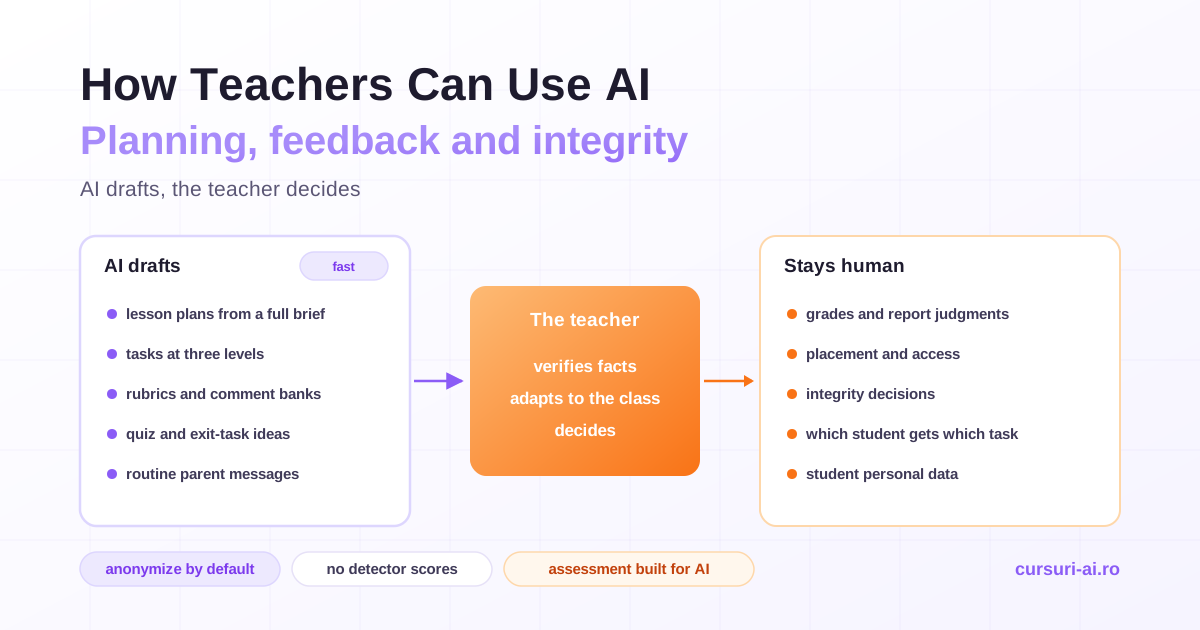
One rule organizes everything in this article: AI drafts, the teacher decides. A model can produce a first version of a lesson plan, a worksheet at three reading levels, a rubric, a bank of feedback comments or a newsletter to parents in seconds. It cannot know your class, it does not know whether a fact it states is true, and it carries the biases of the text it was trained on. So the teacher's professional work moves from writing every first draft to checking, adapting and owning what goes in front of students.
Three habits make that work safely:
- No student data by default. Almost every teaching task can be done without a single name, grade or note about a child. Write prompts about "a student who finds long texts difficult", not about a named pupil.
- Verify everything that reaches a student. Facts, dates, quotations, reading levels and every link. Models still invent sources and plausible details, and a confident mistake in a worksheet becomes thirty mistakes in thirty notebooks.
- Keep consequential judgments human. Grades, progression, placement, access to programs and any accusation of misconduct are decisions about a specific child. AI can inform them; it should never make them.
The rest of this guide applies those habits to the main parts of the job. They are also the frame of AI for Educators and Teachers, which works through planning, materials, differentiation, assessment, inclusion and compliance one lesson at a time.
Lesson planning: from brief to plan in minutes
AI is good at lesson-plan drafts because a plan has a predictable structure. What makes the draft useful is the brief you give it. A vague prompt ("make a lesson on fractions") gets a generic, overstuffed plan pitched at no one in particular. A full brief gets something you can teach after ten minutes of editing.
Act as an experienced primary teacher. Draft a 50-minute lesson plan.

Class: 28 students, age 9-10, mixed attainment; 4 are learning English.
Topic: the water cycle (evaporation, condensation, precipitation).
Prior knowledge: they know what a liquid and a gas are.
Objective: students can explain each stage in their own words
and sequence the stages correctly.

Include: a 5-minute hook, chunked direct instruction, guided practice,
independent practice, two checks for understanding DURING the lesson,
support and stretch notes, and a 5-minute exit task.
Give timings for each phase. Do not cite websites or external
resources; I will choose my own.
Then edit with a checklist rather than a gut feeling:
- One objective, observable. If the plan has three vague objectives, cut to one.
- Timings that fit reality. Models pack in more than a lesson can hold. Leave slack for transitions.
- Checks during the lesson, not only an end quiz, so you find out in time who has not understood.
- Every fact verified, every resource opened. Never send students to a link you have not visited yourself.
- Reading level and examples that fit your class. State the age explicitly in the prompt and swap analogies that some students will not recognize.
- What only you know. The student who struggled last week, the assembly that eats ten minutes, the misconception you saw in the last test.
Often you do not need a fresh plan at all. Paste a plan you already have and ask for something narrow: three alternative hooks, a more active practice phase, the same lesson re-pitched for an older class, or a re-timed version for a 35-minute slot. Narrow requests produce better output than "improve this", and the general principles of writing such prompts are covered in Prompt Engineering: From Beginner to Pro.
Differentiation without lowering expectations
Differentiation is where AI saves the most time, because producing three versions of the same task used to mean three evenings. The rule that keeps it honest: change the access, not the thinking. Every version should work toward the same objective.
A tiered-task prompt that respects that rule:
Here is a task for age 12-13: "Explain how the main character
changes across the story, using evidence from the text."

Write three versions that all keep this objective:
1. Support: same task, plus a sentence starter, a word bank
   and one worked example sentence. Do not simplify the question.
2. Core: the task as written, with a short success checklist.
3. Stretch: same task, plus a second question that asks students
   to evaluate whether the change is convincing, not more questions.
Notice what the support version does not do: it does not turn "explain the change" into "match the character to a feeling", which would remove the thinking. And the stretch version deepens the task instead of adding volume.
AI can also vary interest and format: the same ratio problems set in a football, cooking or music context so students can choose one, or the same content as a text, a diagram and a short scripted explanation. For multilingual learners, first-draft glossaries and simplified versions of a text are a real help, as long as a person who knows the language checks them.
Diagnosis stays human. Deciding which student gets which version is a professional judgment based on what you know about that child that week. Do not paste attainment data into a general AI tool to have it sort students into levels: that is both a privacy problem and a fairness problem, and grouping should stay flexible so that a student who flies in one lesson can move up in the next.
Feedback at scale, with the grade staying yours
Feedback is where many teachers lose their evenings, and where the line between "draft" and "decide" matters most.
| Task | What AI may do | What stays with the teacher |
|---|---|---|
| Objective items (multiple choice, exact answers) | Score against a key you have verified | Checking the key, handling disputes |
| Applying a rubric to an essay | Suggest a level with reasons, on de-identified work in an approved tool | Reading the work, deciding the mark |
| Comment language | Draft and polish comment banks | Selecting, personalizing, verifying |
| Final grade or report judgment | Nothing | Entirely the teacher's |
| Placement, progression, access | Nothing | Teacher and school, through a proper process |
Three workflows give you most of the benefit with little risk:
- Comment banks with no student data. Ask for "ten specific, actionable comments for a persuasive essay where the evidence does not support the claim", then choose and personalize them in your school system. No student text leaves your hands.
- De-identified rubric feedback in an approved tool. Remove names and identifying details, paste the rubric and the work, and ask for the two or three changes that would most improve it. Instruct the model to prioritize; left alone it will produce forty margin notes.
- Feedback on the process. Use AI to draft questions for students' reflections on their own drafts. Students then do the thinking, and you read the reflection.
"Human in the loop" must mean real judgment, not a click. If you accept every suggested mark without reading the work, the AI is grading and you are signing. A practical check is to mark a small sample yourself first, compare it with the AI's suggestions, and resolve every disagreement yourself until you understand where the model drifts. Watch especially for marks that track length, vocabulary or dialect rather than quality: those biases fall hardest on students who already face barriers.
Assessment design that survives AI
Any take-home task whose output is a finished text can now be produced by a model. Banning the tools does not change that, and surveillance damages the trust that honest work depends on. What works is redesigning assessment so that AI can assist but cannot replace the student's thinking.
- Assess the process, not only the product. Outlines, drafts, annotated sources and a short reflection on what changed between versions.
- Add an in-class or oral component. A five-minute conversation about a submitted essay reveals more than any tool. A student who did the thinking can explain it.
- Anchor tasks in the local and the personal. A class experiment, a local issue, a text discussed in the lesson, the student's own data.
- Ask for higher-order work. Evaluating, comparing, justifying a choice and applying an idea to a new case are harder to outsource than summarizing.
- Make AI the object of the task. Give students an AI-generated answer and ask them to find its errors, check its sources and improve it. This teaches AI literacy and subject knowledge at once.
Then make the rules explicit. A simple traffic-light framework, stated on every assignment, removes most of the confusion behind what gets labeled cheating:
| Zone | Meaning | Examples |
|---|---|---|
| Green | AI allowed, no disclosure needed | Spelling and grammar checks |
| Amber | AI allowed, with a short disclosure of how it was used | Explaining a concept, outlining, feedback on a draft |
| Red | AI not allowed | Generating text or analysis submitted as the student's own |
Normalize disclosure. When honest AI use is safe to declare ("I used a chatbot to check my outline and changed the order of my arguments"), hiding it becomes the exception.
Academic integrity without AI detectors
The tempting shortcut is an AI-writing detector: paste an essay, get a percentage. The evidence says do not base an integrity decision on one.
- The tools are unreliable in both directions. They flag human writing as AI (false positives) and miss AI text that has been lightly edited (false negatives). OpenAI withdrew its own AI text classifier with a note that read: "As of July 20, 2023, the AI classifier is no longer available due to its low rate of accuracy."
- They are biased against some of your students. In a study published in the journal Patterns, researchers tested several widely used GPT detectors on essays by native and non-native English writers and found that the detectors "consistently misclassify non-native English writing samples as AI-generated"; the authors caution against using them in evaluative or educational settings.
- A student cannot prove a negative. There is no way to show that you wrote something "from your own head", so an accusation built on a score is almost impossible to answer.
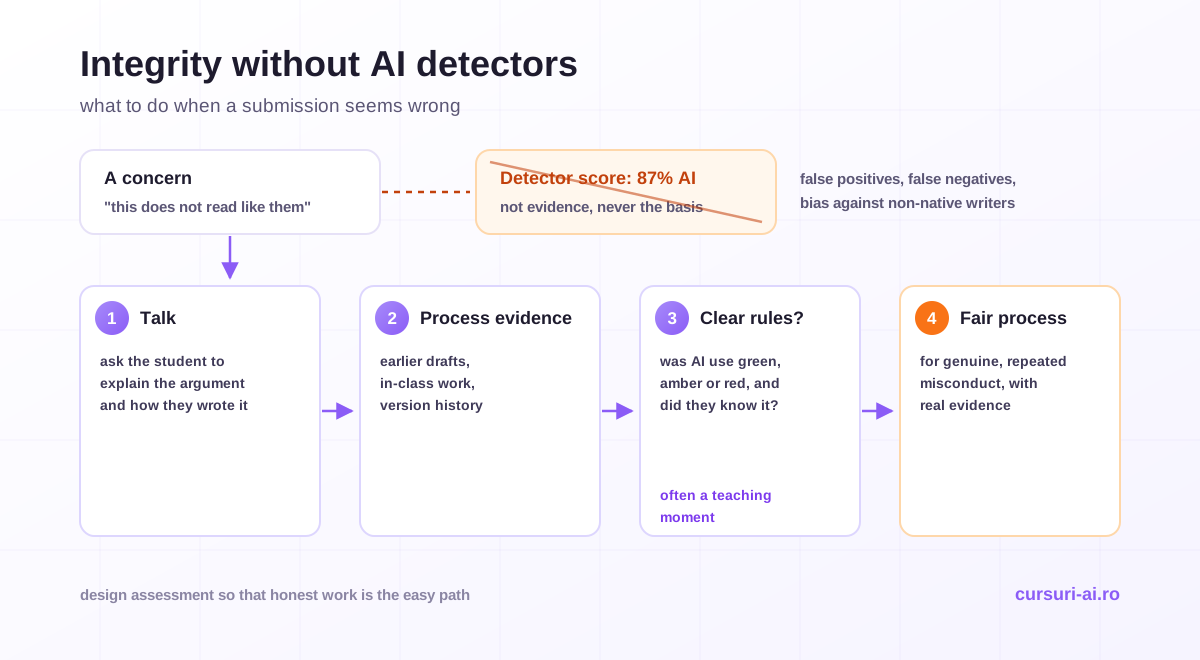
What to do instead, when a piece of work seems wrong:
- Talk to the student. Ask them to explain their argument, walk through how they wrote it, or expand on two points. This is fairer and far more informative than any tool.
- Look at process evidence you legitimately have: earlier drafts, in-class work, version history.
- Check whether the rules were clear. Many first cases are confusion, not dishonesty, and are better handled as teaching moments where your policy allows.
- Use your institution's integrity process for genuine, repeated misconduct, with real evidence and fair procedure.
Tell students openly that you do not use detector scores to accuse anyone. It builds trust, and it shifts the conversation from "will I get caught" to "what is allowed and why".
Student data protection: anonymize by default
Teachers hold a concentration of sensitive data about people who mostly cannot consent for themselves: names, grades, attendance, behavior notes, health and special educational needs, family circumstances. In the EU, the GDPR governs all of it. A few provisions are worth knowing by heart:
- Data minimization (Article 5(1)(c)): personal data must be "adequate, relevant and limited to what is necessary". If the prompt does not need the child's name, leave it out.
- Children merit specific protection (Recital 38), "as they may be less aware of the risks, consequences and safeguards concerned".
- Age of consent for online services (Article 8): where an online service relies on a child's consent, the child must be at least 16, unless a member state has set a lower age, which cannot be below 13. Below that age, a parent must give or authorize consent. Separately, AI tools set their own minimum ages in their terms; check them before any student uses a tool.
- Solely automated decisions (Article 22): people have the right not to be subject to a decision "based solely on automated processing" that significantly affects them, which is one more reason grades and placement stay human.
- Data protection impact assessments (Article 35) may be required before a school adopts a tool that processes student data at scale. That is the institution's job, as data controller, not the individual teacher's.
The practical rule is a sensitivity ladder:
| Sensitivity | Examples | Rule with AI |
|---|---|---|
| Non-personal | Curriculum topics, generic tasks | Any suitable tool |
| Personal | Names with grades, attendance, class lists | Only tools your school has approved, under its policy |
| Special category and other sensitive data | Health and disability, special educational needs, ethnicity, religion | Never in general AI tools |
| Safeguarding | Any sign a child may be at risk | Your safeguarding process only, never AI |
The difference in practice is one sentence. Unsafe: "Write feedback for [full name], who has ADHD and scored 4/10 on fractions and is struggling at home." Safe: "Write three encouraging, specific feedback comments for a student who finds fractions difficult and needs to check their working." Same time saved; no child's data in a third party's system.
The EU AI Act and education: what applies and when
The EU's Artificial Intelligence Act, Regulation (EU) 2024/1689, treats several education uses as high-risk, because they can shape a person's educational path. Annex III, point 3 lists AI systems intended to be used to:
- "determine access or admission or to assign natural persons to educational and vocational training institutions at all levels";
- "evaluate learning outcomes, including when those outcomes are used to steer the learning process";
- assess "the appropriate level of education that an individual will receive or will be able to access";
- monitor and detect "prohibited behaviour of students during tests".
The dates, as they stand on 31 October 2026, according to the European Commission's AI Act page:
| What | Applies from |
|---|---|
| Entry into force | 1 August 2024 |
| Prohibited practices and AI literacy | 2 February 2025 |
| Transparency rules (Article 50), such as telling people they are interacting with an AI system | 2 August 2026 |
| High-risk rules for Annex III uses, including education | 2 December 2027 |
The 2 December 2027 date comes from the AI Omnibus, Regulation (EU) 2026/1744, which entered into force on 27 July 2026 and postponed the Annex III high-risk obligations.
Two other provisions matter to schools today:
- Emotion recognition is already prohibited in education institutions. Article 5(1)(f) bans AI systems that "infer emotions of a natural person in the areas of workplace and education institutions", except for medical or safety reasons. A tool that claims to infer students' emotions, for example from their faces or voices, falls into this category unless it serves a medical or safety purpose.
- AI literacy. As amended by the AI Omnibus, Article 4 requires providers and deployers to "take measures to support the development of AI literacy" of staff using AI systems on their behalf, and states that this "does not require providers or deployers to guarantee any specific level of AI literacy of any individual". A school that deploys AI tools should plan training for the staff who use them.
Schools and teachers are almost always deployers (they use tools others built), not providers. The heaviest obligations fall on the vendors, but the logic of the law is the same as good practice: meaningful human oversight of any decision about a learner. For a wider view of roles and obligations beyond schools, see our EU AI Act compliance guide for businesses.
Outside the EU, the legal framework is different, but the classroom practices in this guide (anonymize, verify, keep decisions human, design assessment for AI) hold everywhere.
This section is general information, not legal advice. Your institution's data protection officer and legal team decide how the GDPR and the AI Act apply to the tools you use.
Teaching students to use AI well
Students need the same habits you do. Short, age-appropriate lessons go a long way: ask a chatbot a question in your subject and check its answer against the textbook; compare two AI answers to the same question; find who is missing from an AI-generated list of "famous scientists"; rewrite an AI paragraph so it says something the student actually thinks. The goal is not to make students fluent in a particular tool but to make them skeptical, careful users who know when not to use one.
The same skills apply in higher education, where literature reviews, research synthesis and academic writing raise their own integrity questions; AI for Research and Academia covers that side. And for the administrative load around teaching (emails to parents, meeting notes, newsletters, reports), the general-purpose workflows in The AI Productivity Masterclass for Knowledge Workers apply directly, with the same rule about student data.
A weekly workflow that sticks
- Monday planning (30 minutes): draft the week's lesson plans from full briefs; verify facts and timings; add what only you know.
- Materials (20 minutes): generate tiered versions of the two most demanding tasks; check that support keeps the thinking.
- Feedback (as needed): use comment banks and de-identified rubric feedback in approved tools; decide every mark yourself.
- Assessment design (once per unit): add a process artifact or an oral check to each major task; state the traffic-light rule on the assignment.
- Monthly review: what saved time, what produced errors you had to fix, and which prompts are worth keeping in a shared library with colleagues.
The hard part is not finding a tool. It is building the judgment to use AI fast without letting it decide anything about a child, and that judgment is what AI for Educators and Teachers is built to develop.
Sources
- Regulation (EU) 2024/1689 (Artificial Intelligence Act), EUR-Lex
- European Commission, AI Act: regulatory framework and application timeline
- AI Act Service Desk, Article 4: AI literacy (as amended)
- Regulation (EU) 2016/679 (GDPR), EUR-Lex
- Liang, Yuksekgonul, Mao, Wu and Zou, GPT detectors are biased against non-native English writers, Patterns, 2023
Frequently Asked Questions (FAQ)
How can teachers use AI to save time? The biggest time savings come from drafting: lesson plans from a detailed brief, worksheets and texts at several reading levels, rubrics, banks of feedback comments and routine messages to parents. In every case the teacher verifies facts and links, adapts the draft to the class, and keeps decisions about individual students.
Can AI grade student work? AI can score objective items against a key you have checked, and it can suggest a rubric level with reasons on de-identified work in a tool your school has approved. The grade itself should stay with the teacher. Under the EU AI Act, systems intended to evaluate learning outcomes are classed as high-risk, and the GDPR gives people rights around decisions based solely on automated processing.
Should teachers use AI detectors to check for cheating? Not as evidence. AI-writing detectors produce false positives and false negatives, OpenAI withdrew its own classifier for low accuracy, and research published in Patterns found detectors consistently misclassify writing by non-native English speakers as AI-generated. Use assessment design, clear rules, process evidence and a conversation with the student instead.
Is it safe to put student information into ChatGPT or other AI tools? Default to no student data at all; most teaching tasks do not need it. Where personal data is genuinely needed, use only tools your institution has approved under its data protection policy. Never enter health, special educational needs or safeguarding information into a general AI tool.
When do the EU AI Act rules for education apply? The ban on emotion recognition in education institutions has applied since 2 February 2025, and the transparency rules since 2 August 2026. The high-risk obligations for education uses listed in Annex III, such as admission, evaluating learning outcomes and proctoring, apply from 2 December 2027, after the AI Omnibus postponed them. This is general information, not legal advice.
Conclusion
Teachers can use AI to win back real time, as long as the line between drafting and deciding stays clear. Use it for lesson-plan drafts from full briefs, tiered materials that change access but not thinking, comment banks and de-identified feedback, and assessment ideas that put process and conversation at the center. Keep grades, placement and integrity decisions human, and never build an accusation on a detector score. Anonymize by default, use approved tools when data is genuinely needed, and know the EU AI Act dates that apply to education: emotion recognition banned since February 2025, transparency rules since 2 August 2026, and high-risk obligations for education uses from 2 December 2027.

The course that continues this article
AI for Educators and Teachers
You have read the theory. In the course you put it into practice: written lessons structured in modules, with examples and exercises, quizzes, the AI Professor in every lesson and progress saved automatically. Once you complete the lessons and reach the minimum quiz score, you get the Certificate of Completion, a private attestation.
From the course syllabus
- Module 0 — AI in Education: The 2026 Landscape
- Module 1 — Lesson Planning and Curriculum with AI
- Module 2 — Creating Teaching Materials and Resources
- Module 3 — Differentiation and Personalized Learning
+ 6 more modules in the full syllabus
€99 per month for this course, VAT included · or pick it in a subscription of 3, 5 or 10 courses, from €199 per month, together with other Business courses; you can change them at every renewal (see what you learn across the whole track).
Monthly subscription with automatic renewal · stop the renewal anytime from your account · digital content with immediate access, see the withdrawal conditions. The certificate confirms that you completed the course and is private: it is not a diploma or a state-recognised qualification.