Most AI image prompts fail for the same reason weak creative briefs fail: they describe a mood and leave every decision that matters to someone else. The bottleneck is rarely the model; it is a prompt that never says what the image is for, where the subject sits, where the light comes from or which words must appear. This guide gives you a reusable prompt anatomy, shows how to adapt it to the main model families, and covers the iteration loop, campaign consistency and the rules on rights and labelling that apply before anything is published.
Why generic prompts produce generic images
An image model makes dozens of decisions per picture: the subject's age and clothing, camera distance, lens, light, palette. Whatever your prompt leaves open, it fills with the most likely choice. That is why "a woman drinking coffee in a cafe" returns the same centred, eye-level, softly lit picture everyone else gets. You did not get a bad image; you got the average one.
Giant prompt lists encode somebody else's decisions for somebody else's brief. A structure that forces you to decide works better. The vendors' documentation converges on this: OpenAI's image prompting guide opens with "Start with the image you need, then describe the subject, composition, style, and constraints." Google tells you to be hyper-specific and to explain the purpose of the image. Black Forest Labs recommends naming only what is visible and dropping words like "beautiful" or "masterpiece" that point at nothing in the frame.
The anatomy of a reusable image prompt
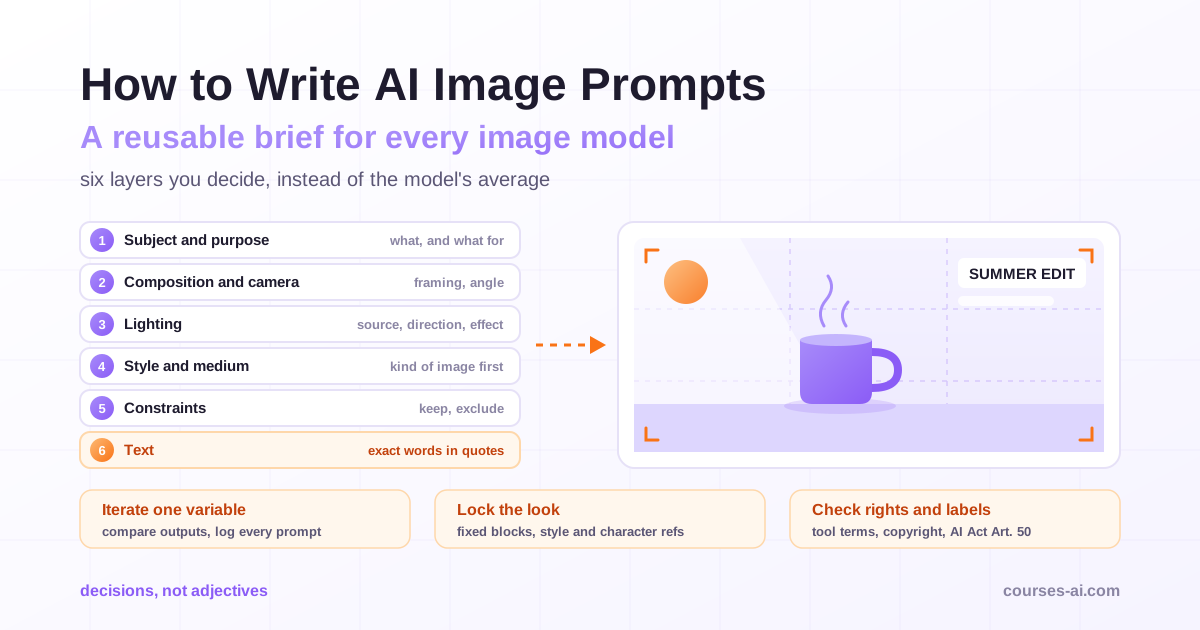
Think of a prompt as six layers. You will not always need all six, but know which ones you leave to the model.
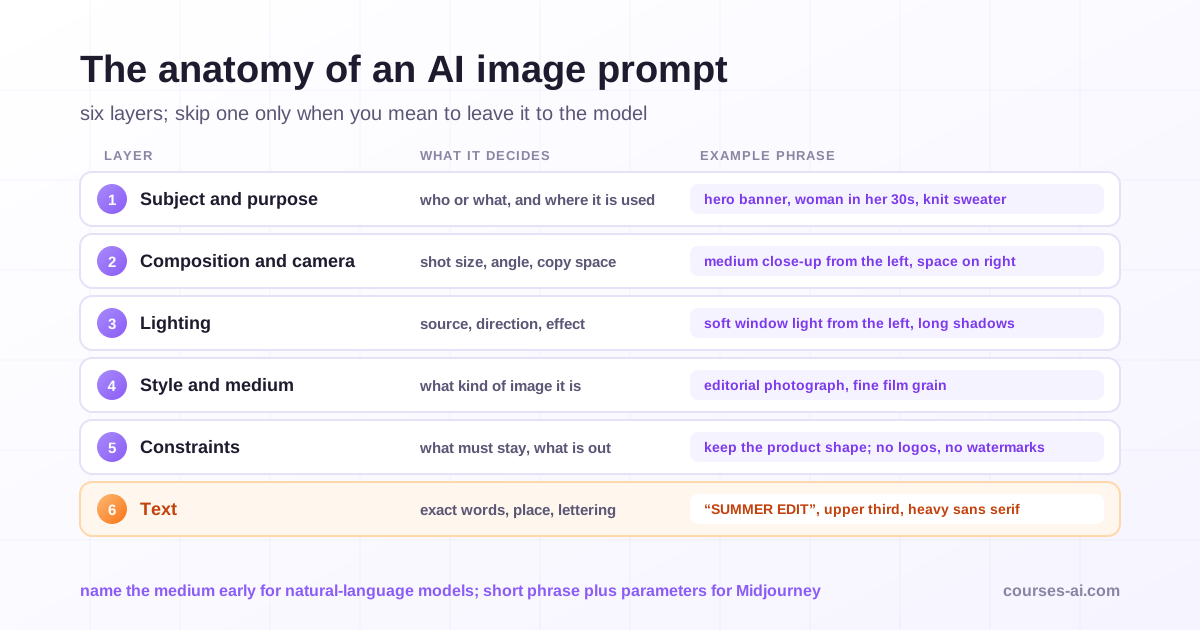
Building these layers into a reusable brief, then turning a brand book into style references and a quality checklist for commercial images, is covered step by step in AI Image Generation.
1. Subject and purpose
Start with what the image is for, then who or what is in it. "Hero banner for a skincare launch page, with space on the right for a headline" tells the model more than any adjective; Google's own example is that a logo "for a high-end, minimalist skincare brand" beats just a logo. Then make the subject specific. For people, OpenAI advises describing body framing, gaze and interaction with objects, such as "full body visible, feet included".
2. Composition and camera
Decide the shot size, camera height and angle, where the subject sits and how much empty space you need for copy. Photographic language works across tools: "wide-angle shot", "macro shot" and "low-angle perspective" are Google's examples. Treat lens and camera names as cues for a look, not physics the model will simulate, as OpenAI's guide notes. Set the aspect ratio with the tool's own setting where one exists, so the composition is built for the final crop.
3. Lighting
Lighting does more for perceived quality than any style word. Name the source, direction and quality, and describe the effect: "soft overcast daylight from a window on the left, long shadows across the table". The FLUX guide's annotated examples describe both the light and what it does to the scene.
4. Style and medium
Say what kind of image it is before you decorate it: editorial photograph, flat vector illustration, watercolour, 3D render, technical diagram. Black Forest Labs notes that its own detailed captions put medium and style first, then subjects and positions, then light, colour and background. Describe the traits of a look (grain, line weight, saturation, texture) rather than naming a living artist: you get a style you can own and repeat.
5. Constraints
Constraints are what must be true for the image to be usable: exact brand colours, the product's real shape, no visible logos, copy space in a specific area. FLUX documentation supports hex codes for target colours. For edits, constraints become a preservation list.
6. Text
Words that must appear in the image are a layer of their own: exact wording, position and typography, covered in a dedicated section below.
How prompting differs between model families
The six layers are the same everywhere; the dialect is not. Three broad families behave differently enough that one prompt rarely suits all of them.
Natural-language models: describe the picture like a brief to a photographer
OpenAI's GPT Image models, Google's Gemini image models (marketed as Nano Banana) and Black Forest Labs' FLUX 3 Image read full sentences and understand relationships. The FLUX guide: "Use sentences to explain relationships: who holds what, what stands behind what, and where the light comes from." OpenAI says short prompts, paragraphs, JSON-like structures and tags "can all express the same intent", and suggests labelled sections for scene, subject, details and constraints in complex requests.
Some tools rewrite your prompt first. FLUX 3 Image expands a short prompt into a detailed description, so write more only for details you want to control. Ideogram's Magic Prompt does something similar and can be switched off when your exact wording matters.
Short prompts plus parameters: Midjourney
Midjourney's documentation takes the opposite line: short, simple prompts typically work best, and long lists of instructions can confuse it. It recommends precise words ("enormous" rather than "big") and exact numbers. Control lives in parameters and references: --no for exclusions, --sref for style references, --seed for the starting noise.
The principles of text prompting, such as stating the goal and the constraints, transfer to images; the syntax does not. For the text side, see Prompt Engineering in 2026: From Beginner to Pro.
Editing and reference-image workflows
Much image work is now instructions about images you already have, and the prompt becomes a change plus a list of what must not change. OpenAI's guide says "Separate changes from constraints": write "change only X" and list what to preserve, such as identity, geometry, layout or lighting. With several images, give each a role: OpenAI says to "Identify each input by number and purpose", and FLUX 3 Image, which accepts up to ten references, asks you to call them "image 1", "image 2" and so on. Gemini lets you name the region to edit in plain words, which Google calls semantic masking.
Negative prompts: use the tool's mechanism, not wishful wording
Writing "no cars" inside a descriptive prompt can backfire: you have just put cars into the description. Midjourney's documentation warns that a party prompt saying "no cake" may still produce a cake. Each family handles exclusions differently:
| Model family | Where exclusions go |
|---|---|
| Gemini image models | Describe the scene you want positively. Google's example: instead of "no cars", write "an empty, deserted street with no signs of traffic". |
| Midjourney | The --no parameter, not a sentence in the prompt. |
| FLUX 3 Image | There is no negative prompt field; the prompt carries everything you want to control. |
| GPT Image | Plain-language exclusions at the end of the prompt, such as "No extra text, no watermarks, no unrelated logos." |
The habit that works everywhere: describe what you want ("a bare white wall") before what you do not ("no posters").
Text in AI images: quote it, place it, keep it short
Headlines, packaging mock-ups and simple posters are now realistic tasks, but text still fails in predictable ways. The vendors agree on how to reduce them:
- Quote the exact words. OpenAI, FLUX and Ideogram all ask for the wording in quotation marks, separating the words to print from the description.
- Say where and how. Give a position ("top third, centred") and a type description: weight, case, colour, alignment. Ideogram advises describing the letters rather than relying on a font name.
- Mention it early and keep it short. Ideogram notes that text named near the start comes out more reliably, and every extra word raises the odds of a typo.
- Spell unusual words. OpenAI suggests spelling brand names letter by letter when needed and asking for no extra text.
- Write the copy first. Google says Gemini works best if you first generate the text, then ask for an image with it.
Then proofread at full size, letter by letter. Prices, offer terms, claims and small print belong in your design tool, set on top of the generated image: a misspelled headline is embarrassing, a misrendered price can be a compliance problem.
The iteration loop: one change at a time
A usable image comes from a disciplined loop, not a perfect first prompt.
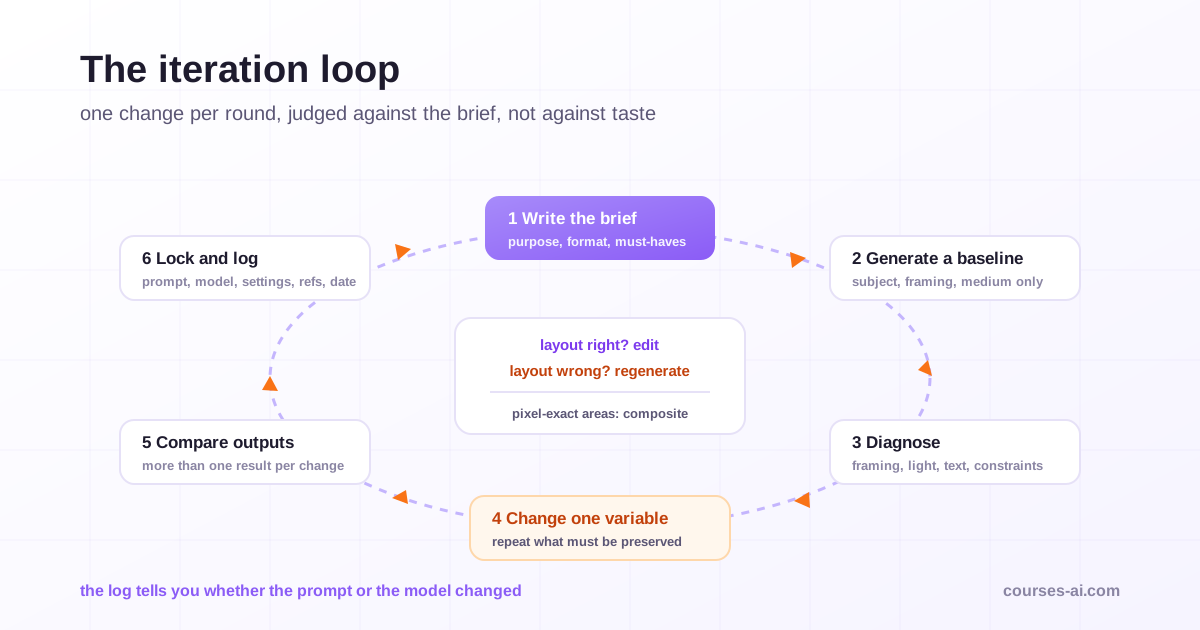
- Write the brief. Purpose, format and the three things the image must get right.
- Generate a simple baseline: subject, composition and medium only, to see what the model assumes.
- Diagnose against the brief, not taste: framing, light, subject, text, constraints.
- Change one variable. Black Forest Labs: "Adjust one important detail at a time". OpenAI: pass the previous output back as the next edit input, request one change and repeat the details to preserve.
- Compare several outputs. FLUX 3 Image has no seed field, so its guide says to look at more than one result before deciding a change did not help. Midjourney offers
--seed, but warns that seeds should not be relied on for identical results across sessions. - Lock and log the prompt, tool, model, settings, references and date next to the approved file.
Two rules keep the loop short. If the composition is right, edit; if it is wrong, regenerate, because no edit rescues a bad layout. And if part of an image must stay pixel-identical, composite the approved edit into the original, as OpenAI recommends, because repeated edits can drift. Gemini's documentation recommends multi-turn conversation for iterating, which suits the loop: one message, one change.
Models are replaced every few months, and OpenAI's guide tells teams to save a baseline of prompts, references and outputs before testing a newer one. Without a log, you cannot tell whether your prompt or the model changed the result.
Consistency across a campaign
Lock the brief, vary one slot
Write the campaign prompt as fixed blocks and one variable slot. Style, lighting, palette, framing rules and exclusions stay identical, word for word; only the subject and scene change. Rephrasing the style block "a bit" for each image is how campaigns drift.
Style references
Midjourney's --sref takes a style reference image or a style code, with --sw setting its weight. Ideogram accepts style reference images, Gemini's Pro image model has dedicated style reference slots, and OpenAI's guide shows how to transfer a style from a reference image. Choose two or three approved images and reuse the same set every time.
Character and product references
For a recurring person, mascot or product, write a character sheet: one descriptor paragraph covering face, hair, build, outfit and colours, reused verbatim, plus reference images where the tool supports them. OpenAI recommends a reusable character reference, then changing the environment and story "while repeating the character's defining details". Gemini's current image models accept several character images. For products, pass the real product photograph and state that its shape, label and proportions must not change. Product photography, generated models and the disclosure that comes with them are treated for retail teams in AI for E-commerce and Retail.
A reference library with an owner
Keep approved references, fixed prompt blocks, brand hex codes and the prompt log in one shared place, with one person approving changes. How visuals fit into the wider campaign workflow is covered in our AI for digital marketing guide.
Before and after: prompt rewrites
These rewrites are illustrative, written for this guide. Each adds decisions, not adjectives.
| Before | After | What changed |
|---|---|---|
| a woman drinking coffee in a cafe, beautiful, 8k | Editorial lifestyle photograph for a coffee brand's social feed, 4:5. A woman in her thirties, short curly hair, cream knit sweater, holds a ceramic cup in both hands by a rain-streaked window. Medium close-up from her left, shallow depth of field. Soft overcast window light. Muted cream, brown and deep green. No visible logos or text. | Purpose, format, subject, framing, light, palette, exclusions; no filler |
| product photo of headphones, white background | Studio product photograph of the headphones in image 1, three-quarter view from the left, centred with generous margins on seamless white. Large soft key light from the upper left, a gentle contact shadow. Keep the exact shape, colour and markings of image 1. | Real product as reference, angle, lighting, preservation constraint |
| poster that says summer sale | Flat vector poster, 2:3. Headline "SUMMER EDIT" in a heavy condensed sans serif, upper third, centred, dark navy. Below it, a stack of folded linen shirts in sand and terracotta. Leave the lower quarter empty for the offer. No other text. | Quoted text, position and type, copy space for terms set in the design tool |
| make the background better | Change only the background to a sunlit terracotta wall. Keep the person, pose, clothing, face, lighting direction and framing unchanged. | Edit written as one change plus a preservation list |
| a street with no cars | An empty, deserted street at dawn with no signs of traffic, wet cobblestones, shop shutters closed. | Exclusion rewritten as a positive description |
A copyable prompt template
Paste it as labelled sections for natural-language models, or compress it to a short phrase plus parameters for Midjourney. Delete lines you leave to the model.
PURPOSE: [where the image will be used] - [format and aspect ratio] - [copy space needed?]
SUBJECT: [who or what, specific details, action, expression]
COMPOSITION: [shot size] - [camera height and angle] - [subject position in frame]
LIGHT: [source, direction, quality] - [effect on the scene]
STYLE / MEDIUM: [photograph, vector illustration, 3D render...] - [texture, grain, finish]
PALETTE: [3-4 colours, hex codes if the tool supports them]
TEXT: "[exact words]" - [position] - [weight, case, colour] | or: no text
REFERENCES: image 1 = [role], image 2 = [role]
KEEP (edits only): [identity, product shape, layout, lighting to preserve]
EXCLUDE: [logos, watermarks, extra text, other unwanted elements]
The rules: rights, copyright and labelling
Commercial use depends on each tool's current terms
Commercial use depends on the terms of the tool and plan you used, on the day you used them. Check who owns or may use the output, whether your uploads can be used for training, and whether the vendor offers any indemnity. Adobe, for example, says its own Firefly models were trained on licensed content such as Adobe Stock and on public domain content, and offers IP indemnification on qualifying plans; Firefly also hosts partner models, so check which model produced an asset. Record the tool, model and plan in the prompt log.
Copyright in AI-only output is thin
The U.S. Copyright Office's January 2025 report concluded that "given current generally available technology, prompts alone do not provide sufficient human control to make users of an AI system the authors of the output." Protection remains possible, case by case, for human-authored material perceptible in the output, creative selection and arrangement, and human modifications. An image generated from a prompt alone may be reusable by competitors; if you need to own the asset, build in human authorship (your own photography or illustration as inputs, real compositing and editing) and keep records. The report describes US law; other jurisdictions apply their own tests.
EU AI Act Article 50: marking and deepfake disclosure
Article 50 of the AI Act has applied since 2 August 2026. Article 50(2) requires providers of systems that generate synthetic images to mark outputs in a machine-readable format; systems already on the market before that date have until 2 December 2026 (Article 111(4), added by the Digital Omnibus on AI). Under Article 50(4), deployers, meaning any person or organisation using an AI system under its authority, except in the course of a personal non-professional activity, must disclose that a deep fake has been artificially generated or manipulated. A deep fake is content that resembles existing persons, objects, places, entities or events and "would falsely appear to a person to be authentic or truthful". For evidently artistic, creative, satirical or fictional work, the duty is limited to disclosure that does not hamper the work. The final Code of Practice on Transparency of AI-generated Content, a voluntary tool for the marking and labelling duties, was published on 10 June 2026. A photorealistic image that resembles a real person, place or event and could pass as authentic is the kind to label. The wider picture by role is in our EU AI Act compliance guide for businesses.
Content Credentials and watermarks
The C2PA, the Coalition for Content Provenance and Authenticity, publishes an open technical standard, called Content Credentials, for recording the origin and edits of digital content. OpenAI's content provenance check looks for two signals in its images, signed C2PA metadata and a SynthID watermark embedded in the image itself; Google says all Gemini-generated images include a SynthID watermark, and Adobe applies Content Credentials to certain Firefly exports. Editing, converting or sharing a file can remove metadata, OpenAI warns, so keep the originals.
Real people, brands and artists
Do not generate a recognisable real person without their consent and the rights to their likeness; in the EU, an image of an identifiable person can also be personal data. Keep other companies' logos and trademarks out of prompts and outputs, and describe a style's traits rather than prompting with a living artist's name.
Frequently Asked Questions (FAQ)
What is the best structure for an AI image prompt? Purpose and format first, then subject, composition and camera, lighting, style and medium, constraints and any exact text. Write sentences or labelled sections for natural-language models; for Midjourney, use a short phrase plus parameters.
Do negative prompts work in every image generator?
No. Midjourney has the --no parameter, FLUX 3 Image has no negative prompt field, and Google recommends describing the scene you want positively. Writing "no X" inside a descriptive prompt can put X into the image.
How do I keep the same character consistent across a campaign? Reuse one character descriptor paragraph word for word, keep the style and lighting blocks fixed, and attach the same reference images every time where the tool supports them. Change only the scene and action between images.
Why does the text in my AI images come out misspelled? Long strings, busy scenes and text added at the end of a prompt are the usual causes. Quote the exact words early, keep them short, give a position and type description, and proofread at full size.
Can I copyright images I create with AI? In the US, the Copyright Office concluded in January 2025 that prompts alone do not make you the author, though human-authored inputs, creative arrangement and modifications can be protected case by case. Other countries apply their own rules.
Conclusion
Good AI image prompts are briefs, not incantations. Decide the purpose, subject, composition, light, style, constraints and text instead of accepting the model's average, and adapt the wording to the model family: sentences for natural-language models, short phrases and parameters for Midjourney, change-plus-preserve instructions for edits. Iterate one variable at a time, keep a prompt log, and build consistency from fixed prompt blocks and a few approved references. Before publishing, check the tool's terms, remember that AI-only output has thin copyright protection, label deep fakes under the AI Act, and keep Content Credentials intact.
Sources
- Image prompting guide, OpenAI API documentation
- Image generation with Gemini (Nano Banana), Google Gemini API documentation: prompting guide, best practices and limitations
- Copyright and Artificial Intelligence, Part 2: Copyrightability, U.S. Copyright Office, January 2025
- Article 50: Transparency obligations for providers and deployers of certain AI systems, AI Act Service Desk, European Commission, consolidated text of Regulation (EU) 2024/1689
- C2PA and Content Credentials, Coalition for Content Provenance and Authenticity
- Also cited: Black Forest Labs, FLUX Prompting Basics; Midjourney documentation (Prompt Basics, No, Seeds, Style Reference); Ideogram, Text in Images; OpenAI, Content provenance; Adobe Firefly FAQ; AI Act Articles 3(4), 3(60) and 111(4); European Commission, Code of Practice on Transparency of AI-generated Content, 10 June 2026
Verified on 10 November 2026 against the vendors' current documentation, the U.S. Copyright Office report and the consolidated AI Act text. Tool features and terms change often; check them before relying on this guide. Not legal advice.

The course that continues this article
AI Image Generation: The Complete Guide from Prompt to Publishing
You have read the theory. In the course you put it into practice: written lessons structured in modules, with examples and exercises, quizzes, the AI Professor in every lesson and progress saved automatically. Once you complete the lessons and reach the minimum quiz score, you get the Certificate of Completion, a private attestation.
From the course syllabus
- Fundamentals: AI Image Generation
- Advanced Prompting and Brand Consistency
- Production Workflows for Business
- Editing, Quality and Production at Scale
+ 6 more modules in the full syllabus
€99 per month for this course, VAT included · or pick it in a subscription of 3, 5 or 10 courses, from €199 per month, together with other Business courses; you can change them at every renewal (see what you learn across the whole track).
Monthly subscription with automatic renewal · stop the renewal anytime from your account · digital content with immediate access, see the withdrawal conditions. The certificate confirms that you completed the course and is private: it is not a diploma or a state-recognised qualification.