Most people who try AI at work get a few impressive results, a few embarrassing ones, and no clear idea which is which until it is too late. The difference between that and real productivity is not a better tool; it is a system: knowing which tasks to hand to AI, how to frame them, how to check the output and how to tell whether you are actually saving time. This guide lays out that system in a tool-agnostic way, so it works whether you use ChatGPT, Claude, Gemini or the assistant built into your office suite.
What the research says about AI at work
Three well-designed studies are worth knowing, because together they explain why results vary so much.
- AI helps a lot on the right tasks and hurts on the wrong ones. In a preregistered experiment with 758 Boston Consulting Group consultants, Dell'Acqua and colleagues found that, on tasks inside the model's capabilities, consultants using AI completed 12.2 percent more tasks, finished 25.1 percent more quickly and produced higher-quality work. On a task chosen to fall outside those capabilities, consultants using AI were 19 percentage points less likely to reach a correct answer than those working without it. The authors call this boundary the "jagged technological frontier": tasks that look equally hard to a human can sit on opposite sides of it.
- Gains are largest for people still learning a job. In a study of more than 5,000 customer support agents, Brynjolfsson, Li and Raymond found that access to an AI assistant increased the number of issues resolved per hour by about 15 percent on average, with the largest improvements for less experienced and lower-skilled agents and small effects for the most experienced.
- Feeling faster is not the same as being faster. In a randomised trial run by METR in early 2025, experienced open-source developers working on large codebases they knew well took 19 percent longer with AI tools, while estimating afterwards that the tools had sped them up by about 20 percent. The authors caution against generalising from 16 developers, but the perception gap is the lesson.
The practical conclusions: choose tasks deliberately, verify outputs on anything that matters, and measure time saved rather than trusting how it feels.
Step 1: pick the right tasks
Start with an inventory. For one week, note the tasks that take more than fifteen minutes and repeat at least monthly. Then sort them on two questions:
- How often does it repeat? Frequent tasks repay the effort of building a good prompt or template.
- How easily can you check the result? If you can verify the output quickly and confidently, AI is low risk. If checking takes as long as doing, or errors are hard to spot, AI is a poor fit.
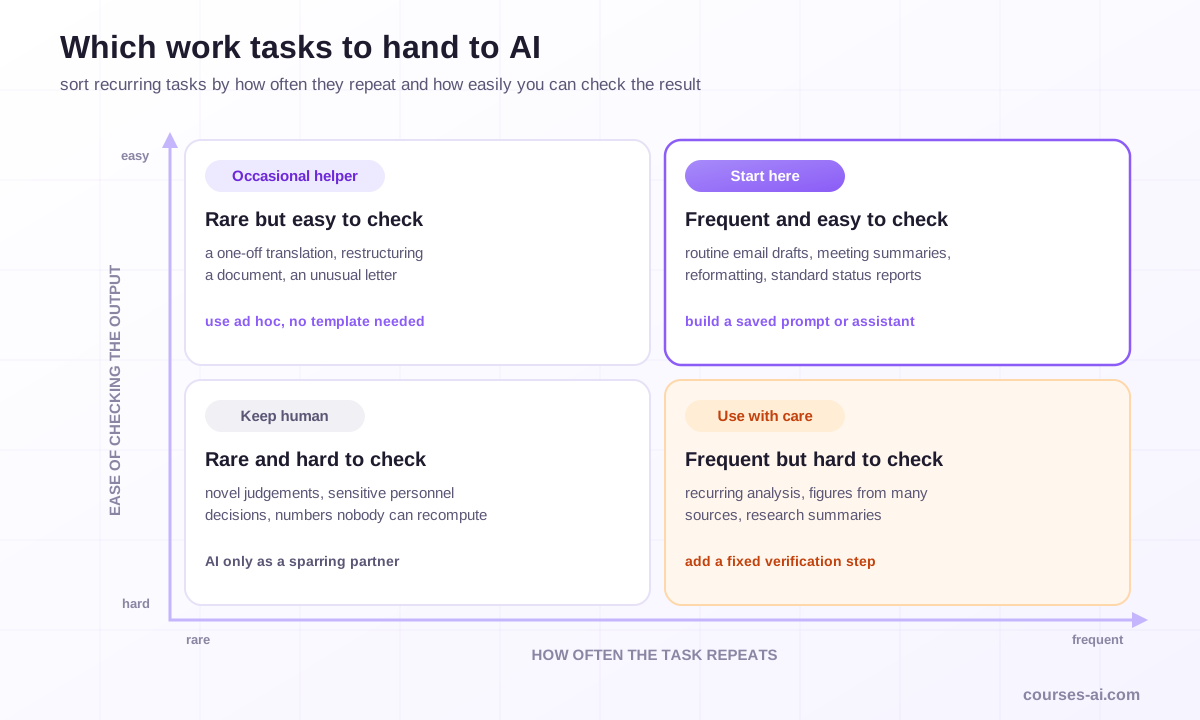
Frequent, easy-to-check tasks (first drafts of routine emails, meeting summaries, reformatting, standard reports) are where to start. Rare, hard-to-check tasks (a novel legal judgement, a number nobody can recompute, a sensitive personnel decision) should stay human, or use AI only as a sparring partner.
Building and maintaining this inventory, then matching each task to the right tool, is how our AI Productivity Masterclass for Knowledge Workers opens, before moving through email, documents, research, meetings, automations and privacy.
Step 2: use five work patterns
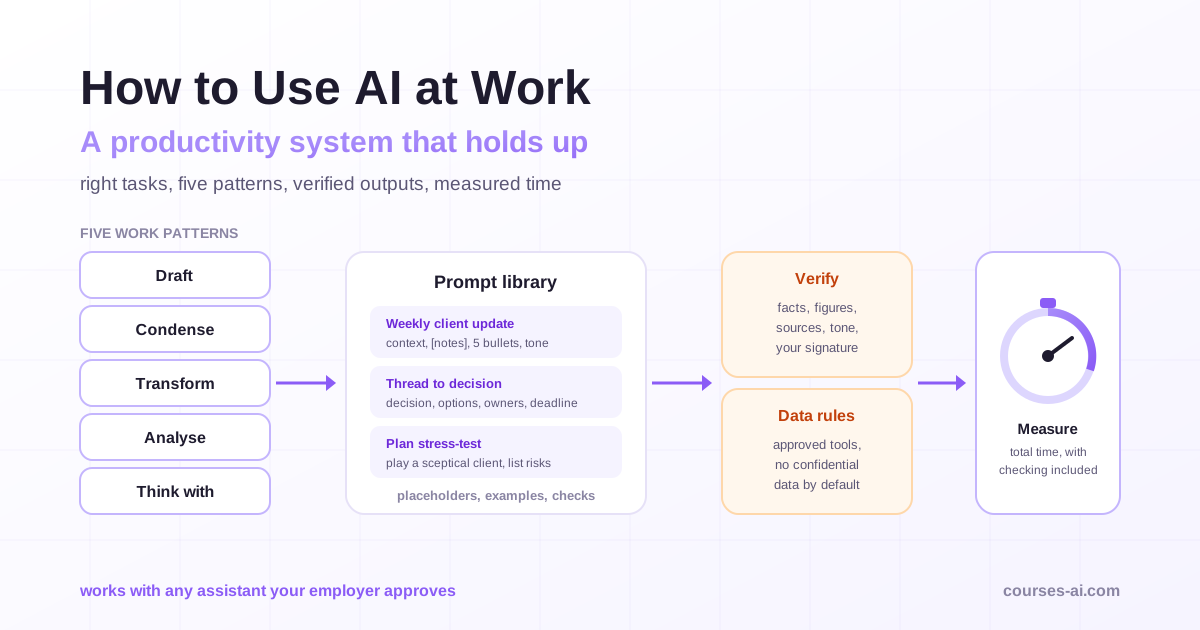
Almost every productive use of AI at work is one of five patterns. Naming them makes it easier to see where AI fits in your day.
1. Draft
AI produces a first version you then edit: an email reply, a project update, a job description, a proposal outline. The value is skipping the blank page. Give the purpose, the audience, the key points and the tone; then rewrite the parts that need your judgement or your voice.
2. Condense
AI shortens material you provide: a long thread into the decision and open questions, a report into an executive summary, meeting notes into action items with owners. Ask it to keep numbers and names exactly and to flag anything ambiguous, then compare against the source for anything you will act on.
3. Transform
AI changes the form, not the substance: notes into a structured document, a technical explanation into plain language, a table into a narrative, a document into another language. This is among the safest patterns because you can compare input and output directly.
4. Analyse
AI finds patterns in material you provide: themes in customer feedback, risks in a contract draft, inconsistencies between two versions, trends in a spreadsheet. Treat the result as a set of leads to check, not as conclusions. For numbers, ask the tool to show the calculation or the formula so you can rerun it; our guide to analysing data with AI without coding covers how.
5. Think with
AI acts as a sparring partner: list counterarguments to your plan, play a sceptical client, propose alternative structures, ask you clarifying questions before you write. Here the output is not the deliverable; your improved thinking is. This is also the safest way to use AI on tasks outside its reliable range, because you remain the one deciding.
Step 3: write prompts like briefs
Good prompts read like a brief to a capable colleague who knows nothing about your situation. Four elements cover most cases:
- Context: who you are, who the output is for, what it will be used for.
- Task: what to produce, in one clear sentence.
- Material: the text, data or notes to work from, pasted or attached.
- Constraints and format: length, tone, structure, what to avoid, and "ask me if anything is unclear".
A weak prompt says "summarise this". A useful one says: "I'm preparing for a budget meeting with the finance director tomorrow. Summarise the thread below in five bullet points: the decision needed, the options with their costs, who supports which option, open questions, and the deadline. Keep all figures exactly as written. Flag anything that contradicts itself."
Our prompt engineering guide goes deeper into techniques; for most office work, the brief structure above does most of the work.
Step 4: build a personal prompt library
The biggest jump in productivity comes when good prompts stop being one-offs. Keep a simple library (a document, a notes app, or the saved-prompt feature of your tool) with:
- the prompt, with placeholders in brackets for what changes each time
- the task it is for and an example of good output
- notes on what to check before using the result
Most assistants also let you save reusable setups (custom instructions, projects, custom GPTs, Gems or similar) that hold your standing context, such as your role, your company's style guide or a set of reference documents. Set one up for each recurring type of work instead of re-explaining yourself every time. If your organisation uses Microsoft 365, our guide to using Microsoft 365 Copilot at work covers the equivalent features inside Word, Outlook, Excel and Teams, and the Microsoft 365 Copilot for Office Work course goes through them by role.
Step 5: verify before anything leaves your desk
AI output is a draft until you have checked it. A short, consistent routine prevents most problems:
- Facts and figures: every number, date, name and quotation matches the source.
- Sources: any claim you did not supply has a source you have opened. Models can state invented facts and references confidently.
- Completeness: nothing important from the input was dropped, especially caveats and exceptions.
- Tone and audience: it sounds like you and fits the reader.
- Responsibility: you would sign it without mentioning AI, because you are accountable for it either way.
Scale the effort to the stakes. A first draft for your own notes needs a quick read; a client deliverable or anything with legal, financial or safety consequences needs a full check, or should not be produced with AI at all.
Step 6: follow the data rules
Productivity gains disappear quickly if confidential data ends up where it should not. Before pasting anything into an AI tool, check:
- Which tools your employer approves, and for which kinds of data. Enterprise versions often have different data handling terms from consumer accounts.
- What never goes in unless the approved tool is cleared for it: personal data of customers or colleagues, health or financial details, confidential contracts, credentials, source code under restriction, anything under a non-disclosure agreement.
- Whether your account uses your inputs for training, and how to switch that off where the tool allows it.
- Who owns and may reuse the output, if you publish or sell it.
When in doubt, remove names and identifying details, or ask. Getting this wrong is the fastest way to turn a productivity tool into an incident.
Step 7: measure time saved honestly
Given the gap between perceived and actual speed-ups, measure. For each task you have moved to AI:
- time a few instances before and after, including prompting, waiting, checking and fixing
- note the quality: did the result need heavy rework, light edits or none?
- keep the change only where the total time, including verification, is clearly lower or the quality clearly higher
Some tasks will turn out not to be worth it. That is a useful result: it frees your attention for the ones that are.
A 30-day plan to build the habit
Week 1: list your recurring tasks, sort them by frequency and ease of checking, and pick three to start with.
Week 2: for each of the three, write a brief-style prompt, test it on real work, and refine it until the output needs only light editing. Save the prompts in your library.
Week 3: add a reusable assistant or project for your most frequent type of work, and apply the verification routine to every output.
Week 4: time the three tasks against your original approach, keep what works, drop what does not, and choose the next three.
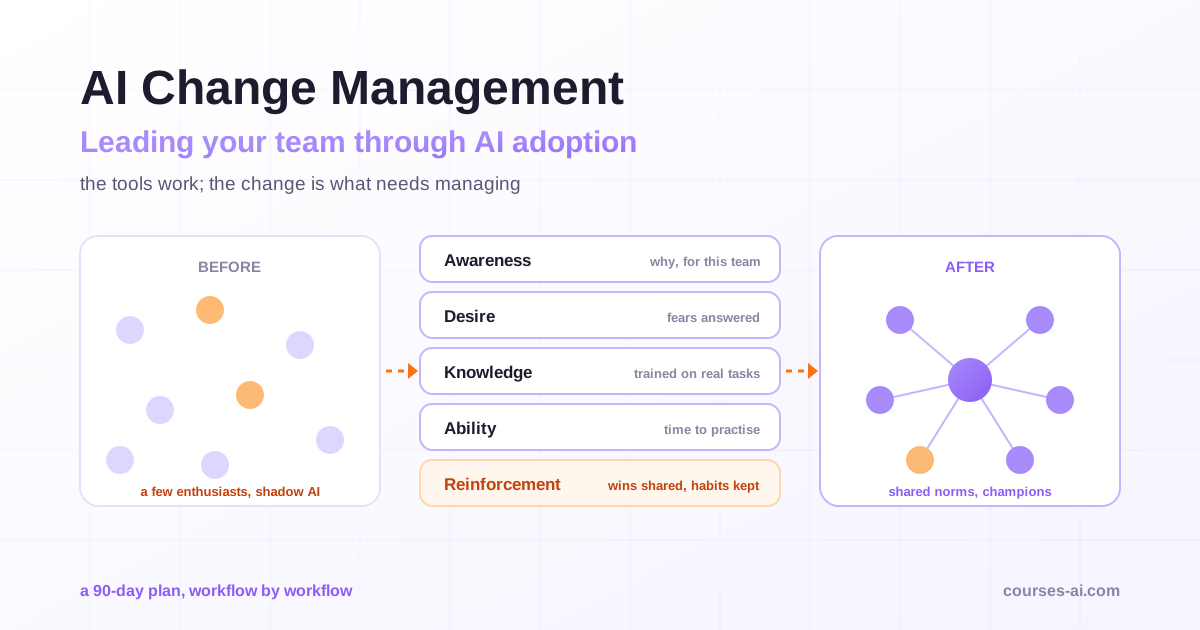
If you lead a team, the same plan works at team level with shared prompts and norms; our article on AI change management covers how to roll it out. For more advanced prompting, the Complete Prompt Engineering Masterclass builds on the brief structure used here.
Common mistakes when using AI at work
- Using AI for everything. It is excellent at some tasks and unreliable at others; the jagged frontier is real.
- Skipping verification because the output sounds confident. Fluency is not accuracy.
- Re-explaining context every time. Saved instructions and projects remove most of that friction.
- Pasting confidential data into unapproved tools. It can breach policy, contracts or law.
- Judging by feel. Measure total time, including checking, before deciding a task is faster with AI.
- Outsourcing judgement. AI can draft the recommendation; the decision and the accountability stay with you.
Frequently Asked Questions (FAQ)
What are the best ways to use AI at work? The most reliable uses are drafting routine documents and emails, condensing long material into summaries and action items, transforming content between formats or levels of detail, analysing material you provide for patterns to check, and using AI as a sparring partner to test your thinking. Start with frequent tasks whose output you can check quickly.
Which AI tool should I use at work? Use the tool your employer approves for the data involved. The major assistants (ChatGPT, Claude, Gemini and the assistant built into your office suite) handle the five work patterns in this guide; differences in features, integrations and data terms matter more than raw capability for most office work.
How much time can AI really save at work? It depends on the task. Controlled studies have found substantial gains on tasks within AI's capabilities and losses on tasks outside them, and one trial found that experienced developers felt faster while actually taking longer. Time a few instances of each task, including verification, before and after.
Is it safe to use AI with work documents? It is safe when you use an approved tool, keep confidential and personal data out unless the tool is cleared for it, and check your account's data and training settings. When unsure, remove identifying details or ask your IT or legal team.
Do I need to tell my manager or clients that I used AI? Follow your employer's policy and any client agreement. Many organisations ask for disclosure in some contexts, such as client deliverables or published content. Whether or not you disclose it, you remain responsible for the accuracy of the work.
Conclusion
Using AI at work productively is a system, not a trick. Pick tasks that repeat and are easy to check, apply one of five patterns (draft, condense, transform, analyse, think with), write prompts as briefs, save what works in a personal library and reusable assistants, verify every output in proportion to the stakes, keep confidential data out of unapproved tools, and measure total time saved rather than trusting the feeling of speed. Thirty days of deliberate practice on three tasks is enough to build the habit and to know where AI earns its place in your work.
Sources
- Navigating the Jagged Technological Frontier: Field Experimental Evidence of the Effects of AI on Knowledge Worker Productivity and Quality, Dell'Acqua et al., Harvard Business School Working Paper 24-013, 2023
- Generative AI at Work, Brynjolfsson, Li and Raymond, NBER Working Paper 31161; published in the Quarterly Journal of Economics, 2025
- Measuring the Impact of Early-2025 AI on Experienced Open-Source Developer Productivity, METR, July 2025
Verified on 15 November 2026 against the cited studies. Study results apply to the tasks, tools and people studied; measure the effect on your own work before relying on them.

The course that continues this article
The AI Productivity Masterclass for Knowledge Workers
You have read the theory. In the course you put it into practice: written lessons structured in modules, with examples and exercises, quizzes, the AI Professor in every lesson and progress saved automatically. Once you complete the lessons and reach the minimum quiz score, you get the Certificate of Completion, a private attestation.
From the course syllabus
- The AI Mindset for Knowledge Workers
- Choosing the Right Tool: ChatGPT vs Claude vs Gemini
- Practical Prompting for Non-Technical People
- Email & Everyday Communication
+ 6 more modules in the full syllabus
€99 per month for this course, VAT included · or pick it in a subscription of 3, 5 or 10 courses, from €199 per month, together with other Business courses; you can change them at every renewal (see what you learn across the whole track).
Monthly subscription with automatic renewal · stop the renewal anytime from your account · digital content with immediate access, see the withdrawal conditions. The certificate confirms that you completed the course and is private: it is not a diploma or a state-recognised qualification.