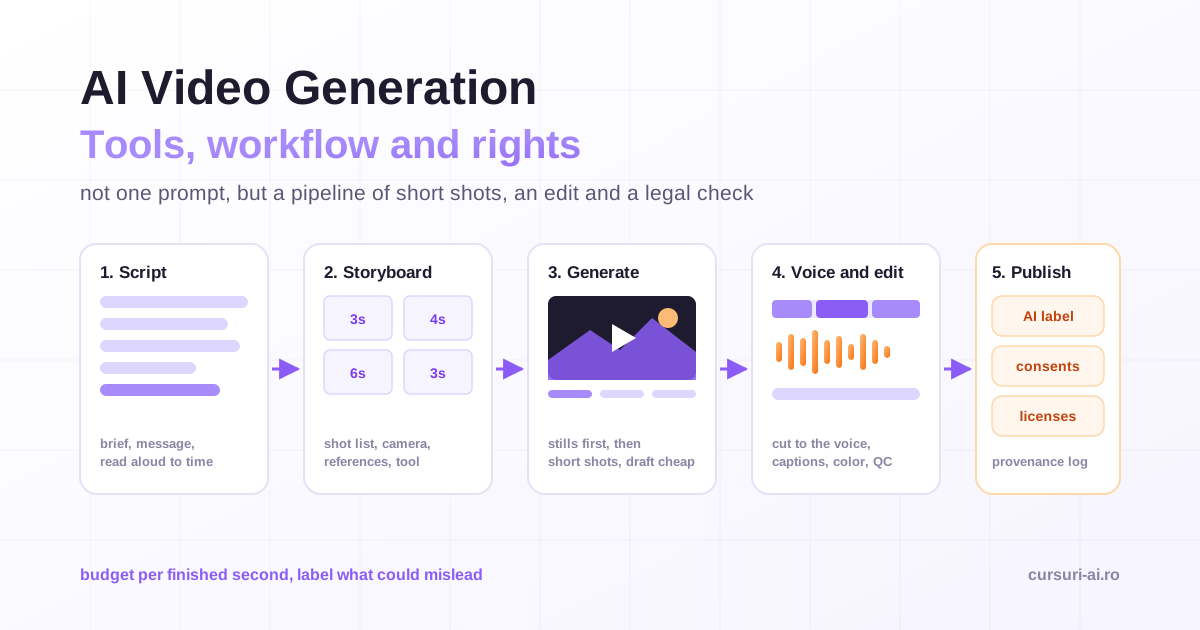
AI video generation has moved from novelty clips to a real production method, but not in the way the demos suggest. Nobody types one prompt and gets a finished film. Teams that ship usable work treat AI video generation as a pipeline: a script, a storyboard, many short generated shots, a voice track, an edit, and a set of legal checks that the demo never shows. This guide walks through that pipeline with the tools as they stand on 31 October 2026, what it costs, and the labeling and rights rules that now apply.
What AI video generation can and cannot do today
The core unit of AI video is the short shot. Google's documentation for Gemini Omni Flash, for example, describes extensions of 3 to 10 seconds per pass and a maximum total length of 40 seconds when you keep extending a clip. Other generators work in similar short units. That shapes everything else: a 60-second ad is not one generation, it is a dozen or more shots, each prompted, selected and cut together.
What the generators do well:
- B-roll and establishing shots: landscapes, cityscapes, abstract motion, product close-ups.
- Animating stills: a product photo, an illustration or a logo given camera movement and light.
- Concept and pitch work: showing a client the mood of a campaign before anyone books a shoot.
- Variations: the same scene in different seasons, formats or aspect ratios.
Where they still struggle:
- Continuity: the same character, outfit and product looking identical across many shots.
- Precise action: hands, text on screen, a specific choreography, physical cause and effect.
- Long, coherent scenes with dialogue, which is why presenter videos usually come from avatar tools rather than general generators.
- Brand accuracy: logos, packaging and colors drift unless you anchor them with reference images.
The practical conclusion is to plan the video around what AI does reliably and to keep a real camera, stock footage or motion graphics for the shots it does not. The full production path, from brief to published and measured result, is the subject of AI Video Creation and Editing: From Script to Publish; this article gives you the map and the rules.
The current tools, by job
There is no single AI video app that does everything well. You assemble a small stack, one tool per job, and route each shot to whichever tool renders it best. Names, versions and prices change monthly, so everything below was checked on the vendors' own pages on 31 October 2026.
| Job | Examples (verified 31 Oct 2026) | What to know |
|---|---|---|
| Video generation from text and images | Runway (Gen-4.5), Google Gemini Omni Flash, Kling 4.0, Luma Ray3.2 | Billed per second or in credits; short shots; route each shot to the model that handles it best |
| Presenter and avatar videos | HeyGen, Synthesia | Scripted talking heads, multilingual; custom avatars require identity verification of the person |
| Voice, narration, dubbing | ElevenLabs | Professional voice clones only of your own voice, after verification |
| Editing | Descript, your usual editor | Descript edits footage by editing the transcript |
| Planning and scripts | Any capable LLM | Brief to script, hooks, shot lists, repurposing |
A few details matter more than the brand names:
- Google's video model naming changed. In the Gemini API, Google shut down the Veo 3.1 preview model IDs on 22 October 2026 and directs developers to Gemini Omni Flash (
gemini-omni-1.1-flash), described in the Gemini Omni documentation as a model for fast video generation, editing and "cinematic control." It generates video with audio from a text description, supports multi-turn conversational editing, subject reference images and first-and-last-frame interpolation, outputs 16:9 or 9:16, and offers 1080p and 4K as upscaled options above the default 720p. Google states that "all generated videos include SynthID watermarking." - Runway lists Gen-4.5 on its pricing page alongside third-party models it hosts, including Kling 4.0, so one subscription can reach more than one model.
- Sora is gone from the API. OpenAI's deprecations page records that the Videos API and the
sora-2andsora-2-promodels were removed on 24 September 2026, with no replacement listed. Tutorials and comparisons built around Sora are out of date. - Avatar tools are a separate category. HeyGen describes "business presenters, talking avatars, or custom characters" and video translation that "syncs your lips." Synthesia requires that "the person represented by the avatar must record their own consent video," recorded live with an on-screen passcode. HeyGen states: "Every custom avatar requires on-camera identity verification from the person depicted."
Choose by the job, not by the leaderboard. A photoreal product shot, a stylized animation, a presenter reading a script in eight languages and a quick social clip are different jobs with different best tools.
A workflow that works: script, storyboard, generation, edit
The workflow below is the one that separates usable output from a folder of impressive but unusable clips.
Step 1: Brief and script
Start with a one-paragraph brief: audience, platform, length, the single message, the call to action and the brand constraints. Then write the script, with an LLM as a drafting partner rather than an author. Two rules apply to video scripts specifically. Write for the ear, with short sentences that can be read aloud in one breath. And write to time: read the script aloud with a timer before you generate anything, because first drafts almost always run longer than the slot.
The prompting skills that make an LLM useful here (role, constraints, examples, iteration) are the same ones covered in our prompt engineering guide.
Step 2: Storyboard and shot list
Break the script into shots before you open a generator. For each shot, write down what the viewer sees, how long it lasts, how the camera moves, which reference images anchor it, and which tool will render it. A simple table is enough:
| Shot | Seconds | What we see | Camera | Reference | Tool |
|---|---|---|---|---|---|
| 1 | 3 | Morning light over a city rooftop garden | Slow push-in | Mood still #1 | Text-to-video |
| 2 | 4 | Hands opening the product box on a wooden table | Top-down, static | Product photo set | Image-to-video |
| 3 | 6 | Presenter explains the main benefit | Medium shot | Avatar | Avatar tool |
| 4 | 3 | Product on the table, logo readable | Slow orbit | Product photo, logo file | Real footage or motion graphics |
Notice shot 4. If a shot needs a perfectly accurate logo or legible packaging, plan it as real footage, a 3D render or motion graphics from the start. Do not spend credits hoping a generator gets your trademark right.
Step 3: Generate the shots
A good video prompt reads like a director's note, not a wish. Cover, in order:
- Subject: who or what, with the details that must stay fixed.
- Action: one clear action per shot.
- Setting: place, time of day, weather.
- Camera: shot size, angle and movement ("slow dolly in," "static top-down," "handheld follow").
- Light and style: "soft window light, shallow depth of field, natural color."
- Audio, if the model generates it: ambient sound, not dialogue, unless you have tested it.
For example:
A ceramic coffee cup on a light oak table by a window, steam rising.
A hand enters from the right and lifts the cup.
Early morning, soft side light, shallow depth of field, natural colors.
Static close-up at table height, slight slow push-in.
Quiet room ambience, a distant street sound.
Two habits save most of the time and money. First, generate the key frame as a still image first, refine it until it is right, and then animate it with image-to-video. Still images are usually cheaper and faster to iterate than video, and a locked still anchors composition, color and character. The craft of producing those stills is covered in AI Image Generation: The Complete Guide from Prompt to Publishing. Second, draft cheap, finish once: explore at the lowest resolution and fastest tier, then render only the chosen shot at the final quality.
Step 4: Voice, music, edit and finishing
Record or generate the voice track after the shots are locked, then cut to it. If you use a synthetic voice, use a stock voice or your own verified clone; ElevenLabs states that "even with their consent, you cannot clone someone else's voice" as a Professional Voice Clone, and that a person who wants to share their voice should clone and verify it on their own account and share it. Descript's model of editing, where "deleting a word deletes that moment of video," makes rough cuts of narrated content fast.
Then finish like any other production: color match the shots, normalize loudness, add captions (many people watch social video without sound), export in the right aspect ratio for each platform, and watch the whole piece at full screen before it ships. Generated clips often hide small artifacts, such as a sixth finger, melting text or a flicker, that only show at full size.
Consistency: keeping characters, products and style stable
Consistency is the hardest problem in AI video, and it is solved by process more than by prompts.
- Use reference images. Gemini Omni Flash supports subject references ("you can generate a video incorporating specific subjects provided as reference images") and first-and-last-frame interpolation. Luma describes its Uni-1 image model as carrying style and character references. Feed the same reference set to every shot of a character or product.
- Write a style bible. One page with the fixed description of each character (age, hair, clothing, color palette), the lighting style and the camera language. Paste the relevant lines into every prompt word for word.
- Lock what worked. Save the exact prompt, settings and reference files of every kept shot. You will need them for revisions.
- Cut on action. Short shots with a cut during movement hide small differences between generations far better than long holds.
- Edit instead of regenerating. Tools that support conversational editing of a generated clip let you change one element (a color, an object) while keeping the rest, which is more stable than re-rolling the whole shot.
Cost: budget per finished second, not per subscription
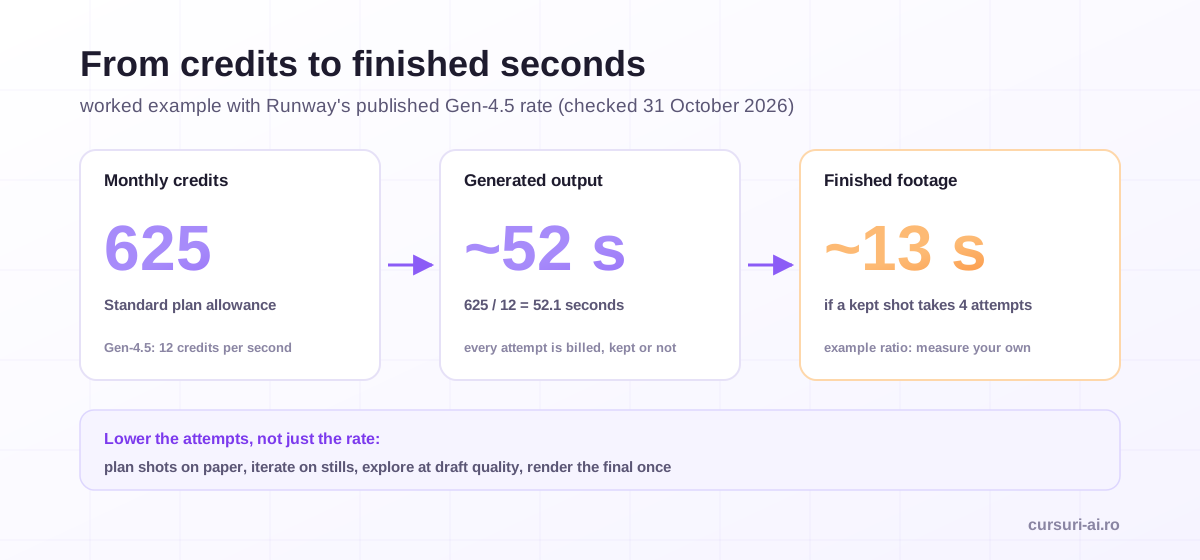
Most generators bill in credits per second of output, and the number that matters is cost per second that ends up in the final cut. Runway's pricing page is a useful worked example: it states that "Gen-4.5 uses 12 credits per second of generated video," and its Standard plan includes 625 credits a month. That is about 52 seconds of Gen-4.5 output per month, before a single retry.
Retries are the multiplier people forget. Generation is probabilistic, so a usable shot can take several attempts. If, for example, your shots need four attempts on average, those 52 seconds of output become about 13 seconds of finished footage. Track your own attempts-per-keeper ratio for a few projects; it is the most useful number in your budget.
Ways to keep cost proportional:
- Plan shots on paper first; generation is the most expensive way to think.
- Iterate on stills, animate only the winners.
- Explore at draft quality; render the final version once.
- Use real footage, stock or motion graphics where they are cheaper and more accurate.
- Check commercial-use terms of the plan before client work, not after.
Labeling AI-generated video
Labeling now has three layers: what the law requires, what the tools embed, and what each platform asks.
The law, in the EU. Article 50 of the AI Act (Regulation (EU) 2024/1689) has applied since 2 August 2026. Article 50(2) requires providers of systems that generate synthetic audio, image, video or text to mark outputs "in a machine-readable format and detectable as artificially generated or manipulated." The Digital Omnibus on AI, Regulation (EU) 2026/1744, gives providers whose systems were already on the market before 2 August 2026 until 2 December 2026 to comply with that marking duty. Article 50(4) applies to you as the deployer: if you publish image, audio or video content that is a deep fake, meaning AI-generated or manipulated content that resembles existing persons, objects, places, entities or events and would falsely appear authentic, you must disclose that it was artificially generated or manipulated. For evidently artistic, creative, satirical or fictional work, the duty is limited to disclosing the existence of such content "in an appropriate manner that does not hamper the display or enjoyment of the work." Under Article 50(5), the information must be given clearly "at the latest at the time of the first interaction or exposure." The Commission published a voluntary Code of Practice on marking and labelling AI-generated content on 10 June 2026 to help providers and deployers comply.
The tools. Machine-readable marking increasingly happens on the provider side: Gemini Omni Flash outputs carry SynthID, and the C2PA "Content Credentials" standard, whose steering committee includes Adobe, Google, Meta, Microsoft, OpenAI and TikTok, records where content came from and how it was edited. Do not strip that metadata in your export pipeline; check that your editor preserves it.
The platforms. YouTube's disclosure policy requires creators "to disclose AI-generated or altered content that seems realistic," such as making a real person appear to say or do something they did not, altering footage of a real event or place, or creating a realistic scene that never happened. Non-realistic content, minor edits and using AI for scripts or thumbnails do not need disclosure. Repeatedly skipping disclosure can lead to labels applied by YouTube, removal of content or suspension from the YouTube Partner Program. Other platforms have their own labels; use the built-in label wherever one exists and add a plain-language line in the caption when the content could mislead.
Rights: likeness, voice, music and ownership
Likeness and voice. Never generate or clone a real, identifiable person without explicit, documented, specific consent for that use. Beyond personality and image rights, which vary by country, a person's face or voice processed to identify them is biometric data under Article 4(14) of the GDPR, and Article 9 prohibits processing it for unique identification unless an exception such as explicit consent applies. The reputable avatar and voice tools enforce verification for exactly this reason; use those flows and keep the consent records. From 2 December 2026, the Digital Omnibus also adds to the AI Act's prohibited practices the use of AI systems to generate realistic intimate or sexually explicit images, video or audio of an identifiable person without that person's explicit consent.
Music. Use music you have licensed for the specific use and platform, or tools whose terms grant commercial rights on your plan. YouTube's policy lists AI-generated music among the examples that require disclosure. Keep the license or terms snapshot with the project.
Who owns the output. In the US, the Copyright Office's report on copyrightability, published on 29 January 2025, concludes that "prompts alone do not provide sufficient human control to make users of an AI system the authors of the output," that copyright "does not extend to purely AI-generated material," and that human authors are protected for their own expression perceptible in the output and for the creative selection, coordination or arrangement of material, or creative modifications, assessed case by case. In practice, your edit, script, voice-over and arrangement are where your protectable work usually lives; a raw generated clip may not be protectable at all. Other jurisdictions approach this differently, so client contracts should say who owns what and should not promise exclusivity over raw generated footage that the law may not protect.
Keep a provenance log. For every published piece, record the tools and plans used, dates, prompts, reference files, consent documents and music licenses. It answers "can we use this?" questions months later and supports your disclosure decisions.
The full governance workflow, from consent templates to a pre-publication legal check, is part of AI Video Creation and Editing; for campaign-level use of video alongside other channels, see our guide to AI for digital marketing, and for the copy that surrounds the video, AI for Content Creation and Copywriting.
This section is general information, not legal advice. Rules on likeness, music licensing and copyright differ between countries; for client work or anything involving real people, check with qualified counsel.
Sources for this section:
- Regulation (EU) 2024/1689 (AI Act), Articles 3(60) and 50
- Regulation (EU) 2026/1744 (Digital Omnibus on AI)
- U.S. Copyright Office, Copyright and Artificial Intelligence
A pre-publication checklist
- Every shot has a purpose in the storyboard; nothing was generated "to see what happens."
- Logos, packaging and on-screen text are real assets, not generated guesses.
- Characters and products match across shots; the style bible was used for every prompt.
- Every real person shown or voiced has given documented consent for this specific use.
- Music and voice are licensed or generated under terms that allow this commercial use.
- Realistic AI content is labeled on each platform, and machine-readable credentials were preserved in export.
- Captions, aspect ratios and loudness are right for each platform.
- The provenance log is complete: tools, plans, dates, prompts, references, consents, licenses.
Frequently Asked Questions (FAQ)
What is the best AI video generator right now? There is no single best one, and the ranking changes with every release. On 31 October 2026 the main general generators include Runway Gen-4.5, Google's Gemini Omni Flash, Kling 4.0 and Luma Ray3.2, while HeyGen and Synthesia cover presenter and avatar videos. Test two or three on your own shots and route each shot to the tool that renders it best.
Can AI generate a whole video from one prompt? Not a usable one for professional work. Generators produce short shots, typically a few seconds each, so a finished video is planned as a storyboard, generated shot by shot, voiced and edited. Treat AI video generation as one stage of production, not the whole production.
Do I have to label AI-generated videos? In the EU, Article 50 of the AI Act requires deployers to disclose deep fakes, AI-generated or manipulated content that would falsely appear authentic, with a lighter duty for evidently artistic or fictional work, and providers must mark outputs in a machine-readable way. Platforms add their own rules: YouTube requires disclosure of realistic altered or synthetic content. When in doubt, label.
Can I use a celebrity's or a colleague's face or voice in an AI video? Only with their explicit, documented consent for that specific use. Likeness and voice are protected by personality rights in many countries and by data protection law when they identify a person. Reputable avatar and voice tools require the person depicted to verify their identity, and ElevenLabs does not allow a Professional Voice Clone of someone else's voice at all.
Who owns an AI-generated video? It depends on the jurisdiction and on how much human creative control went into it. The US Copyright Office concluded in January 2025 that prompts alone do not make a user the author, while human selection, arrangement and modification can be protected case by case. Your script, edit and voice-over are usually the protectable parts.
Conclusion
AI video generation is most useful when it is treated as one part of a production pipeline rather than a replacement for one. Plan the video in a script and a storyboard, route each short shot to the tool that renders it best, anchor consistency with reference images and a style bible, and budget per finished second, not per subscription. Then do the work the demos skip: label realistic AI content, keep machine-readable credentials intact, clear every likeness, voice and music right, and keep a provenance log. The tools will keep changing every month; that workflow and those checks are what stay constant.

The course that continues this article
AI Video Creation and Editing: From Script to Publish
You have read the theory. In the course you put it into practice: written lessons structured in modules, with examples and exercises, quizzes, the AI Professor in every lesson and progress saved automatically. Once you complete the lessons and reach the minimum quiz score, you get the Certificate of Completion, a private attestation.
From the course syllabus
- Module 0 — The AI Video Landscape in 2026
- Module 1 — Scriptwriting, Storyboarding and Pre-Production with AI
- Module 2 — Text-to-Video Generation
- Module 3 — Image-to-Video, Animation and AI Avatars
+ 7 more modules in the full syllabus
€99 per month for this course, VAT included · or pick it in a subscription of 3, 5 or 10 courses, from €199 per month, together with other Business courses; you can change them at every renewal (see what you learn across the whole track).
Monthly subscription with automatic renewal · stop the renewal anytime from your account · digital content with immediate access, see the withdrawal conditions. The certificate confirms that you completed the course and is private: it is not a diploma or a state-recognised qualification.