AI for accountants and finance teams is no longer a pilot topic: language models draft variance commentary in seconds, document AI reads invoices, and assistants sit inside the spreadsheet. What separates the teams that gain hours from the teams that gain a restatement is not the tool. It is the control design around it. This guide covers the use cases that pay off, the ones that need care, and the review, audit-trail and data-protection controls that keep every figure defensible.
The rule that makes AI usable in finance
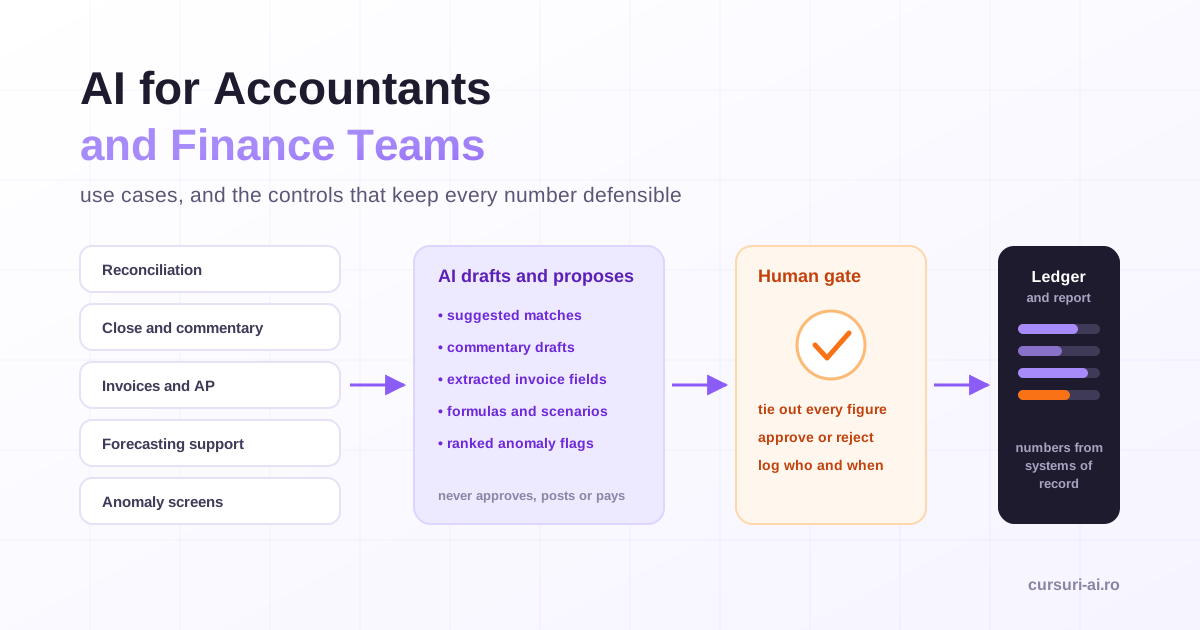
Every workable AI process in a finance function follows one sentence: AI drafts and proposes; a qualified person verifies and decides. The model can suggest a match, write a first draft of a variance explanation, extract fields from an invoice or flag an unusual journal. It does not approve, post, pay, sign off or form an opinion. Anything that constitutes a decision, an approval, a posting, a payment or a professional judgment stays with a named person who is accountable for it.
That rule is not caution for its own sake. A language model predicts plausible text, and its output is fluent and confident whether it is right or wrong. Microsoft's own Copilot documentation states that generative AI responses "aren't guaranteed to be 100% factual" and asks users to review output before sending it on. In a function where a wrong number can end up in a board pack, a tax return or a filed set of accounts, review is the control, not an optional extra.
| Area | What AI does well | What stays human |
|---|---|---|
| Reconciliation | Proposes matches, groups breaks by likely cause, drafts explanations | Approving matches, clearing items, booking adjustments |
| Close and reporting | Drafts commentary, standardizes packs, tracks the close checklist | Sign-off, figures, disclosure judgment |
| Variance analysis | Explains movements you have already quantified | Which explanation is true, materiality |
| Accounts payable | Extracts invoice data, proposes coding, flags exceptions | Payment approval, vendor master changes |
| Forecasting | Structures driver models, drafts scenarios, writes formulas | Assumptions, plausibility, accountability |
| Audit support | Scans full populations, ranks anomalies, summarizes evidence | Conclusions, professional skepticism |
Turning that table into daily workflows, from prompts to verification routines to a full AI-assisted month-end close, is the core of AI for Finance and Accounting Professionals. The sections below go through each area in turn.
Use case 1: account reconciliation
Reconciliations are high-volume, rules-heavy and full of messy references, which makes them a natural fit for assistance. A good setup runs deterministic matching first (exact amount, date, reference), then lets AI propose matches for what is left: a bank receipt with a truncated reference against an open invoice, a partial payment, a fee netted from a transfer. Each proposal comes with a confidence level and the reason for the match. The model can also group the remaining breaks by likely cause (timing differences, unbooked fees, partial payments, unknown) so the investigation starts in the right place.
The bright line is clearing. AI proposes matches; a person approves them. Two unrelated items with the same amount can be paired with high confidence, and a fraudulent payment can hide in a bulk of auto-cleared items. Approve clean, exact matches in bulk only after a spot-check; review everything else individually. And never let anyone, human or model, plug a residual to force a balance: an unexplained difference is a finding.
A prompt that encodes those rules:
You are helping with a bank reconciliation. Dataset A is the bank statement,
dataset B is the cash ledger. Propose matches between them. For each match give
the pair, a confidence level (high/medium/low) and the reason (amount, date,
reference). List unmatched items separately, grouped by likely cause: timing,
bank fee, partial payment, unknown. Do not treat any match as confirmed and do
not change any amount. I will approve or reject each proposal.
Use case 2: the close and management commentary
The close is a sequence of tasks with dependencies, owners and deadlines, and much of its effort goes into words: flux explanations, management commentary, board-pack narrative. AI is strongest here when the numbers are already final. Give it the reconciled variance table and the operational context you collected from budget holders, and ask for a first draft in your house style. You keep figures you trust; the model only turns them into sentences.
Three rules keep commentary honest:
- Numbers come from the system, never from the model. If a percentage or a total appears in the draft, it must appear in the source table. Ask the model to quote figures only from the table and to mark any figure it would need to compute.
- Every explanation needs an owner. The model can say that freight costs rose; only the budget holder can confirm that it was a carrier surcharge rather than a misposting.
- Tie out before release. A reviewer ticks every figure in the final text back to the source, exactly as for a manually written pack.
Use case 3: variance analysis
Variance analysis is where the model's language strength and its arithmetic weakness meet. Let the spreadsheet or the BI tool compute the variances (actual against budget, prior period and forecast, in absolute and percentage terms) and apply your materiality threshold. Then give the model only the lines above the threshold, with the drivers you know, and ask it to explain, rank and suggest questions for the budget holders.
What the model must not do is invent causes. A good prompt says so explicitly: "Where the data does not show a cause, write 'cause to be confirmed with [owner]' instead of guessing." A plausible but wrong explanation in a variance commentary is worse than a gap, because it closes a question that should have stayed open.
For analysis on larger datasets, prefer tools that run real code or formulas over the data (spreadsheet assistants, notebooks, data-analysis features of AI assistants) to a model that reads numbers and reasons about them in prose. A formula can be checked; mental arithmetic cannot. The workflow for doing that without programming is covered in Analyze Data with AI Without Coding and, in more depth, in No-Code Data Analysis with AI.
Use case 4: invoice processing and accounts payable
Document AI (OCR plus field extraction, often called intelligent document processing) reads supplier invoices and returns structured fields: supplier, invoice number, dates, net, tax and gross amounts, line items, purchase order reference. Combined with the purchase order and goods receipt, that feeds a three-way match, and a model can propose a general ledger code and cost center from the description and the supplier's history.
Measure before you trust. Run the extraction on a sample of real invoices, compare every field with the source, and note where it struggles: unusual layouts, scans, handwriting, multi-currency, credit notes. Set confidence thresholds so that low-confidence fields go to a person, and treat any mismatch with the purchase order as an exception, not something to resolve automatically.
One control deserves to be singled out. Bank details are never changed on the strength of a document. If an extracted invoice carries an IBAN that differs from the vendor master, the process stops and someone verifies the change through an independent channel (a call-back to a number already on file), with a second person approving the master data change. Payment-redirection fraud relies on exactly the kind of convincing document that an automated pipeline is built to accept.
The input side is also changing. Under the EU's VAT in the Digital Age (ViDA) package, adopted on 11 March 2025, digital reporting requirements built on e-invoicing apply to cross-border B2B transactions from 1 July 2030. As more invoices arrive as structured data rather than PDFs, extraction matters less and validation matters more: the controls move from "did we read it correctly?" to "is it correct?".
Use case 5: receivables and collections
AI helps with the language of collections: reminder sequences adjusted to the customer's history, summaries of a long dispute thread, a first reply to a remittance query. It can also prioritize the collection queue by amount, age and payment behavior.
Two limits apply. Customer data used for this is often personal data (sole traders, individual consumers, named contacts), so data protection rules apply from the first prompt. And decisions with a real effect on a person, such as escalating to a collection agency, suspending supply or refusing credit, need a human decision-maker. Article 22 of the GDPR gives individuals the right not to be subject to a decision based solely on automated processing that produces legal effects or similarly significantly affects them.
Use case 6: forecasting and budgeting support
A language model is not a forecasting engine. Statistical and machine-learning forecasting methods, run in your planning tool or in code, produce the numbers; a language model helps around them. It is useful for structuring a driver-based model (volume times price, headcount times cost per head), proposing which drivers to include, writing and explaining spreadsheet formulas, generating scenario narratives and stress-testing assumptions with questions such as "what would have to be true for this growth rate to hold?".
Assumptions stay owned. Every driver in the final model should have a named owner and a source (contract, pipeline report, market data), and the model's suggestions are inputs to a discussion, not entries in the plan. Spreadsheet assistants now act inside the workbook: Microsoft's support pages describe edit, plan and chat modes for Copilot in Excel, with edits that include changing worksheets, transforming data and creating charts and PivotTables, and they note that once Copilot's changes are saved, anyone with access to the file can see them. Work on a copy or rely on version history for important models, and apply the same review to an AI-edited workbook as to one a junior analyst built: check the formulas, not just the totals. Using the Microsoft 365 assistants with that discipline across Excel, Outlook and Teams is the subject of Microsoft 365 Copilot for Office Work.
Use case 7: audit support and anomaly detection
Analytics can look at every transaction instead of a sample. Well-established screens include:
- Duplicates and near-duplicates: the same invoice number, amount and supplier, or the same invoice with one character changed.
- Timing: journals posted at weekends or late at night, clustering just before period end, back-dated entries.
- Thresholds: amounts just below approval limits, split purchases.
- Relationships: a vendor bank account that matches an employee's, a vendor created and paid on the same day.
- Unusual users: postings by people who do not normally post to that account.
AI adds speed and the ability to combine signals into a risk ranking, and a language model can summarize the evidence for each flagged item. But an anomaly is a question, not a conclusion. Most flags have innocent explanations, and a detector that flags a large share of a population is noise. Tune for signal, investigate discreetly, seek the innocent explanation first, and never let a flag trigger an automatic consequence for a person.
Why AI gets numbers wrong, and how to design around it
Language models process text as tokens, not as numbers in cells. They can transpose digits, round inconsistently, mix up periods or confidently compute a total that does not exist in the data. Assistants that run code for a calculation avoid much of this, but you cannot tell from fluent prose whether a given figure was computed or simply generated. The design answer is to separate roles:
- Systems of record compute. The ledger, the spreadsheet or code you can inspect produce every number.
- The model writes, classifies and proposes. Its output is text that refers to numbers, not a source of them.
- A tie-out step connects the two. Every figure in AI-assisted output is checked against the source before it leaves the team, and the checker is not the person who prompted the draft.
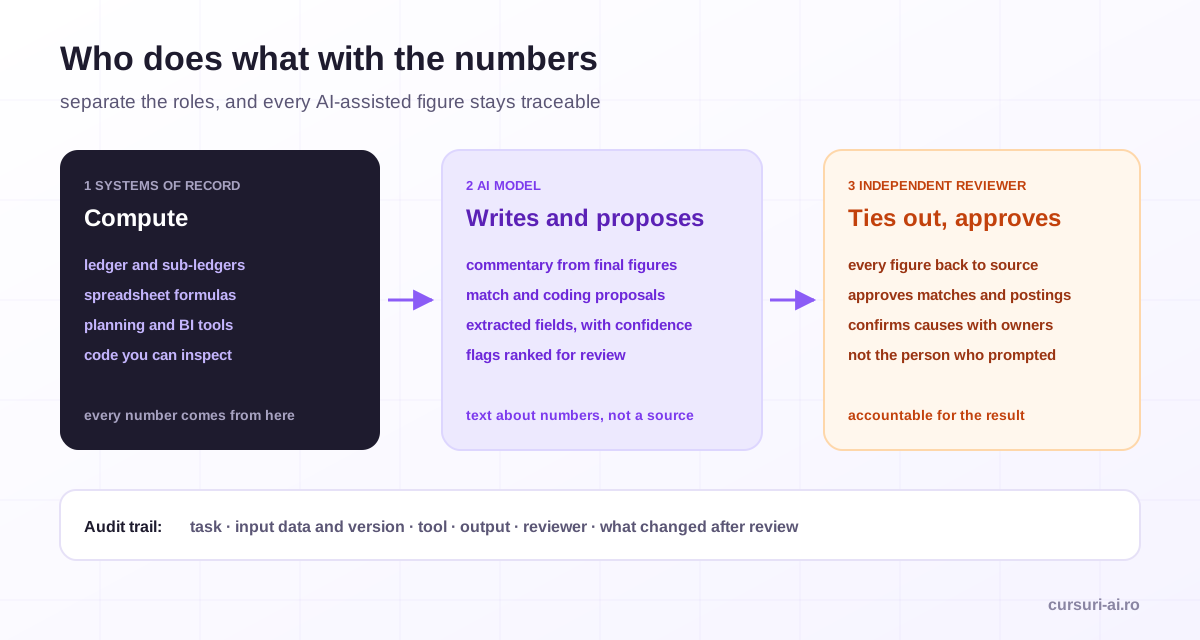
A practical test for any AI-assisted workflow: if you deleted the model's output, could you reproduce every number in it from a system of record? If not, the workflow has a number with no source.
Controls: an audit trail for AI-assisted work
Your existing internal control framework already has the right concepts. AI-assisted work slots into it as long as the model is treated as a preparer that never holds approval rights.
| Risk | Control | Evidence |
|---|---|---|
| Fabricated or mistyped figure in a report | Tie-out of every figure to source by a reviewer | Signed review checklist |
| Wrong match cleared in a reconciliation | AI proposes, named person approves; spot-check of bulk approvals | Approval log with reviewer and date |
| Fraudulent bank detail change | Independent call-back plus second approver for vendor master changes | Change ticket with verification record |
| Unapproved prompt or template drift | Prompts and templates kept as controlled documents with versions | Version history, owner |
| Confidential data in an unapproved tool | Approved-tool register by data class; technical blocks where possible | Register, access logs |
| Over-reliance, no one understands the output | Preparer can explain every line; reviewer independent of preparer | Review notes |
| Agent acting beyond its role | Read-only access by default; no posting or payment rights for AI tools | Access configuration, logs |
For each AI-assisted task, keep a light record: the task, the input data and its version, the tool, the output, who reviewed it, and what changed after review. It does not need to be elaborate. It needs to let an auditor, or your successor, see what the model did and what the people did. Designing these controls workflow by workflow, from segregation of duties to an AI-in-finance policy the team can follow, is covered in the internal-controls and guardrails modules of AI for Finance and Accounting Professionals.
Pay special attention to permissions before you switch on an assistant that searches company data. Microsoft's documentation, for example, states that Copilot only surfaces organizational data the individual user has at least view permission to. That is the right design, but it means any oversharing already present in shared drives (a payroll file readable by the whole company) becomes much easier to find. Clean up access before rollout, not after.
Data protection and confidentiality
Finance handles some of the most sensitive data in an organization: unpublished results, salaries, bank details, customer and supplier records, and in listed companies inside information. Classify data before it touches any AI tool:
| Class | Examples | AI handling |
|---|---|---|
| Public | Filed accounts, press releases | Any approved tool |
| Internal | Process notes, templates, draft commentary without sensitive figures | Approved business tools |
| Confidential | Unpublished results, management accounts, pricing, contracts | Approved tools under a data processing agreement, never consumer accounts |
| Restricted or personal | Payroll, individuals' bank details, health or benefit data | Minimize or pseudonymize; often keep out of AI entirely |
The GDPR principles that matter most here are data minimisation (Article 5(1)(c): personal data must be "adequate, relevant and limited to what is necessary"), a lawful basis for each processing purpose, security of processing (Article 32), the Article 22 rule on solely automated decisions, and a data protection impact assessment (Article 35) where new processing is likely to result in a high risk to individuals. In practice: give the model the least data the task needs, replace names with codes and re-attach them locally, aggregate salary data into bands, and involve your data protection officer before a workflow touches personal data at scale.
Vendor terms are part of the control. Before a tool is approved for confidential or personal data, get written answers on model training, retention, data residency, sub-processors and audit logs. The details can surprise you even with a major vendor: Microsoft states that prompts, responses and data accessed through Microsoft Graph are not used to train foundation models and that EU traffic stays within its EU Data Boundary, but its documentation also notes that models provided by Anthropic as a sub-processor are currently excluded from that boundary. An administrator choice about which models power an assistant can therefore change where your data is processed. Write the answer down in a register of approved tools, with the highest data class each tool may receive.
What the EU AI Act means for finance teams
Most finance-productivity uses (drafting commentary, summarizing, extracting invoice fields under human review, reconciliation suggestions) are not in the AI Act's high-risk categories. Some finance-adjacent uses are. Annex III of Regulation (EU) 2024/1689 lists "AI systems intended to be used to evaluate the creditworthiness of natural persons or establish their credit score", with an explicit exception for systems used to detect financial fraud, and it separately covers AI used in employment and workers' management. A finance team that scores individual customers for credit, or that helps HR evaluate employees, needs to check those provisions.
The dates moved in 2026. Following the amending regulation known as the AI Omnibus, the European Commission states that high-risk obligations for Annex III use cases apply from 2 December 2027 (and from 2 August 2028 for AI embedded in products covered by Annex I). The AI literacy duty in Article 4 has applied since 2 February 2025; in its amended wording, providers and deployers must take measures to support the development of AI literacy of their staff, without having to guarantee a specific level. For a finance team, that translates into practical training on verification, data handling and the limits of the tools, which is worth doing regardless of the legal wording. The broader picture, including transparency duties, is in EU AI Act Compliance in 2026: A Guide for Businesses.
A 30-day rollout that does not create risk
- Week 1: governance first. Approved tools and data classes, a one-page AI-in-finance policy, the tie-out rule, access clean-up.
- Week 2: low-risk wins. Commentary drafts from already reconciled numbers, meeting and email summaries, formula explanations. Measure time spent before and after.
- Week 3: measured extraction. Invoice extraction on a sample with field-level accuracy recorded; reconciliation suggestions on one account with every proposal reviewed.
- Week 4: review and decide. Keep what saved time without increasing errors or rework, document the controls, and pick the next workflow by two criteria: time saved and cost if wrong. High-cost-if-wrong tasks (payments, postings, disclosures, anything affecting individuals) come last, with controls that match the stakes.
Measure honestly: time per task, error and rework rates, exceptions sent to people, and review time. A tool that saves an hour of drafting but adds an hour of checking has not saved anything yet.
This article is general information, not legal, tax, audit or accounting advice. Check the official texts and your professional standards, and involve qualified advisers for decisions with legal or financial consequences.
Frequently Asked Questions (FAQ)
How can accountants use AI safely? Use approved business tools, never consumer accounts, for anything confidential. Let AI draft, extract and propose, but keep every approval, posting, payment and sign-off with a named person. Compute numbers in systems of record, tie out every figure in AI-assisted output to its source, and keep a simple record of what the tool did and who reviewed it.
Will AI replace accountants? AI changes the work more than it removes the need for it. Drafting, extraction and first-pass matching get faster, while judgment, review, client communication and accountability remain human tasks, and the controls described here create new review work. The professionals who know how to direct and check AI output are the ones who benefit.
Can I put client or company financial data into ChatGPT or another chatbot? Not into a personal or consumer account. Confidential and personal financial data belongs only in tools your organization has approved, under a data processing agreement, with model training off and acceptable retention and residency. Minimize and pseudonymize even then, and keep restricted data such as payroll out unless there is a specific, approved basis.
Is AI used in finance high-risk under the EU AI Act? Most finance-productivity uses are not. The high-risk list in Annex III includes AI used to evaluate the creditworthiness of natural persons or establish their credit score (fraud detection is excepted) and AI used in employment decisions. According to the European Commission, those high-risk obligations apply from 2 December 2027.
What is the best first AI use case for a finance team? Commentary drafting from numbers you have already reconciled. The figures are already verified, the model only turns them into text, a reviewer can check it quickly, and the time saved is easy to measure. Invoice extraction on a measured sample and reconciliation suggestions are good next steps.
Conclusion
AI earns its place in finance where the work is language-heavy or pattern-heavy: commentary, explanations, document extraction, match suggestions, anomaly ranking. It stays safe when systems of record compute every number, a named person approves every decision, every AI-assisted figure is tied out before release, and confidential data only goes to approved tools under clear terms. Build those controls first and start with low-risk, measurable wins; the time savings then hold up under review, and so do the accounts.
Sources
- Regulation (EU) 2024/1689 (Artificial Intelligence Act), EUR-Lex
- European Commission: AI Act, regulatory framework and application timeline
- Regulation (EU) 2016/679 (General Data Protection Regulation), EUR-Lex
- Microsoft Learn: Data, Privacy, and Security for Microsoft Copilot
- European Commission: VAT in the Digital Age (ViDA)

The course that continues this article
AI for Finance and Accounting Professionals
You have read the theory. In the course you put it into practice: written lessons structured in modules, with examples and exercises, quizzes, the AI Professor in every lesson and progress saved automatically. Once you complete the lessons and reach the minimum quiz score, you get the Certificate of Completion, a private attestation.
From the course syllabus
- Module 0 — AI in Finance and Accounting: The 2026 Landscape
- Module 1 — Automating Financial Reporting
- Module 2 — Analyzing and Interpreting Financial Data with AI
- Module 3 — Forecasting and Budgeting, Assisted
+ 6 more modules in the full syllabus
€99 per month for this course, VAT included · or pick it in a subscription of 3, 5 or 10 courses, from €199 per month, together with other Business courses; you can change them at every renewal (see what you learn across the whole track).
Monthly subscription with automatic renewal · stop the renewal anytime from your account · digital content with immediate access, see the withdrawal conditions. The certificate confirms that you completed the course and is private: it is not a diploma or a state-recognised qualification.